I set my XY coordinates on lightburn, sent the file to the Omtech Pronto 40. It starts 2" to the right side and runs off the material on the right when I frame.
Can you describe, what you set where?
Is it homing correctly on power up?
What are the X and Y display values after a completed boot?

In the main page set up on lightburn, upper left, in the nine pin box I have the upper left circle selected. The X and Y positions are both set to 0.2500in. My work piece is roughly 9"x12". In my laser window it’s set to absolute coordinates and the upper left circle is selected.
On my actual Omtech Pronto 40 screen, when I start it up, it immediately homes to X-0, Y-0. Then after a count of 3 seconds it moves again on it’s own, to X-128mm, Y-33.1mm. When I initially start it up, and it goes to X-0, Y-0 the actual location on the table is X-20mm, Y-=10mm.
When I actually start the job, the laser moves from X-128mm, Y-33.1mm to the original home position 0/0 or 20mm/10mm and starts it’s job. However, if I’m trying to place my piece at 0/0 it will be off. I can frame several times and line up everything by eye and print my job just fine, but I know I will want to cut or engrave multiple jobs at a time and need to be able to set my start position in absolute coordinates.
I’m sure it’s my lack of knowledge on how to make it all work. I’ve just spent a lot of time trying to research, so I thought I’d use the forum. Thanks for any help.
Bill Smith
You’ll never fix anything varying a bunch of stuff… Lets take them one at a time.
First, if it isn’t where you expect it to be on power up.
The Ruida will home, then, it will move to the return position specified in it’s configuration.
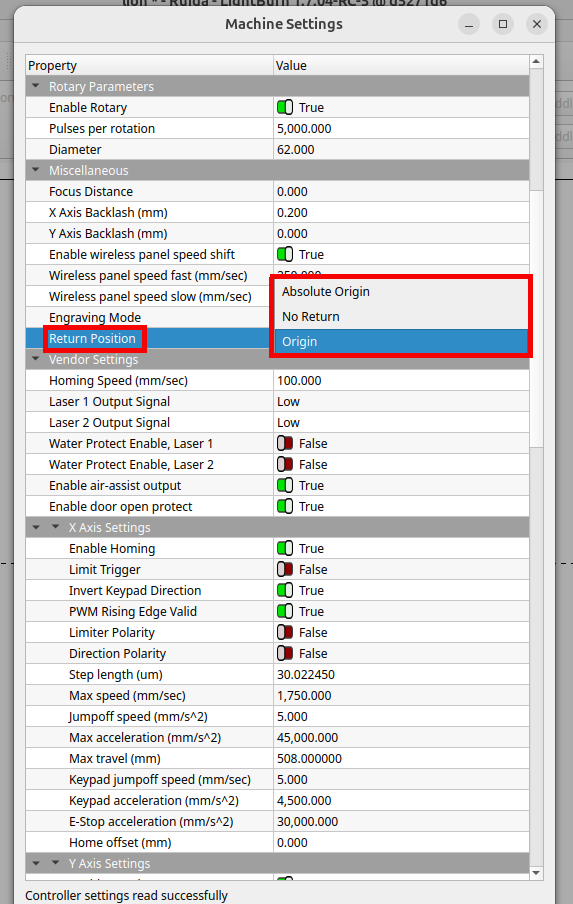
Mine is set to origin, meaning whatever was the last set origin. After mine homes, it returns to where I set it previously.
To use this you need to push the origin button on the controller itself.
What is yours doing before you ever touch the machine, it’s powered up and…?
When I initially turn on my Omtech key and press the start button the laser moves to the x-0, y-0 position. Then after 3 seconds it moves to the x-128mm, y33.1mm position. The machine settings screen you have displayed, is that from your Ruida? If so how do I see mine?
If you need more help, sing out.