So I have been playing with MillMage for a little bit. And have been making some bottle openers. Well I decided to make a travel game that is base and a lid held together with magnets. I made my first one, and found due to the wood, the lid did not sit flush, it had a little arc to it.
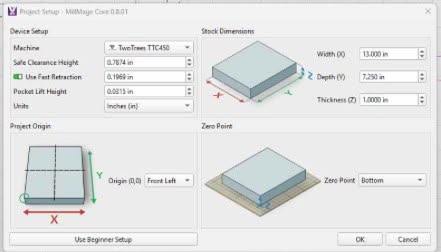
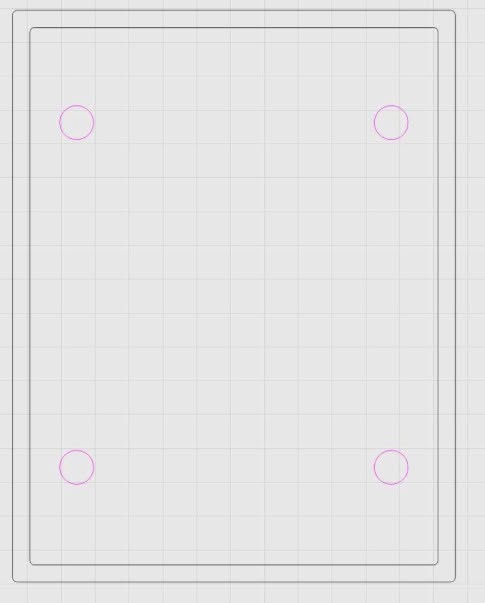
So my thought is to surface the wood to 3/4” and then mill out the rest. What I want to do is set the Z zero to the bottom of the material, and then tell Millmage to mill down to .75” to take care of any arcs in the wood. Then for the magnet holes (in pink) start at .75 and mill them to .625. Every time I try something like this, MillMage will not do it, it does not like a lower starting depth than the final depth, even though my Zero is at the bottom.
Since I plane the wood, there is always a little variance in the thickness and I don’t want to measure every time and then adjust all the operations.
Is there any way to get MillMage to reference the cut depths from the bottom of the material instead of the top?
I gave this a lot of thought and could not come up with settings that would override the logic. All your Z positions would have be positive. Milling is a subtractive process, so it logically operates in the negative.
I seem to remember something about using a touch probe, and the material might be thicker than the probe base. But I do not have one, so this is just speculation on my part.
My real question is what in your workflow requires you to compute from the bottom of the material?
If the surface of the stock material is uneven it makes sense for you to set the zero point at the bottom, however in the Operation settings, the depth of cut remains being described relative to the material surface, with 0" at the surface and 1" (deep) at the bottom, regardless of where the zero point in work coordinates will be (the conversion to gcode will take care of that).
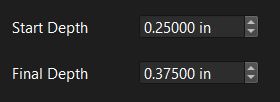
So your settings would need to be something more like this;
MikeyH and NicholasL are right about MillMage’s depth logic. I treat the material surface as zero and picture depths like marks on an inch ruler: 0.75 means three-quarters down. That cleared up my setting confusion fast. I personally use an inch ruler to visualize rough depths before typing values, and I found this online version handy for that exact purpose at Online Ruler.