Machine Details
Machine: OMTech 50W CO2 Laser
Controller: Ruida 644XS
LightBurn Version: 2.1.02
Computer: HP laptop, Windows 11
Is this a new issue: Yes, started after upgrading to 2.1.02
Description
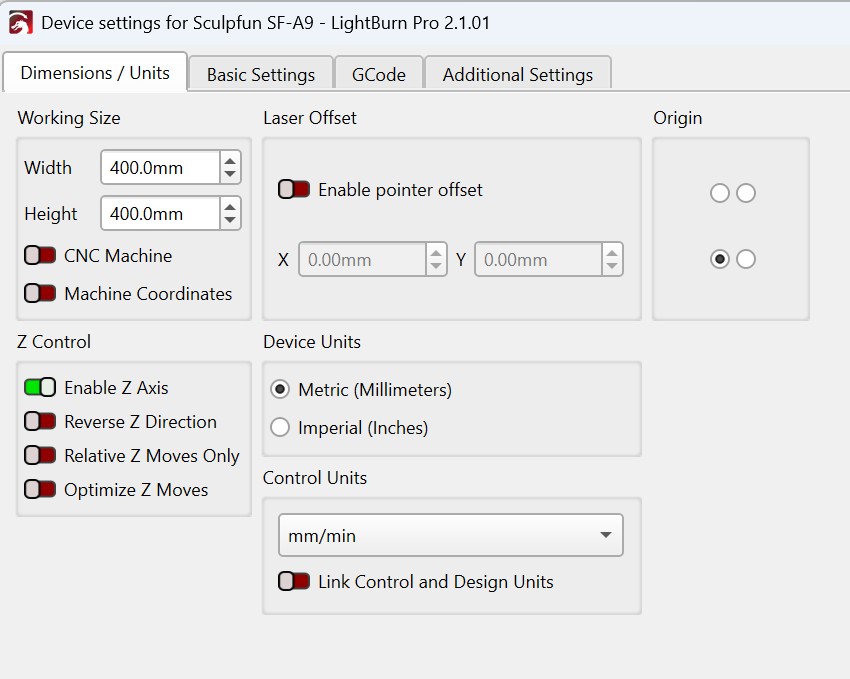
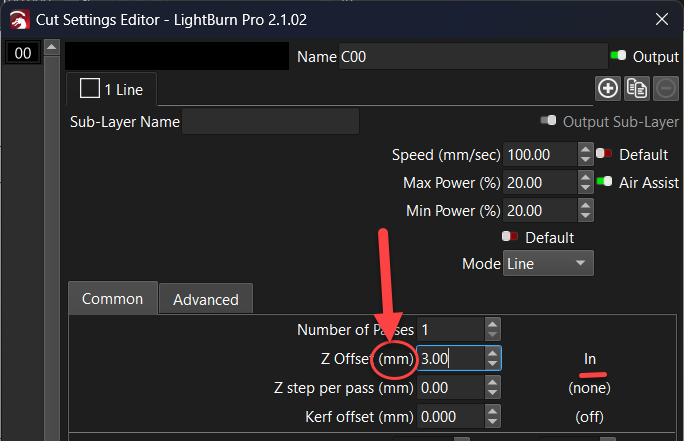
After upgrading to LightBurn 2.1.02, I noticed the material thickness field is no longer visible in the Cuts/Layers panel. I located the Z Offset field in the Cut Settings Editor as an alternative. However, even after correcting my Control Units to mm/sec in Device Settings, the Z Offset field continues to display “In” (inches) next to the value instead of mm. This appears to be related to the units bug described in your May 21, 2026 PSA.
I did: I entered 3.00 in the Z Offset field for my 3mm basswood material after setting Control Units to mm/sec.
I expected: The machine to focus correctly and cut through the 3mm basswood material.
Instead: The machine is not cutting or focusing properly because the Z Offset field still shows “In” (inches) even after correcting the units, meaning it reads 3.00 as 3 inches instead of 3 millimeters. This has already caused wasted material.
Steps Already Taken
1. Went to Laser Tools → Device Settings → Dimensions/Units tab
2. Changed Control Units dropdown to mm/sec
3. Saved settings and returned to Cut Settings Editor
4. Z Offset field still shows “In” next to the value
Please advise on a permanent fix. I have orders to fulfill and have already lost material to this issue.
Thank you!