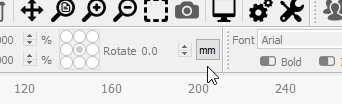
I think I know what the issue is - Your entire UI is in inches, not mm. The design you’re showing is about 25" around, significantly larger than the 150mm working area of the Ortur laser. You have the working area set to be about 150" square - that’s likely why you keep hitting bounds errors.
On the main toolbar is a button to toggle between in/mm.
Click that to get into mm mode, then go to Edit > Device Settings and change the page size to 150 x 150 mm. Then adjust the size of your design to fit within that.
LightBurn defaults to mm for everything which is likely why no one noticed this before.
I think the area of the Ortur Laser Master is actually 150 x 160 mm, so you might want to add in that last 10mm, but I’m happy to hear it’s working for you.
Not a happy camper
now having problems.have to fool lightburn. when i want to print horizontal i have to have my print verticle. then when i liad a lightburn graphic
when i try framing it a crash occures.
Starting stream
ALARM:2
On or near line 2:
Stream completed in 0:00
[MSG:Reset to continue]
then i have to reboot program and start over.
have been unable to test fire since last crash
wifi card.lbrn (248.1 KB)
this i graphic i loaded on last crash.lost com connection
when i try to load graphic software wants to close
got up this morning and having trouble starting job.Project loaded in 17 milliseconds
ok
ok
ok
ok
ok
Starting stream
ALARM:2
On or near line 2:
Stream completed in 0:00
[MSG:Reset to continue]tried to loade previous graphic
Project loaded in 2 milliseconds
ok
ok
Homing
ok
no fire buttion activation
rebooted software
loaded graphic then had to uplug cord to computer and plug it back in to connect to computer
Project loaded in 4 milliseconds
Waiting for connection…
Waiting for connection…
Waiting for connection…
Waiting for connection…
Waiting for connection…
Waiting for connection…
ok
Homing
ok
reloaded nwe image system crashed again
Starting stream
Stream completed in 0:11
Project loaded in 2 milliseconds
Starting stream
ALARM:2
On or near line 3:
Stream completed in 0:00
[MSG:Reset to continue]
added new graphic fire button worked
then tried to frame and sustem crashed
ok
Starting stream
ALARM:2
On or near line 3:
Stream completed in 0:00
[MSG:Reset to continue]
replace text with last compleated projectand frame and everything worked
overlaid new text and deleted old text and now ready to print after an hour
Starting stream
Stream completed in 0:11
ok
Starting stream
Stream completed in 0:11
Starting stream
Stream completed in 0:10
Starting stream
Stream completed in 0:10
ok
I think part of your problem on OLM might be the origin zero zero
Machine homes always to front, left
Therefore on OLM the wires and the motherboard are are the back of the machine, and the front is the logo
Regarding alarm 2, this means your machine thinks you are going to go outside the 150x160 area
Is a soft limit. You are instructing machine to go , for example to X170 and it knows it cant so throws an error
So a few things to consider
when you type $$ in console, it will output all Grbl settings
What do you read on $130 and $131
What type of job origin are you trying to run? can you take a full screenshot of your lightburn with job included and the laser panel selected?
Answers like this one make it harder to help you - I’ll explain. If I ask, “how is your machine oriented” and you say “the same as always”, that doesn’t answer the question, and since I don’t know which direction your machine has always faced, I still don’t know the answer.
If you said “the ‘Ortur’ label is facing toward me, and the arm of the machine with the laser on it goes to the right”, that would actually give me information needed to help you. If you said that, I would know the machine is properly oriented so there would have to be a configuration or wiring issue. If you told me “The USB plug is facing me” then I’d know the machine was upside down.
The USB and power plugs are on the rear of the machine, and the Ortur label should face you. When you power it up and it homes, it goes to the toward you and the left of the machine.
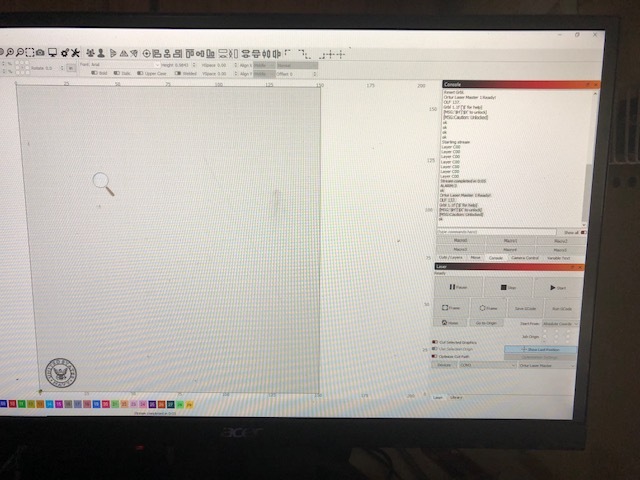 g)
g)