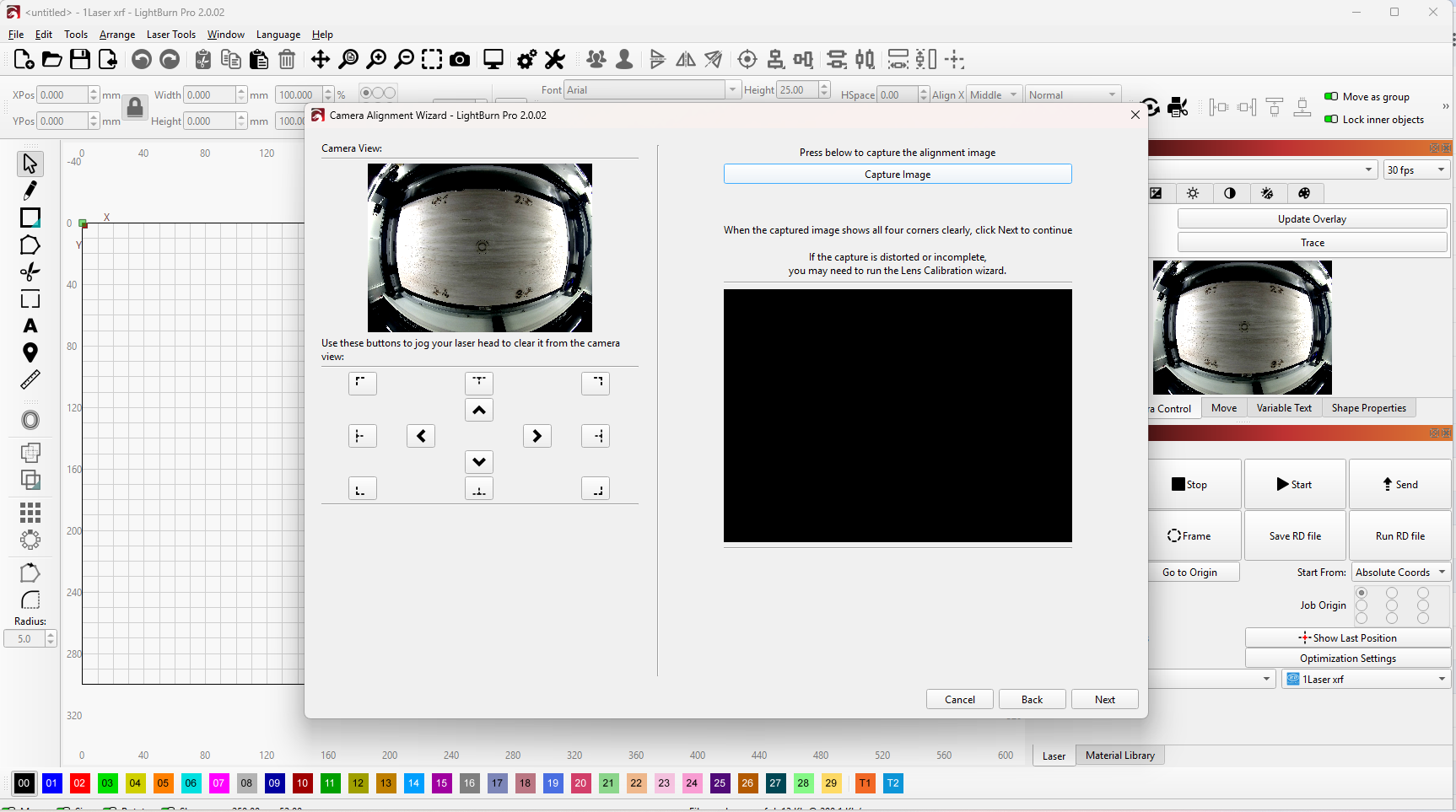
When I’m doing the Camera calibration and alignment I’m getting a good live image but my capture is showing up black. I have restarted lightburn, my laser and both at the same time as well as unplugging and plugging back in my usb cable into my Laser engraver. I’ve seen a lot of people are having this issue, has there been a fix for it yet? I was able to calibrate my camera but I can’t align it at all.
I’ve had this problem before, I’m experiencing it again tonight. This has been a problem with this technology and its software since its conception. Upgrade after upgrade after upgrade has done nothing to acknowledge, address, and eliminate this problem. It’s been 3 months since I’ve done anything with my laser because I just cannot get the thing to properly calibrate without this huge process of moving a card around to 30 different locations just to have the entire process fall flat and absolutely fail. I turn my laser on to it tonight, it’s out of calibration, somehow and the fix is the same Stone age 1.0 process. Nothing has changed, now here you are posting the exact problem I experienced a week after I purchased this machine a year ago.
I’ve got a dark screen for my capture and calibration image.
The camera feature is a gimmick, not (yet) a professional tool. Actually, you absolutely don’t need it; you can do anything at the same precision (even higher precision) and at the same level of effort without the camera.
Yes, we are waiting for a new release of it (which is in the works) but until then, a non-usable camera feature is no excuse for not being able to work with a laser 
Did you change the camera capture system?
There are a LOT of lasers out there, including my 3, that do not have cameras. @misken said it right when he called it a gimmick. Everything has to be just right for it to work. I do not consider my operation a “Stone age 1.0 process”. I started a thread (search: Fried Some Rocks!) that got a stunning number of postings. That puts me on the Bleeding Edge of Technology, no? And it all without a single camera, yes.
I’m not sure how to change the capture system so no I haven’t done that. I’m more interested in how to bypass the camera and line up projects correctly without it. I’m brand new to laser technology and would love to learn how to do it without the camera. I tried to see if there is a youtube video on it but I couldn’t find one.
Note: I have all diode laser, so there could be errors in what I say.
- Set up guides to accurately locate the part in position. This is called Making a Fixture, but can be as simple as guide rails. Or as complex as a bunch of holes in a plate.
- Design your part in Lightburn and select Absolute Coords.
- “1laser XRF” implies you must use a red laser pointer with an offset. Use this for Framing.
- Select the entire design and Group it. This will allow moving it as a single unit.
- Move the design until it Frames perfectly over the part.
- Save your project file. Now you can use this over and over with repeatable accuracy.
- If you vary the engraving on the same part, load this file, save it as a master, then make your edits. Save that file with a new relevant name.
- For a new engraving, do #7 again.
I have set up all three of my machines this way.
- The iCube has plate fixtures for dog tags, pens, keychains, and so on.
- The S30 has wood frame supports for various glasses when not using the rotary.
- The SF-A9 has alignment rails for doing cutting and charcuterie boards.
These are not all I do with the laser, but shows what you can do without a camera. Surely you can get some ideas from this. Home switches, fixtures, and master drawings make it simple here.
I also collected some advice here:
Thank you for the explanation! I will do that and go from there. I really appreciate the help!
@misken and @MikeyH I’m sorry that you two see it this way and don’t use this fantastic tool for what it’s intended for.
The problem is that it’s too difficult to get it to work perfectly, especially for new or impatient users. However, I can assure you (again) that the camera system can make your daily work and the use of your material much more efficient.
I really hope that the developers will fix the problems with calibration and exposure, so that people no longer give up on using their camera.
But, it also takes a little patience and will to set up a LB camera, it can be compared to laser beam/mirror alignment, here there are also quite a few people who give up (too early).
In September I will hopefully have some time again to do the “documentation” of my installation and use of a LightBurn camera system. By then I also have the Windows computer that I will use as a reference/comparison to my Mac and my Linux systems.
We are all here to help each other. Please come back and tell us how it went.
And feel free to ask for more help too. 
You know me too well!
I do not know about @misken but I do not do any truly production work where the camera would be an advantage. For the mostly one-off projects, it is not worth investing the time to get it right.
I did mention in another post where it was interesting enough to consider, so I am not totally against it. 
Mike, it was definitely not my intention to offend anyone, I’m just so “convinced” of a (well-functioning!) camera system in LB that I wish everyone could see/use it. 
There are many examples, e.g. mass production, where templates or rigs make the most sense - completely agree with that.
No worry, you did not.
No doubt it has value. I may try one some day, but you can be assured I will research it a lot before I commit. 
Melvin, I have not changed anything since the last time used my laser. I did notice there is an interface upgrade that was part of a release upgrade.
Mikey, I don’t understand your reply you said it yourself you do not use cameras in any part of your lasering process. This question and complaint were solely based on and steered toward those of us that use cameras for accurate placement of imagery for laser work. That process is still in its infancy IE 1.0. The process to calibrate and align the camera that I have to use right now is exactly the same as it was when I took the machine out of the box a year ago, absolutely nothing has changed. Yet a lot of information is on the internet, YouTube and otherwise accurately stating that the process is fraught with fallacies so your statement about it being a gimmick is 100% correct.
I am interested in learning your method of using the laser machine and getting accurate results without a camera. I will have to research that until a better approach toward alignment and calibration of cameras becomes second nature to this technology.
LightBurn version 2.0 brought a ton of new camera features! Some of them are not immediately visible, like the completely rewritten Windows drivers.
The change to QT6 also opens the door for more exciting camera capabilities in future updates.
A list of new features:
We introduced a new, post-stoneage way to calibrate the camera lens using the new calibration card with AprilTags and tracking function. (The circle pattern should not be used anymore)
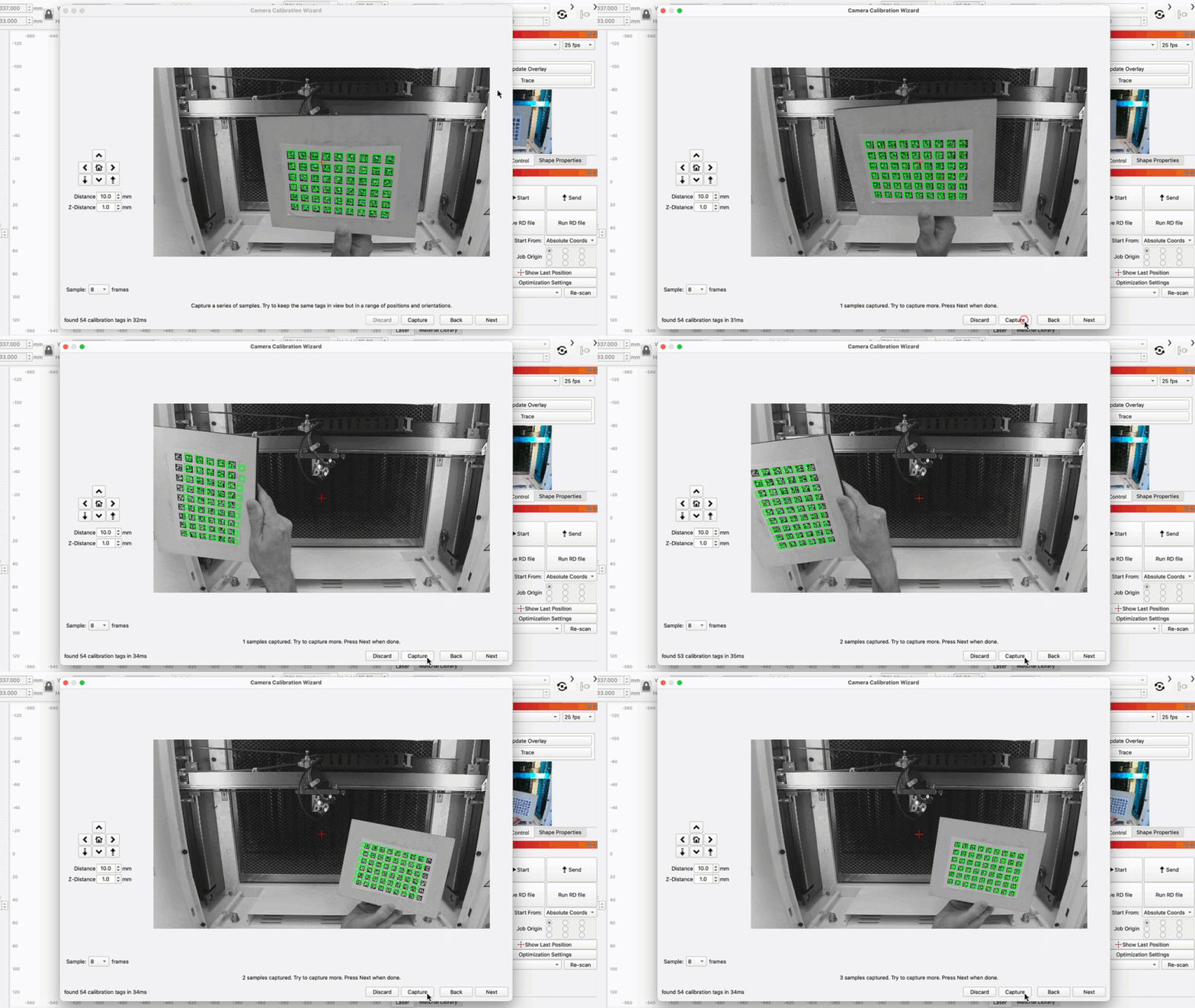
If you’re seeing the black overlay image, it may be due to using an old Camera Lens correction profile in version 2.0.
Please follow the instructions for camera calibration with Tracking to see if it solves it for you too: Calibrate Camera Lens (Labs) - LightBurn Documentation
This feature is still in testing (Labs feature) but is currently the most precise way to calibrate your camera. It’s only accessible with a right click on the “Camera” window:

After this, perform another Camera Alignment as usual: Calibrate Camera Alignment - LightBurn Documentation
By the way, it’s already possible to auto-align when using a Head-Mounted camera.
I was being a bit of an SMD (smart a%# dude) by calling it a gimmick. It is an accessory that is great when it set up properly. With the variety of cameras and computer system installations out there, it takes a lot of patience to get it working.
My operation does not justify the effort. Everyone’s setup is different, so each person has to decide for themselves if they will benefit.
I believe the difficulties stem from all the variations, and not from Lightburn itself.
Same for me  I sometimes exaggerate a bit to make people get the idea of what I’m talking about.
For me, the camera feature is working great nearly all of the time. But I also programmed image detection algorithms myself and know the background of the projection algorithms, physics etc. Since most people I deal with in support forums are less technical oriented, I try get them away from trying to get complicated tool running and from getting frustrated too soon.
Most peole can’t imagine why the object height plays a role here, to me it’s the most obvious thing in the world  So before I start to explain all details, I try to show that you can perfectly live without it as well, get to know your laser perfectly and then start with advanced features
Same here, I have survived this long without it. Never had an issue with alignment, but my workflow my differ from others.
I believe the tools should exist and any improvements made are welcome.