Good evening,
I just tried to get my Creality Falcon A1 Pro up and running with LightBurn RC 2.1. The printer is detected thanks to the profile, but unfortunately I can’t get the camera to work. Is there a trick to this?
Good evening,
I just tried to get my Creality Falcon A1 Pro up and running with LightBurn RC 2.1. The printer is detected thanks to the profile, but unfortunately I can’t get the camera to work. Is there a trick to this?
Welcome Juergen.
Maybe this can help:
Thx for the quick response but it seems the LB SW does not support the camera but only the RC. Because of that in did the update … and still seek for a solution 
Did you add the camera? Or can you explain in detail what doesn’t work?
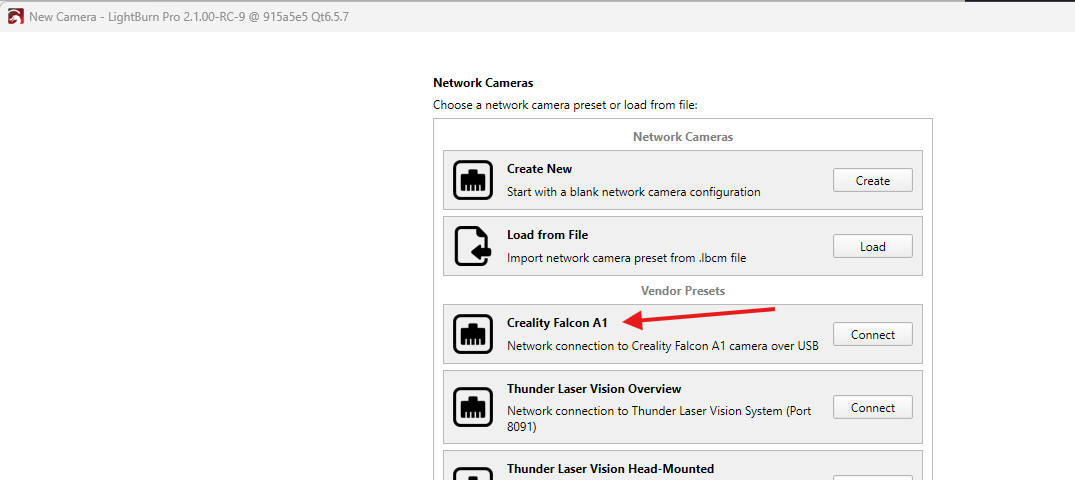
Although the camera is connected over USB, it uses the RNDIS protocol and is therefore only supported in the upcoming version 2.1, and the RC.
To add it:
Go to “Laser Tools > Manage Cameras”
“Add New”, select Network, and choose the vendor preset for the Creality Falcon A1:
Good morning Aaron,
thx a lot for the hint ! This solves my issue. Indeed I was on the “USB-Track” because the equipment is connected via USB but in that way it works pretty well
Thank you for the feedback!
I figured that this was the reason why you couldn’t find the camera and already made a request to move the Vendor Presets to the first step of the wizard. While it’s technically correct that RNDIS is a network protocol, I get that someone would look for the camera under the USB option.
Ah yes It’s tricky when it’s connected via USB to consider the network tab. But thx a lot to point to that !!!