I want to print to a printer. The only thing on the workspace is my design. There are other things off of the workspace. Using a Mac Mini to an HP printer on 11 x 17 paper (tabloid). It prints. But it prints everything, whether on or off the workspace and the entire print is smaller than a dime. Help!
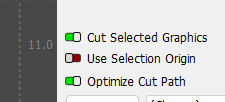
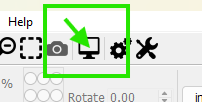
With “Cut selected graphics off, Preview show everything. With it on, Preview only shows what I want cut. I always have cut selected on so it was on while I tried to print.
On Windows, there’s a printer scale factor buried deep in the Advanced settings, with selections of None, Fit, and Fill, with a default of None. I suspect Mac has a similar factor, likely equally buried, that may prove useful.
I trust you have selected the proper paper size, as the doc cautions about odd behavior:
If your design is printing too small, check the paper size you’re printing on.
I thought selecting a specific object / group would limit printing to just that, but … nope.
It may be more useful to select what you want to print, export that selection as an SVG (which does work), then print the SVG file using a program better suited to graphics.
But will that print to scale? I’m not printing just to print. I want to see if my design is going to work with the other parts of the project.
The SVG file dimensions will be dead-on accurate, so the results on the printed page depend on the graphics program doing the printing.
Inkscape, for example, handles SVG files natively and prints them accurately. You’ll certainly get better results from graphics programs intended to produce printed results, rather than one intended to run laser cutters.
However, if your HP printer uses a laser + toner + fuser, then all accuracy bets are off:
Paper doesn’t react nicely when pulled around hot fusers and squeezed through rollers. 
I’ll just burn it on paper or cardboard when I get home. Thanks.