Error8 issue, any help please

ALARM: 8

Homing fail. Cycle failed to clear limit switch

when pulling off. Try increasing pull-off setting or check wiring

Hi there,

I have the above error in Lightburn. Long story short, i have just recently installed the latest version of Lightburn (I believe it’s v2.1.02). Additional to that i have just done my monthly cleaning cycle and assembled everything back together.

I have checked all limit switches and all of them are working and throw out a message to prove it.

This alarm occurs at start up and the homing sequence begins. It also occurs if i use my auto focus for the z axis and it also happens when I run remotely from a flash drive.

I have an iKier K1 70w, and I’m not sure if this is the machine or Lightburn. I have disable the statt up sequence and I"m able to still use my machie as long as i focus manually.

Does anyone have any suggestions for me please?

Many thanks

Don

Once the command to Home is sent by Lightburn, it is out of the picture. The Home cycle is entirely in the controller.

This is your clue. Your pulloff distance ($27) is not enough to completely clear the switch.

  1. In the Console window, enter $$.
  2. Look at the list of parameters and find one that shows something like $27=2.000
  3. With that value, add 1 or 2 to what it says.
  4. Write that new value in the form **$27=**n.nnn using the Console window.
  5. Test your Home cycle.
  6. If you still get the Alarm 8, add a little more to the value.
  7. You should not have to go more than 5-6mm pulloff.

Thank you for your prompt feedback MikeyH. I have been away this week. Ihave pushed the $27 up to 7.0 and still the Error 8 persists. Is there anything else i should try?

That should been more than enough!

If the switch is stuck before you try to Home, that would trigger a different alarm. It has to be closing the switch on initial approach, or it would not reverse for the pulloff. Maybe a different parameter is creating your problem…

Do this:

  1. From a cold start, power up everything.
  2. If the machine does not try to auto-home, initiate a Home cycle.
  3. Open the Console window and enter $$ in the input box.
  4. Copy everything (you can right-click) in the Console window and paste it in a Reply.
  5. Also paste it in a text file and save in a safe place. You may need it someday. :grin:

No problem, please see below

$$
$0=10
$1=25
$2=0
$3=7
$4=0
$5=0
$6=0
$10=1
$11=0.010
$12=0.002
$13=0
$20=0
$21=1
$22=1
$23=3
$24=200.000
$25=2000.000
$26=250
$27=7.000
$30=1000
$31=0
$32=1
$33=1
$34=10
$35=1
$100=100.000
$101=100.000
$102=1600.000
$110=50000.000
$111=20000.000
$112=1000.000
$120=4000.000
$121=1000.000
$122=500.000
$130=410.000
$131=410.000
$132=120.000
$140=30000.000
$141=20000.000
$142=1000.000
$143=2000.000
$144=1000.000
$145=500.000
$150=6000.000
$151=6000.000
$152=1000.000
$153=1000.000
$154=500.000
$155=500.000

Not sure how stiff your machine is, but the Xaccel ($110) seems excessively high. It is typically the same as the $111 value, which matches my SF-A9 machine. I am not sure this would impact the pulloff activity, but it would not hurt to bring it down.

You did not supply the beginning part of the startup (before the $$ entry) from the Console window. I was looking for hints on what might be causing your issue in what it is reporting.

Sorry about that MikeyH, I have included it below. I’ve made the adjustments to $110 and nothing changed..

Waiting for connection…
ok
[VER:1.1h.20230501:]
[OPT:VNZHDL+I,254,2048]
Target buffer size found
ok
[G54:0.000,0.000,0.000]
[G55:0.000,0.000,0.000]
[G56:0.000,0.000,0.000]
[G57:0.000,0.000,0.000]
[G58:0.000,0.000,0.000]
[G59:0.000,0.000,0.000]
[G28:0.000,0.000,0.000]
[G30:0.000,0.000,0.000]
[G92:0.000,0.000,0.000]
[TLO:0.000]
[PRB:0.000,0.000,0.000:0]
ok
Homing
ALARM:8
Homing fail. Cycle failed to clear limit switch when pulling off. Try increasing pull-off setting or check wiring.
Grbl 1.1h [‘$’ for help]
[MSG:‘$H’|‘$X’ to unlock]
<Alarm|MPos:0.000,0.000,0.000|FS:0,0|Pn:Z|WCO:0.000,0.000,0.000>
ok
[MSG:Caution: Unlocked]
ok
<Idle|MPos:0.000,0.000,0.000|FS:0,0|Pn:Z>

You have a powered Zaxis?

Time to talk about what kind of limit switches you have:

  1. Mechanical
  2. Optical
  3. Magnetic

I will review your reply in the morning. Sleepy time here.

P.S. To be honest, your issue makes no sense, so we are going to be very happy when it is solved. :hugs:

Thanks MikeyH,

It is a micro plunger switch, if that helps. Its a head scratcher for me too, it worked and then it didn’t.

Maybe the plunger part is sticking intermittently. Got a picture of it?

I have pressed the shaft when the machine is powered on and the limit switch does acknowledge a warning.

Try putting a little lubricant on the plunger of each one. Then operate it with your finger about 10 times or so. That will ensure the plunger fully extends when released.

Do this for all the switches.

If this does not clear up your issue, we can do some one-by-one switch testing.

All done but yet still the same issue.

Thank you for your help thus far. It’s clear to see that this is machine related. If I press the auto focus on the machine it runs into the same issue. This is without a computer and Lightburn connected to the laser.

You mentioned a switch by switch testing, what should i do next?

For each switch, and releasing very slowly,

  1. Push the plunger in and hold.
  2. Enter ? In the Console window.
  3. Release (SLOWLY) and enter ? again.
  4. Repeat for all limit switches.
  5. Copy everything from the first ? down and paste in a Reply.

Hi MikeyH,

Ive done as you requested, please see below.

Waiting for connection…
ok
[VER:1.1h.20230501:]
[OPT:VNZHDL+I,254,2048]
Target buffer size found
ok
[G54:0.000,0.000,0.000]
[G55:0.000,0.000,0.000]
[G56:0.000,0.000,0.000]
[G57:0.000,0.000,0.000]
[G58:0.000,0.000,0.000]
[G59:0.000,0.000,0.000]
[G28:0.000,0.000,0.000]
[G30:0.000,0.000,0.000]
[G92:0.000,0.000,0.000]
[TLO:0.000]
[PRB:0.000,0.000,0.000:0]
ok
Homing
ALARM:8
Homing fail. Cycle failed to clear limit switch when pulling off. Try increasing pull-off setting or check wiring.
Grbl 1.1h [‘$’ for help]
[MSG:‘$H’|‘$X’ to unlock]
[MSG:Caution: Unlocked]
ok
<Idle|MPos:0.000,0.000,0.000|FS:0,0|Pn:Z>
ALARM:1
Hard limit triggered. Machine position is likely lost due to sudden and immediate halt. Re-homing is highly recommended.
<Idle|MPos:0.000,0.000,0.000|FS:0,0|Pn:ZY2>
?
<Idle|MPos:0.000,0.000,0.000|FS:0,0|Pn:ZY2>
ok
<Idle|MPos:0.000,0.000,0.000|FS:0,0|Pn:ZY2|WCO:0.000,0.000,0.000>
ALARM:1
Hard limit triggered. Machine position is likely lost due to sudden and immediate halt. Re-homing is highly recommended.
Grbl 1.1h [‘$’ for help]
[MSG:‘$H’|‘$X’ to unlock]
ok
<Idle|MPos:0.000,0.000,0.000|FS:0,0|Pn:Z>
?
<Idle|MPos:0.000,0.000,0.000|FS:0,0|Pn:Z>
ok
<Idle|MPos:0.000,0.000,0.000|FS:0,0|Pn:Z>
ALARM:1
Hard limit triggered. Machine position is likely lost due to sudden and immediate halt. Re-homing is highly recommended.
Grbl 1.1h [‘$’ for help]
[MSG:‘$H’|‘$X’ to unlock]
ok
<Idle|MPos:0.000,0.000,0.000|FS:0,0|Pn:YZ>
?
<Idle|MPos:0.000,0.000,0.000|FS:0,0|Pn:YZ>
ok
<Idle|MPos:0.000,0.000,0.000|FS:0,0|Pn:YZ|Ov:100,100,100|A:S>
ALARM:1
Hard limit triggered. Machine position is likely lost due to sudden and immediate halt. Re-homing is highly recommended.
Grbl 1.1h [‘$’ for help]
[MSG:‘$H’|‘$X’ to unlock]
ok
<Idle|MPos:0.000,0.000,0.000|FS:0,0|Pn:Z>
?
<Idle|MPos:0.000,0.000,0.000|FS:0,0|Pn:Z>
ok
<Idle|MPos:0.000,0.000,0.000|FS:0,0|Pn:Z>
ALARM:1
Hard limit triggered. Machine position is likely lost due to sudden and immediate halt. Re-homing is highly recommended.
<Idle|MPos:0.000,0.000,0.000|FS:0,0|Pn:XZ>
?
<Idle|MPos:0.000,0.000,0.000|FS:0,0|Pn:XZ>
ok
<Idle|MPos:0.000,0.000,0.000|FS:0,0|Pn:XZ>
ALARM:1
Hard limit triggered. Machine position is likely lost due to sudden and immediate halt. Re-homing is highly recommended.
Grbl 1.1h [‘$’ for help]
[MSG:‘$H’|‘$X’ to unlock]
ok
<Idle|MPos:0.000,0.000,0.000|FS:0,0|Pn:Z>
?
<Idle|MPos:0.000,0.000,0.000|FS:0,0|Pn:Z>
ok
<Idle|MPos:0.000,0.000,0.000|FS:0,0|Pn:Z>
ALARM:1
Hard limit triggered. Machine position is likely lost due to sudden and immediate halt. Re-homing is highly recommended.
<Idle|MPos:0.000,0.000,0.000|FS:0,0|Pn:ZX2>
?
<Idle|MPos:0.000,0.000,0.000|FS:0,0|Pn:ZX2>
ok
<Idle|MPos:0.000,0.000,0.000|FS:0,0|Pn:ZX2>
ALARM:1
Hard limit triggered. Machine position is likely lost due to sudden and immediate halt. Re-homing is highly recommended.
<Idle|MPos:0.000,0.000,0.000|FS:0,0|Pn:Z>
?
<Idle|MPos:0.000,0.000,0.000|FS:0,0|Pn:Z>
ok
<Idle|MPos:0.000,0.000,0.000|FS:0,0|Pn:Z|WCO:0.000,0.000,0.000>
ALARM:1
Hard limit triggered. Machine position is likely lost due to sudden and immediate halt. Re-homing is highly recommended.
<Idle|MPos:0.000,0.000,0.000|FS:0,0|Pn:ZZ2>
?
<Idle|MPos:0.000,0.000,0.000|FS:0,0|Pn:ZZ2>
ok
<Idle|MPos:0.000,0.000,0.000|FS:0,0|Pn:ZZ2>
ALARM:1
Hard limit triggered. Machine position is likely lost due to sudden and immediate halt. Re-homing is highly recommended.
Grbl 1.1h [‘$’ for help]
[MSG:‘$H’|‘$X’ to unlock]
ok
<Idle|MPos:0.000,0.000,0.000|FS:0,0|Pn:Z>
?
<Idle|MPos:0.000,0.000,0.000|FS:0,0|Pn:Z>
ok
<Idle|MPos:0.000,0.000,0.000|FS:0,0|Pn:Z>

Pn:Z in the status shows one of the Z-limit switches remained activated.

Can you confirm if the auto-focus switch is ‘Z2’? (press the auto-focus plunger by hand and run ? to see if ‘Z2’ appears after 'Pn:Z", if nothing happens then try the same with the upper Z-limit switch)

Recheck the action/wiring/connector on whichever switch turns out to be ‘Z’. If you can completely disconnect the switch (if you see a 2-wire connector near the switch) and then see the active pin status clear - that will confirm the switch is stuck/faulty.

It’s clearly the Z axis that’s causing issues.

You could also try if the axes can be homed individually by entering these commands in the console:
$HX , and $HY

Hi NicholasL

This is the message i get from the Z axis limit switch

ALARM:1
Hard limit triggered. Machine position is likely lost due to sudden and immediate halt. Re-homing is highly recommended.
Grbl 1.1h [‘$’ for help]
[MSG:‘$H’|‘$X’ to unlock]
ok
<Idle|MPos:0.000,0.000,0.000|FS:0,0|Pn:ZZ2>
?
<Idle|MPos:0.000,0.000,0.000|FS:0,0|Pn:ZZ2>
ok
<Idle|MPos:0.000,0.000,0.000|FS:0,0|Pn:ZZ2>
ALARM:1
Hard limit triggered. Machine position is likely lost due to sudden and immediate halt. Re-homing is highly recommended.
Grbl 1.1h [‘$’ for help]
[MSG:‘$H’|‘$X’ to unlock]
ok
<Idle|MPos:0.000,0.000,0.000|FS:0,0|Pn:Z>
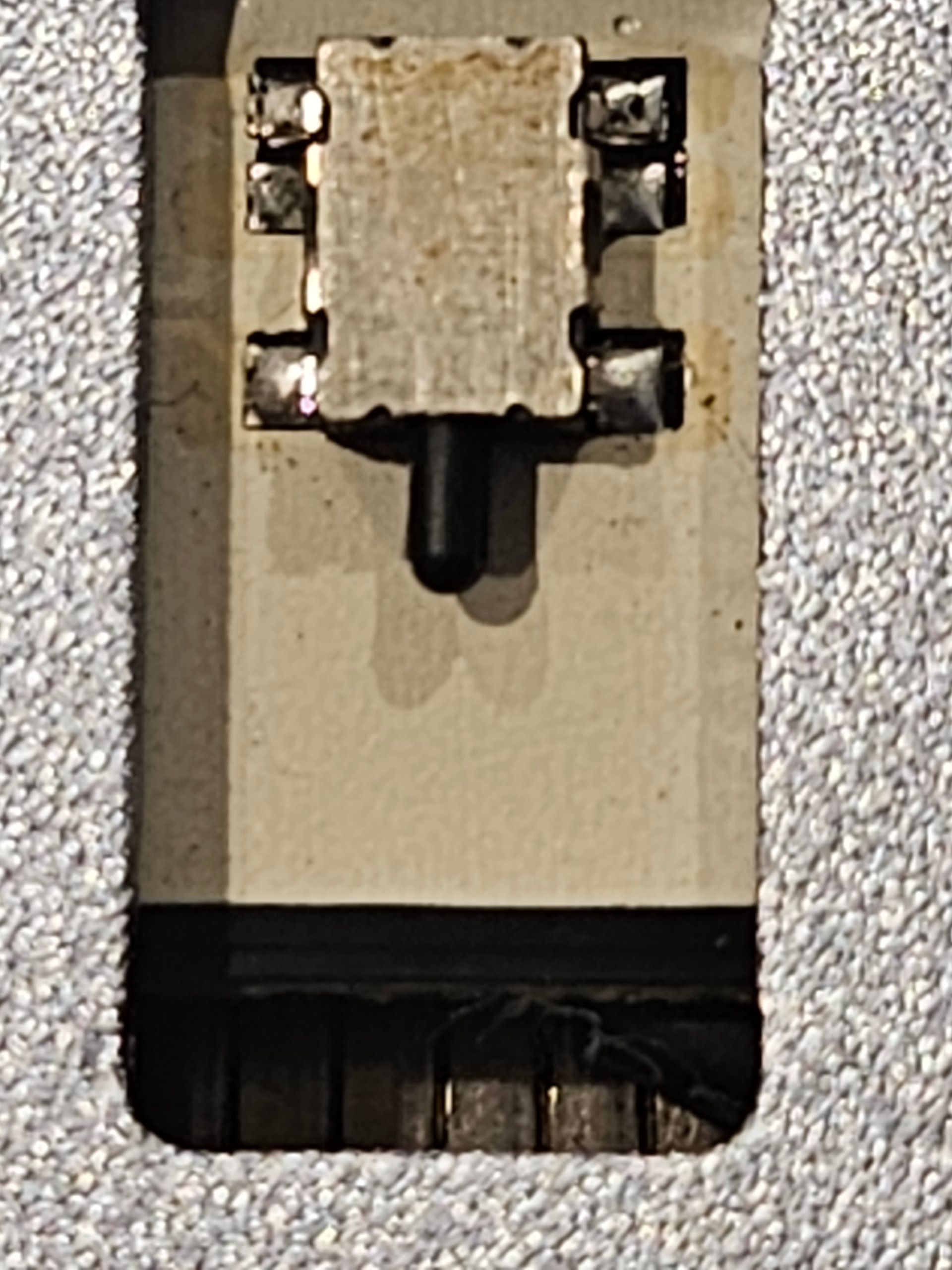
I will attempt to see if i can access the switches wiriing and see what I can see.

Hi Aaron.F

I executed the $X and $Y cammands without any issues. On the fly I tried $Z which gave the same issue I’ve been dealing with if thats of any use.

Hi Donovan,

I take it you were manually triggering the upper Z axis limit switch to get the ‘Pn:ZZ2’ ?

…that would mean the touch probe is the ‘Z’ active input causing the issues and the Alarm 8 (even though it’s not directly involved with homing).

See if you can repair or disconnect the touch probe and check with ? status check from console to see if the ‘Pn:Z’ will clear, which should then result in an alarm free ‘Home’ cycle.

Test the touch probe switch for continuity if you have a multimeter to see if it’s functioning or stuck on.