I just received my Falcon two 40 watt laser, set it up according to the manufacturer’s info, installed Lightburn on my Mac M1 PowerBook (Tahoe 26.3 OS), and cannot get LightBurn to connect. I installed the drivers provided by Creality (Creality Falcon2 GRBL | GCode), plugged in a USB C cable (tried 3 different cables to include one type A to C and two type C on both ends with direct port connect AND USB hub), reinstalled firmware for master and laser, and I can’t get any connection for the simple text drawing I made. Attempted home button and frame button, both turn dark for about 5 seconds and then go back to normal.
I’d sure appreciate some help from folks that might’ve seen this before!
Thanks in advance,
Newbie John
From the very little (very little indeed) that I know (and learned here on the forum), it seems that the Mac operating system often has some communication problems with USB ports, however I believe that the solution I know for this problem has already been discarded; replacing the USB cable with one of the cheapest ones you can find.
There are several Mac users who have already experienced the same problem, I believe it won’t be long before you get a more useful answer than mine. 
1 Like
Do you mean the Home button on the laser?
Did you ever see the machine move at all?
Screenshots of the entire LightBurn window would help us diagnose.
1 Like
Many have found connection problems with Mac and their laser to be an issue with how MacOS translates, or rather doesn’t translate the onboard USB 3+ to the USB 2.0 of the laser. The most common solution seems to be using a "dumb: USB 2.0 hub connected though a Lightning adapter. Faulty, cheap USB cables are another source of problem for Mac and PC users alike. Get a high quality USB cable, with the ferrite core on the ends and a USB 2.0 hub and see if that solves your issue. This video will help diagnose if your Mac sees the device and offers a couple suggestions if it doesn’t.

1 Like
Thank you Luis, I’m pretty persistent, and with the help of the group, I’m sure I’ll get it sorted out!
John
2 Likes
Thanks Aaron. Yep, I meant the home button in the software (LightBurn window). Home button on the laser sends it right to the home position.
Jhon
Thanks for the video Tim, I look forward to watching it. The interesting aspect of this is the fact that when I’m connected between the laser and my PowerBook, when I turn on the laser I get a “beep” from my Mac. I would think that this indicates some form of communication between the two, but no dice!
As you mentioned, there are differences between USB cables, and so far I’ve tried 3 different cables including the “el cheapo” they sent along with the laser, as well as a USB hub with bot USB 2.0 and USB 3.0 ports. I went direct to my PowerBook ports with the 2 USB C connectors as well.
I set it aside for the evening, and will try again today using some of the info included in the video and a Chat GPT link my son sent.
John
The recommended hub in @thelmuth’s video is the cheapest dumb hub you can buy. Yours may not trigger the action required if it is USB 3.0 capable.
PC USB-C to USB-A to Hub to USB-A cable to USB-C laser.
IOS apparently will not downshift to the USB 2.0 standard required by the laser if it sees a USB 2.0 connection, meaning the laser. The Hub forces it to reevaluate the connection (the Hub) and make the protocol switch.
Well, I dug out an older USB 2.0 hub and 2.0 to 3.0 cable, and rebooted everything and voilà, it worked.
So thanks to all of you for the replies, and ideas regarding the “the fix”. Unless it takes a crap later, I’m going to call this one fixed!!!
Thanks again,
John
3 Likes
I love it when a plan comes together!
1 Like
Many, if not all lasers with a USB-C connection won’t connect with a USB-C to C cable.
We have this documented here:
USB C Cable Problems
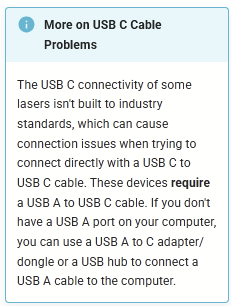
Here’s a more detailed ZDNET article
Why some gadgets don't charge with USB-C
Although the printer may have a USB-C port, it lacks the necessary hardware to support USB-C charging protocols. On a more technical level, the manufacturer opted to save a few cents by omitting some basic components (typically just two resistors, which cost virtually nothing) to accommodate different power inputs. Since USB-C doesn’t supply power without first negotiating what the device needs, no power is delivered.
By contrast, USB-A always delivers a default 5V without any negotiation.
3 Likes
This topic was automatically closed 30 days after the last reply. New replies are no longer allowed.