Purchased this machine directly from manufacturer in China Favo Laser.
Running the Ruida 8445S. For over 12 months now. No issues what so ever.
Cut hudreds of sheets of material.
I have just attempted to send a cut file across after updating to 2.1
As soon as the file Transferred into the machine. The machine jacked the bed lead screws up smashing straight into the laser nozzle. I hit the power button just after it hit.
Since then. I have had to reset the machine over and over again to get it to reboot and actually load the display screen.
And when it does finally go through its power on test and calibration. Its like something in the software/controller is continually trying to push the bed up button over and over repeatedly.
If i hit the menu button fast enough time, it will enter the menu screen which seems to stop the continous button pressing, but as soon as you exit out its back to trying to lift the bed out of the machine.
I dont even know where to start to try and diagnose what LB has sent across into the machine that would cause this kind of behaviour.
Do you control Z-Axis with Lightburn? It is probably not on by default unless you enabled it from Edit > Device Settings
You may want to check all Z-Offset and Z-Axis related controls (settings and layer settings) inside the file you’ve sent to the controller.
I doubt it is a software related issue but either a physical button or the Z-Axis motor should have got stuck in your machine. If the buttons are not physically stuck, the machine may be trying to home the Z-axis to a wrong homing coordinate - if you suspect Lightburn was the issue, this behaviour cannot be created with sending a file; the only way to send wrong Z-axis home coordinates to the machine is by setting it from Manufacturer Settings and it should have triggered few warnings before doing so.
As a work around - check if;
any buttons on the controller lifting the Z-Axis might have got stuck
if you have any stoppers on either end of the Z-axis rails and if they are still in place
you can unplug the Z-axis motor and check the manual / help for resetting Z-axis home coordinates for any anomalies
If none of these work, you may consider checking the Z axis motor/driver and potentially resetting/readjusting the working allowances of the Z axis from scratch.
No. Z axis control is not enabled in lightburn. I control it manually from the screen on the machine as I have no need or desire to move it once the job is setup for my work.
I have been able to stop the constant Z Up from occuring by installing LB 1.7 (what I upgraded from)
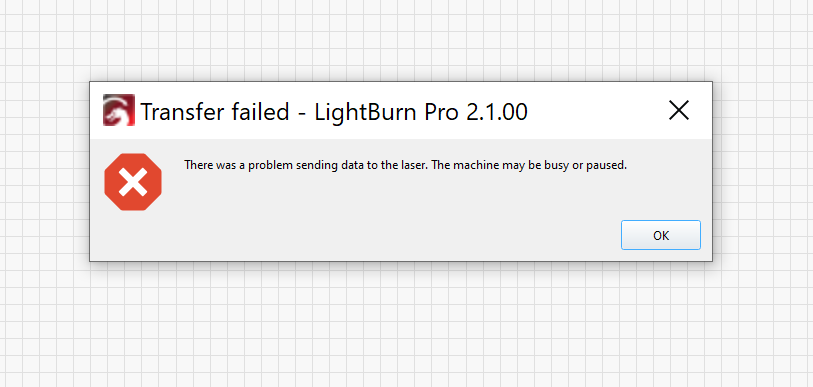
However LB will not allow me to send any files across to it any longer saying the machine is busy or paused.
The buttons are all soft-touch still with the protective cover ontop as they are still so new.
The stoppers are still in place, that is the only thing that saved the bed from being wound up any further. Although one of the jackscrews does have a nasty clunk when moving now thanks to it smashing up into the workpiece.
I can unplug the Z-Motors but what ever has been pushed across in that first file from 2.1.01 has caused problems with the controller in a big way. Here is a couple of videos I took today of the issue.
I would be happy to send that through tomorrow. I have just sent a lengthy email through to the support department outlining as much info as I could on the issues that occurred, so I will wait to get a response before sending another email with that data.
With the units, I did read the PSA. I am not able to get any file to load back onto the controller at this point with any version of LB after this axis control problem occurred.
I was able to stop the Z axis from continually going up by connecting to the machine with version 1.7 of LB and importing the machine settings from it, But still no outgoing communications.
The way that rolling back to version 1.7 has stopped this behaviour is surprising to me - I cannot think of any reason why the new version of Lightburn software might be having real-time communication with the controller which is causing this. Let’s wait to hear from them.
In the meantime, maybe you can check and replace your cable or whatever protocol you’re connecting your laser to the computer and I would also try to remove & recreate the machine profile to check if the controller will respond to incoming files from version 1.7
Believe me, when it took off on its own I nearly jumped out of my skin. I was shocked. ive been running this laser for 12 months +
And a friends laser for about 2 years prior and ive never encountered it.
I have tried already multiple cables (all new) They are all direct to the Ruida board, not through the patch cable the machine runs up to the side usb port.
I have not yet tried another PC but that will be tomorrows job.
I tried to setup the machine to use my home network through ethernet, but I cannot make the machine output a static IP and my PF Sense is not issuing a DHCP licence for what ever reason so I thought I would give that a skip to avoid complicating the process further.
I have emailed LB with as much detail as I could provide so hoepfully some answers come from it.
This indicated 100% the issue is at the controller level
One of the little buttons on the control seems to be causing bad contact and always pressing down.
This is not software, this is a controller hardware failure.
This is because you are interrupting the input of the jog buttons by bringing the menu up.
I get this is something that is probably not going to be as easy to diagnose as most peoples machines that are just hardware failures.
To put it into perspective.
I installed 2.1.01. I setup a work file and within 0.1 Seconds of me sending that file to the Laser, it send the Z motors up at full speed until I hit the E-Stop.
With a bit of stuff in between including me trying to make sure the machine didnt smash itself to pieces when i powered it back up.
I removed all Lighburn files and installations. reinstalled LB 1.7 and connected to the controller. The issue ceased immediately.
All XYZ functions on the controller pad are smooth and function completely now.
I am now left with the machine controls functioning ok, BUT. Lightburn is reporting the machine is paused or busy therefor I cannot send any files across to test it or use it.
This is not just some coincidence or hardware failure on the machine IMO.
I will try to use RDWorks tomorrow. Its not something I have heard of or used before. But I will see about installing and trying to get something connected and transfered to the machine.
It can see the machine is there,but something is stopping the transfer of data as though the job I sent across with 2.1.01 is still somehow stuck in its memory and unable to be cleared.
I was able to get the latest version of RDWorks installed today. Selected the controller type, RD detected the machine straight away.
I was able to send a file into the machine, and it cut without any issues.
I assumed RD had fixed what ever the problem LB caused.
Closed RDWorks and Reverted back to LB 1.7.
As soon as it sent its first file across, the machine became unresponsive again. Constant errors saying machine is paused or busy.
When I try and enter the file system on the controller screen it gives me an error stating incorrect file type, which seems to put the machine into a crashed state until you power cycle the controller and open it back up again.
I am at a loss as to what to try next. I dont wish to learn how to use RDWorks to use my machine as I have become familiar with LB and it seems significantly easier to use.
When you sent a file from LightBurn, did the filename have any characters in it other than letters, numbers, or an underscore?
Someone else mentioned that using any other characters in the filenames for that machine can cause weird controller behavior, which can even continue until the file itself is deleted.
The file name was just “cut”
No number or any other special characters.
It seems as though any file sent by lightburn now, even though I have tried reverting to 1.7 and 2.1.
Just stops the machine from responding and puts it into a busy or paused state.
A local laser tech recommended reloading The controller configuration across from the backup usb stick which I’m going to try and do. He seemed to think lb had somehow effected the config part of the controller.