I have the exact problem 
I have changed my “How do you want to connect to it?” in the Device Wizard from “Ethernet or Wifi/TCP Ruida” to “Ethernet or Wifi/UDP” and it’s transerring files without a problem now 
I have now tried.
LB 1.7 and most of its variants.
LB 2.0 and most of its variants.
LB 2.1.01 which caused this disaster. Not keen on being an experiment with LB 2.1.02.
Even after being able to send and cut successfully with RDWorks software.
LB Still nukes the machine when I try and send a file across. Soon as I do the machine starts saying its paused or busy and cant do anything at all.
I have lost so far about 3 weeks worth of productivity due to 2.1.01.
All I wanted to try was the nesting feature, which honestly is worse than just doing it manually if you care about actually saving material.
I saw the new 2.1.02 update today when I booted up my UV laser , but im stuffed if im going to attempt another update on either of my systems after the last one rendered my c02 laser inoperable .
Other users reported similar issues with the 8445S in this thread
@DieselTuner can you check if the steps suggested by @adam1018 here solve it for you as well?
Hi everyone,
I’m using the 8445 and haven’t had any issues at all. I’ll put the data together and take some screenshots so you can see how I’ve got it working. I won’t get around to it until tomorrow, though.
Best regards, Kersten
What an absolute nightmare.
I dont know if this will be the case for all people with this issues.
I had to revert back to LB1.7 first and send a file across to stop the machine from constantly sending the Z axis up when powered on.
Then using RDWorks, I sent a basic cut file across to the machine, which worked perfectly.
Open the file menu on the machine (which you can only do when a LB file isnt the first saved in its memory or it crashes the controller) and clear its memory out of all files including the one that RD just sent across. Back to a clean slate.
Close it down, Install LB 2.1. And yes, DO NOT use anything other than lower case letters in your file name. Even though LB Defaults to a full capitalized file name each time you send a file.
So far I have test cut one small piece and its worked ok.
I’m wondering if updating the Microsoft Visual C++ Redistributables is really part of the solution. Did you install those?
The Z-Axis moving up when powered on if a file with capital letters is on the controller was particularly nightmarish!
I can only attribute this to a potential firmware bug and recommend updating the controller, if possible.
In RDWorks, that’s:
-
“Config > System Settings”
-
“Upgrade firmware” in the Controller tab:
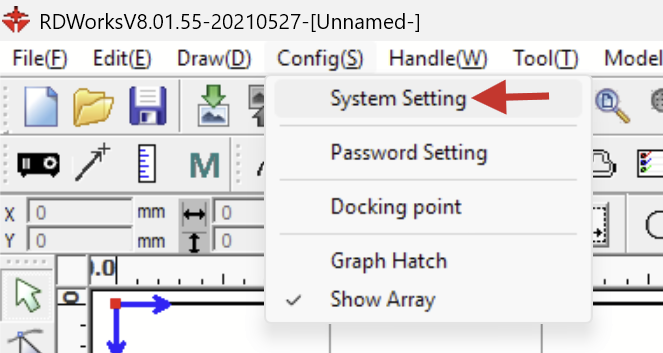
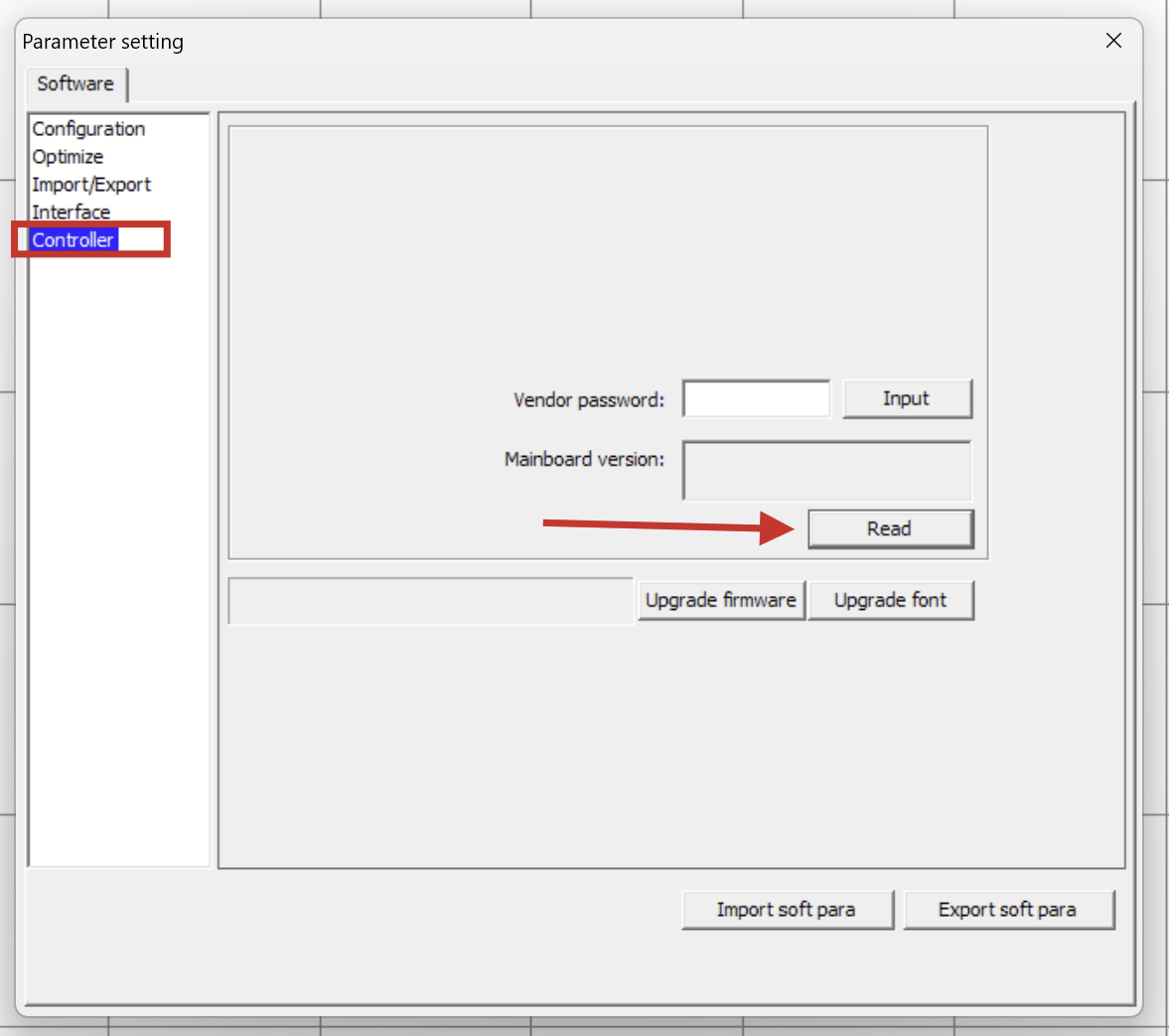
If you could first click “Read” and let us know the current firmware version, that might help us assess the situation.
Hello, I bought my 8445s just two months ago, directly from China, and it is running version RDC-V50.01.07. It makes no difference whether I use lowercase or uppercase letters; it converts them to uppercase, and there are no issues whatsoever. I can’t say whether it behaves differently with older versions
I probably spoke to soon, the issue isnt resolved. IF a moderator could “Unsolve” This one for now that would be much appreciated.
Its just a workaround to get the machine cutting again for the mean time I have since found.
Well he C++ Stuff, it was already fully up to date. So I cant say yes to that one.
I had already tried 2 laptops, and 1 main PC trying to diagnose the issue. the Main pc was Windows 11, I reinstalled windows 10 on it which is what I am using now.
1 laptop was win11, the other was win10. Same issue with both.
As it currently sits now.
The machine will not accept a origin point that is anything other than top right in the bed.
I mean you can set the origin where every you like, but it will cut from the top right of the part regardless ( A bit annoying but not a deal breaker)
I can only send 1 file into lightburn.
As soon as a second file is attempted to be sent. The machine becomes unresponsive and errors. “Machine is busy or Paused”
So far my only workaround is to send a file across from RDWorks. Which unfreezes the controller.
I can then go into the memory settings and clear all files from memory.
I can then send 1 file across from LB to cut.
Done.
@kersten_k thank you for confirming the firmware version and that uppercase filenames aren’t an issue with this version.
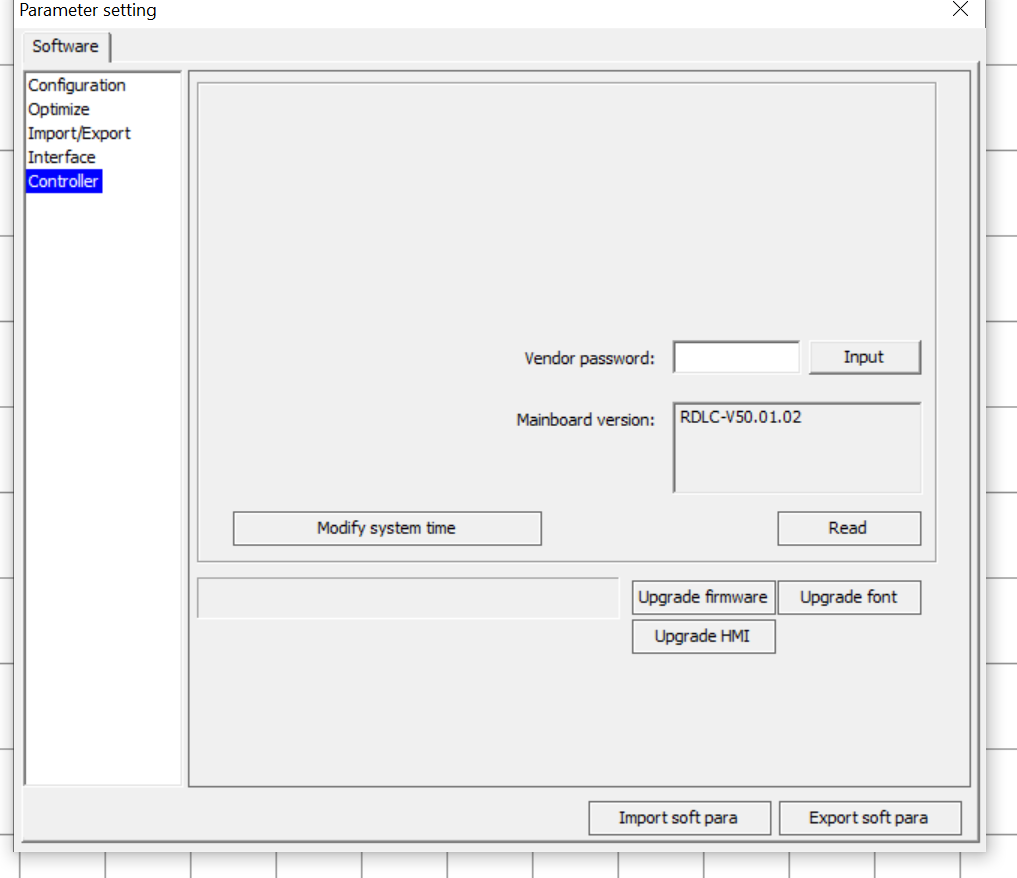
@DieselTuner Please check the firmware version of your controller with RDWorks and upgrade it if possible. (According to the RuiDa forum, the Vendor password is: RD8888)
Absolutely will do mate. The machine is just cutting a job for me now and I am not at all game to poke it with a file request in RD until its finished lol.
Nice, there’s hope!
Kersten has a newer version RDC-V50.01.07 installed.
Upgrade the firmware, and please report back.
As a safety measure, select “Export soft para” to back up your settings before the upgrade.
Is there a documented procedure to allow a factory reset and recover ALL the vendor settings.
I generally don’t believe in the three-finger boot option on a pc, but he’s having so many issues it’s about at the point that maybe it needs a low level reset? If it’s hosed up, can it hurt?
If he’s going to do a firmware upgrade anyway? I can imagine some of the dangers, but I’ve never been one to upgrade firmware unless there’s a valid reason. It would be nice to know if this is some kind of anomaly with firmware before proceeding.
Just speculating. 

It felt like a valid reason to upgrade the firmware, since another user with a newer version doesn’t have the same issues. The RuiDa 8445s is also one of their newer models.
Personally, I’m more hesitant to perform a factory reset. It’s not clear whether these factory settings actually include the manufacturer’s adjustments (Favo Laser, in this case), or RuiDa factory settings. That’s Why I suggested exporting the parameters before the upgrade, just in case..
I agree with you here. “Never change a running system”. But the System is not running.
Maybe, I like firmwareupdates too much, but I also like firmware changelogs. RuiDa doesn’t share those as far as I can tell.
Might be the best option. It seems odd that a new controller is acting up this way.
I was hoping you’d know how much of the vendors actual settings are or are not saved. I know it’s kind of like the twilight zone when the Chinese stuff is involved.
I’ll follow along to see how it works out.
Agreed, but there are minor differences in how the files are transmitted from RDWorks and LightBurn. Ruida doesn’t share code with us, though they do support our efforts with technical information and are forthcoming when we ask.
They sent us an 8445, along with details of the differences required in the communication for file uploading, TCP connections, querying the file list, etc, and never mentioned anything about upper/lower case - just that the filenames were now 2x longer than in previous firmware.
This really does feel like a weird interaction between something in that earlier firmware and something that LightBurn is sending the machine that it doesn’t like. We have multiple 8445’s in the company and have never seen anything like this (on this controller or any controller - never in the history of LightBurn).
That’s very reassuring to know they do help you out. Too bad everything in China seems to be difficult to get good information. It could be, being Chinglish is not their first language, simply a translation problem, both ways?
Does the 8000 versions still use UDP and the IP remains static or has that protocol been updated to handle DHCP?
No, they’re a relatively large company, and their CTO’s English is quite good. Technical docs from them have always been quite readable and thorough, and this is the only user who has reported this issue (the weird resetting) that I’m aware of so far.
The hardware is now TCP, but the IPs are still static.