Hello,
I have heard about a “dual laser source issue” with the LP5, which was fixed in version 2.0. I would require a Dev’s attention to provide more details. - Before I escalate this, could you see if the following works?:
The Device Profile LaserPecker offers on their page here is incomplete and we’ve already sent them an updated version which uses our Custom Gcode device type with the changes in Gcode, these devices need.
Please add a new device to your installation by downloading this file, drag it into the workarea in LightBurn and select “Import”
LP5_Config-Custom-Gcode.lbzip (152.9 KB)
**Important Notice!**
There might be a settings mismatch for the S-Value depending on your specific firmware setting for the laser power ($30)
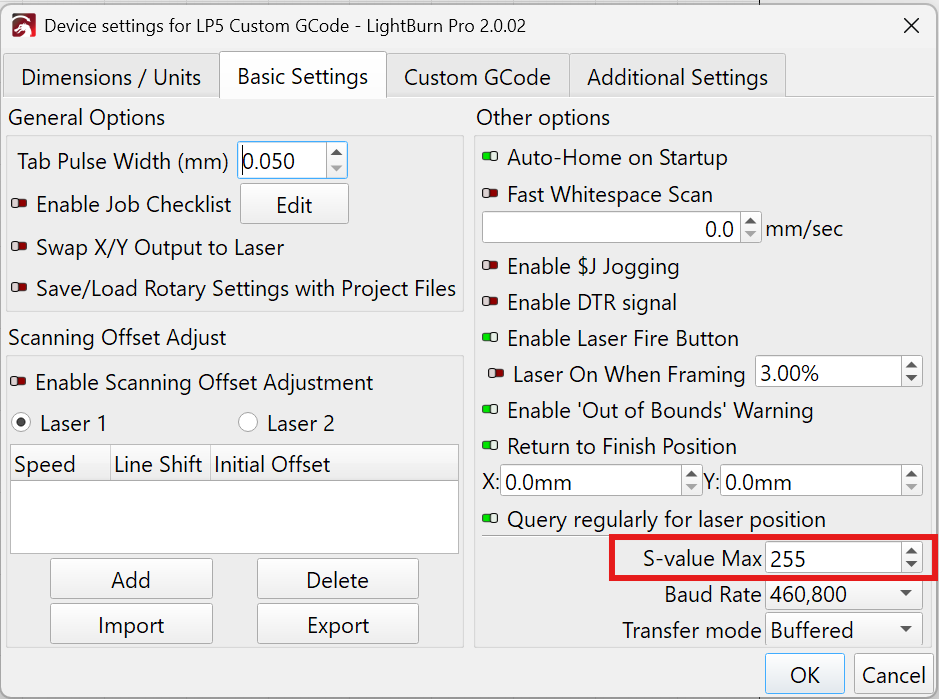
If you could send us the reply of this command in the Console Window, we can see your firmware settings and evaluate whether there are additional steps needed. Enter this in the command prompt and press ‘Enter’: $$
See this docs page for a detailed explanation: GRBL: Low or No Power Output - LightBurn Documentation
In LightBurn version 2.0, we moved the macros from the Console Window to a dedicated Macros Window:
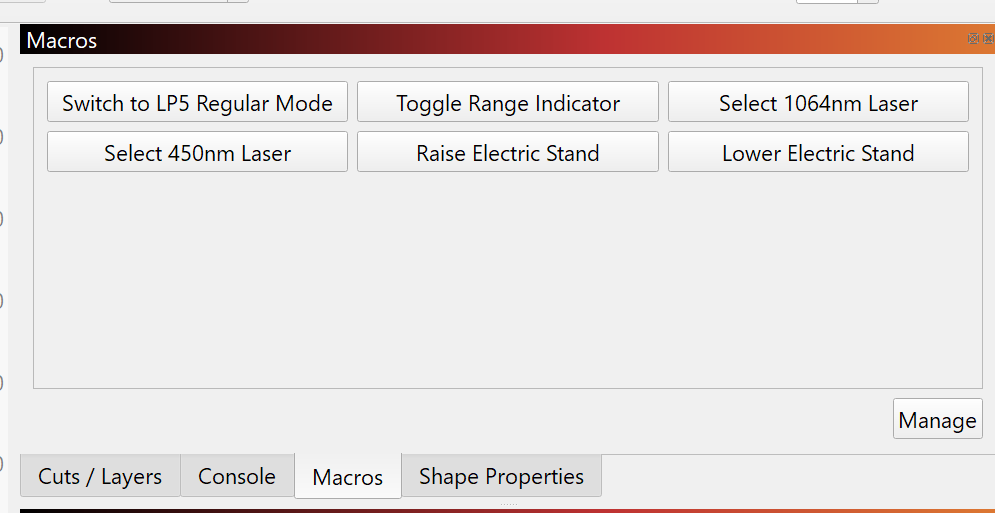
I don’t have access to an LP5 yet to confirm this, but for framing to work on this one, you need to first change to the 450nm Laser by selecting the appropriate macro and hold down the Shift key when clicking “Frame”.
There is this ongoing thread about the topic with more details:
Please let us know, how it goes!