Now, here’s the part I don’t understand: those switches are set the way they started and the motivation for changing the setting was that they didn’t work that way.
Maybe I lost track of the plot somewhere …
Now, here’s the part I don’t understand: those switches are set the way they started and the motivation for changing the setting was that they didn’t work that way.
Maybe I lost track of the plot somewhere …
Now that isn’t easy, which is shown by the length of the post.
I have tightened or checked every bolt accessible and undone and rebolted the belts. Cleaned everything with alcohol. Reduced the acceleration but i think after everything the main culprit was the PWM. Unfortunately I didn’t write down what my PWM Y and X were at the very start. Through all of the testing I’m now wondering if they weren’t both False but one of each. When I changed them to both True the drift went so advice given above was valid and correct. So potentially if the x had been True and the Y false originally it was showing my original issue. Changing them both to True removed it.
After more testing I should be able to confirm it. The experience provided by staff has been amazing and at the very least I’ve been educated and serviced my machine. Anyone reading this post should benefit if they had similar issues. As stated by Ed, when you get your machine the settings aren’t always correct. Tonight I feel far less stressed. 
If the Y axis was originally false that might have contributed a little to that original (mainly Y) drift, but all the mechanical tweaks you made were bound to have improved things too.
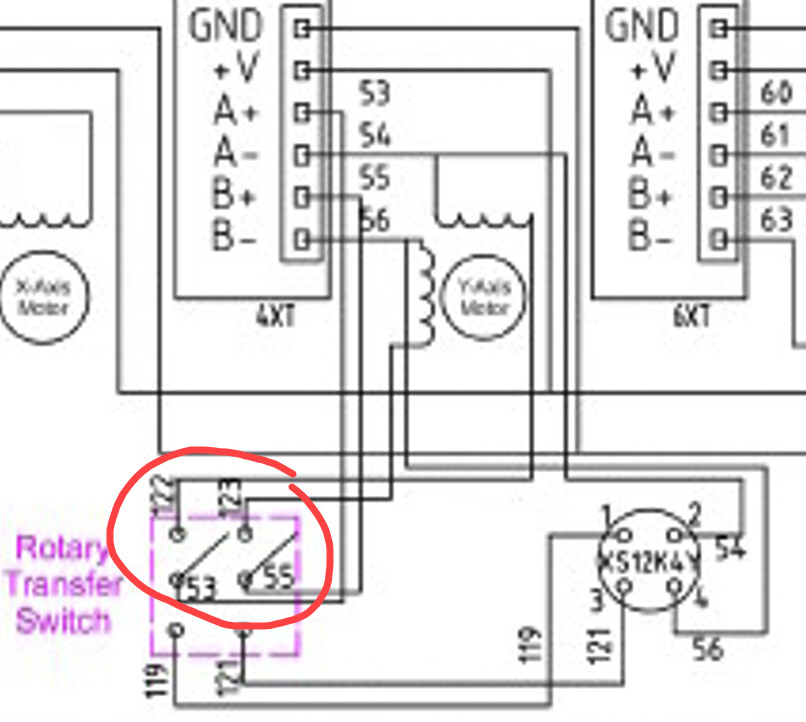
One small thing I noticed and don’t particularly like about the Y-axis wiring is that of the two phases that drive that stepper motor, one leg of each phase has to pass through the contacts of that little rotary switch:
At best, that drops a little voltage as heat into the contacts. At worst, especially if the switch is rarely physically used - the contacts could slowly become more oxidised and eventually (with machine vibration helping) momentarily open, which would show as an intermittent position error.
So if you’ve tried everything else and keep getting Y-axis issues in the future, working this switch back and forth a few times, or temporarily bypassing it, might be worth a try.
Back to the firmware settings - it’s too easy to make changes and then forget what the original settings were 
For anyone else reading this, I strongly recommend you download a copy of the firmware settings from your controller before making any changes.
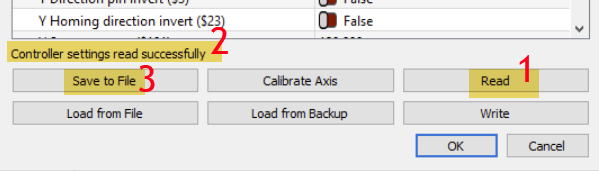
With the machine connected and in an idle/ready state, go to Laser Tools>Machine Settings
Look for the Controller settings read successfully message (if you encounter any problems check the connection and try using ‘Read’ again).
Click Save to File and name the file something like RuidaSettings_Original.lbset and keep it somewhere safe.
It’s good practice after writing changes to hit ‘Read’ to confirm they were written correctly, and then ‘Save to File’ again a dated copy e.g. RuidaSettings_21July26.lbset
Ah, but LightBurn saved an automatic backup, so after you follow @NicholasL’s advice to save a named copy of the current settings, you can restore a backup from before all this started and see exactly what settings arrived from the seller.
Which would be interesting to know, given my advice from a week ago:
TL;DR: For most machines, both the X and Y axis
PWM Rising Edge Validswitches should beFalse, so if they’re eitherTrueor different, that’s a clue.
I’ll word it more strongly in the next rodeo. 
I’ll take a look but would that not have been overwritten after every change?
I’m just so pleased to have been helped get to this stage. It’s my fault for not checking what they were and noting them. I think I saw the answer and went with that. At least I’ve learned what a symptom of this PWM is and to swap them as necessary. I’m very happy .
Yes, but you’ll find a sequence of dated automatic backup files in that directory, so you can pick the appropriate one.
Remember to restore the manual backup you made containing the correct settings. 
Ed, you were right. I’ve checked the backups from earliest to now.
22/11/23 x true y false
13/7/26 changed to true from your advice but I failed to see they were different 
16/7/26 changed both to false from Nicholas’ advice.
Today both false - still cutting as it should.
Clearly I have read your initial comment, got giddy reading the x=true and changed the y to match. I never tried both to false until Nicolas told me where I’d gone wrong.
I’ve backed up those settings.
Thanks so much guys I’m really pleased with everything now.
That way lies Nirvana.