LB "Start" Button not working with Snapmaker Marlin

Hello @All,

I started to test LB 2 with my Snapmaker 2.0 A250 3DP/CNC/Laser machine.

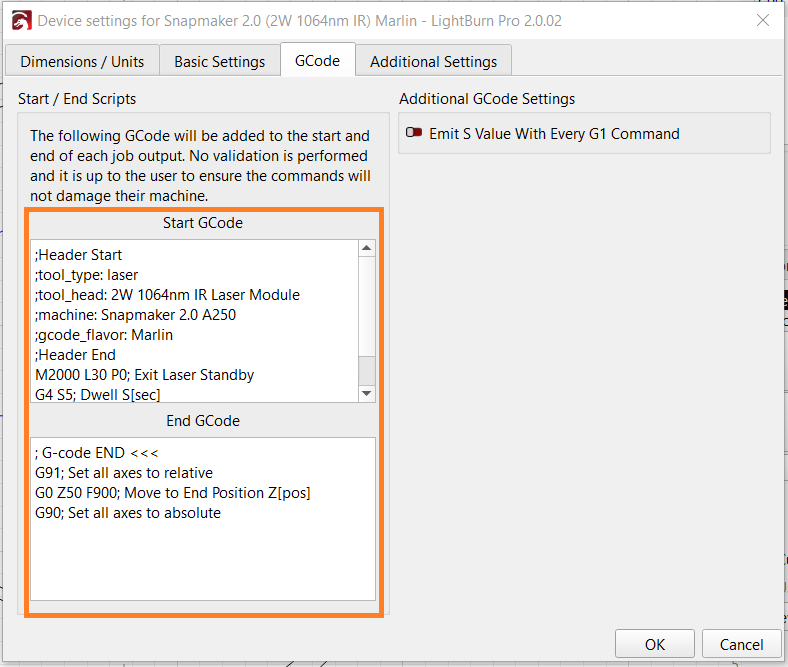
First I created a device for use with Snapmaker (Marlin) gcode controller. I also created the necessary device settings with Working Size, Machine Units, Basic Settings and Start-/End-gcode and so on.

Testing the machine with “Move”, “Console” and “Makros” works like a charm.

For a test burn I painted a rectangle and some lines, set the right parameters for the layer, positioned the laser and pressed the “Start” button… The output progress bar starts, but nothing happens.

As a further test I saved the gcode to a file and tried to run it from file… Nothing happens.

Opening the gcode file and cut&paste the gcode (start, move and fire, end) directly to the console and it works as expected.

After some additional tests I found the ;thumbnail: part as the guilty. If I remove the thumbnail data from the gcode file I can run the gcode as expected.

GCode Snip

;Header Start
;header_type: laser
;file_total_lines:58
;max_x(mm): 120
;max_y(mm): 130
;max_z(mm): 0
;min_x(mm): 100
;min_y(mm): 110
;min_z(mm): 0
;thumbnail: data:image/png;base64,iVBORw0KGgoAAAANSUhEUgAAAOsAAADmCAYAAAA0lHILAAAACXBIWXMAAA7EAAAOxAGVKw4bAAAIWUlEQVR4nO3cO3LUShiG4c/HrsKpXSwBqtgAayHwcgi9B7YBeyBmAewAF4ETpnQCI2bGc9OlL//lfbNpKejkKWmkbl0NwzDob/f393p8fNTt7a2IqF/Pz8/6+fOnPn/+/G/sahfr3d2dfv36pYeHhy4TJKKXnp6e9PXrV/358+ff2M3uCW/fvtX379/1/…

…kJggg==

;Header End
; LightBurn Pro 2.0.01
; SnapMaker device profile, user origin
; Bounds: X100 Y110 to X120 Y130

;USER START SCRIPT
;header_type: laser
;tool_head: 2W IR Laser Module
:machine: Snapmaker 2.0 A250
:gcode_flavor: Snapmaker Marlin
:max_power: 255
M2000 L30 P0
M2002 T2 P0
G4 S5

;USER START SCRIPT

G21
G90
G0 X78.75 Y-74.05 F0
G91
; Cut @ 6000 mm/min, 100% power
M106 P0 S255
M05
G0 X11.5 Y-1 F0
; Layer C00
M03 P100 S255

Now my question: Is it possible to suppress the output of the thumbnail in LB?

I would like to avoid to edit the gcode file every time I have something to engrave or cut. :face_in_clouds:

Many thanks for every hint regarding the thumbnail issue!

Happy burning,
Jörg

You can do a little bit of a workaround, by creating a second machine and setting it up exactly the same. Yet, using GRBL-M3 as the device type. Use the Snapmaker (Marlin) to setup the project, then swap to the GRBL-M3 device to actually run it. The A series runs fine with GRBL gcode (it’s what I purely use because it’s lean). :upside_down_face: Just make sure everything is exactly the same between the two profiles.

Hi there,

many thanks for your hint!

I tried to change the device profile to grbl-M3, but it produces lots of errors with my machine. As a second try I used Marlin (without the “Snapmaker”) and this has brought the solution to the issue. The Start button is working directly again. :slight_smile:

The created code is (nearly) the same, but without the header section including the thumbnail stuff.
I tested it with all of my laser modules and it seems all are working as expected. Laser power with M3/M4 and M5 as also M7/M8 and M9 for enabling the Air Assist with the 40W laser is working. The only I need to start/stop manually with the Start GCode and End GCode section is the laser fan (M2002 T2 P[n]).

Tomorrow I’ll play a bit more with the settings and see if all commands and features are working.

The Get Position button is still not working, but it seems this is a general LB/Snapmaker problem with interpreting the machines result of the (modified) M114 command.

I’ll keep this post updated about the additional findings and the pros and cons about using the Marlin code.

Many thanks and happy sizzling, :sparkler:
Jörg

1 Like

Hello Burners!

After some other work (many thanks to my lovely wife :wink: ) I found the time to do additional testings with the Snapmaker and Lightburn.
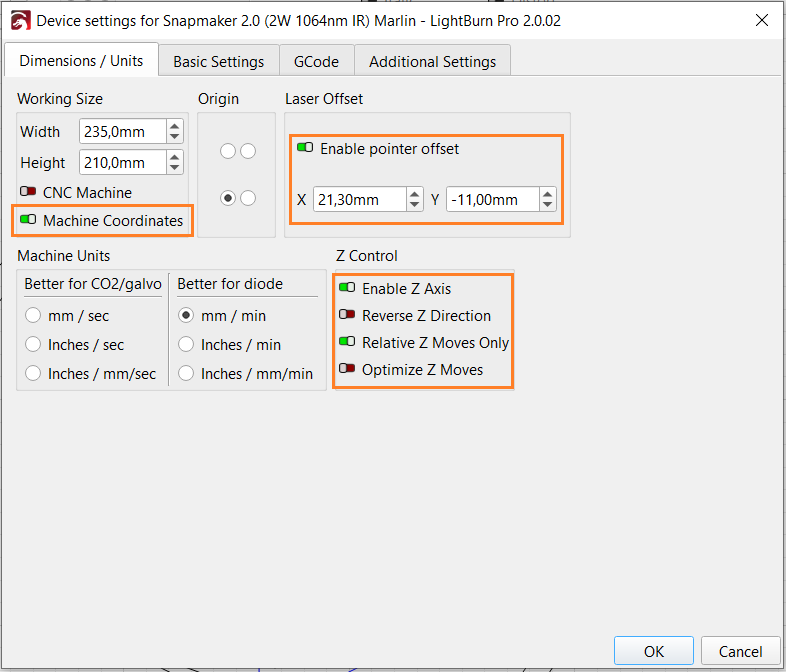
I created a new device from scratch:

Device: Marlin
Name: Snapmaker 2.0 (2W 1064nm IR) Marlin
Units: mm/min
Size: 235 x 210mm
Origin: Front / Left

Device Settings:


Important settings:

Dimensions
Important to use Machine Coordinates, Enable pointer offset and Enable Z Axis

Basics:
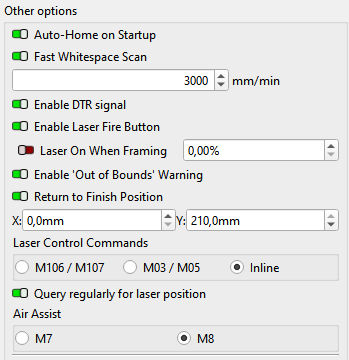
Usage of Inline laser power control and M8 for Air Assist.

GCode
Some additional (mostly comments) as Start- and End GCode.

The Basics setting window needs to be enlarged a bit to get the Laser Control Commands and the Air Assist section visible! (<- Bug?)

If someone want’s to review or test the settings, I attached the device profile here.
Snapmaker 2.0 (2W_1064nm_IR) Marlin.lbzip (2.2 KB)

Currently it seems all is working as expected (Get Position, Move commands, Macros, Start button…).

Machine: Snapmaker 2.0 A250
FW: 1.20.3
Laser: Snapmaker 2W IR
LightBurn: Pro 2.0.02

If any additional information is required, please don’t hesitate to contact me.

Many thanks and happy sizzling, :sparkler:
Jörg

1 Like

Hello from my “underground”,

I’ve done some further burnings now and found an additional issue with LB together with my Snappy:

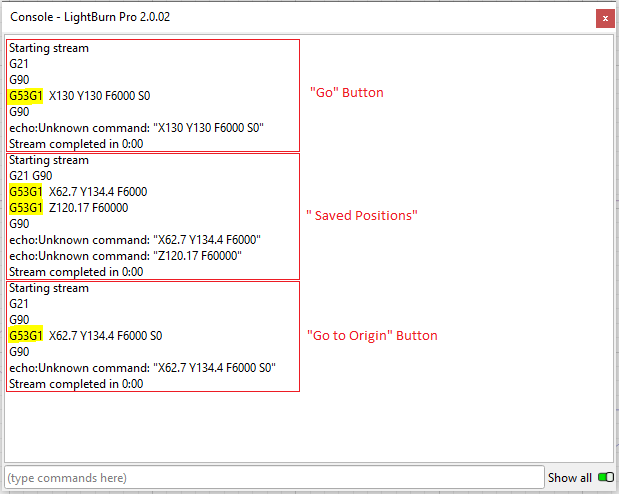
The Go and Go to Origin button as also the Saved Positions movements are not working, because of the transmitted GCode. In case of pressing the Go button the device returns

Starting stream
G21
G90
G53G1 X130 Y150 F6000 S0
G90
echo:Unknown command: "X130 Y150 F6000 S0"
Stream completed in 0:00

If I use the console command G53 G1 X130 Y150 F6000 S0 (with a space between G53 and G1) the move is done as expected.

So, it seems LB has a small bug with the commands in the move tab.

I’ll try to open a case for this issue soon.

Many thanks and happy sizzling, :sparkler:
Jörg

You sure you do not have this in the GCode window? I did not see all of the commands listed.
GRBL does not allow multiple Gxx commands on the same line. Is GCode Clustering turned off?

Hello Mike,

many thanks for your answer!

And yes, this is exactly the output I get in the console window if I use the Go button.
You mentioned if the GCode Clustering is turned off. Currently I’m using Marlin as device controller. So, I assume, due to this I don’t have this switch available in Basic Settings.

If I use the command G53 G1 X130 Y150 F6000 S0 (with the space between G53 and G1) in the console the command is executed and acknowledged by an Ok.

Many thanks and happy sizzling, :sparkler:
Jörg

Hello again,

to get some visibility to this case, here’s a screenshot of the console window if I press Go, Saved Positions and Go to Origin Buttons:

Many thanks and happy sizzling, :sparkler:
Jörg

We are at the point that I am sure it is a software issue, apparently Marlin specific. Those last images, and your statement that having a space works, show this needs to be escalated by @JohnJohn at Lightburn.

Thank you for being patient with me. I am not a Marlin guy, so it took me a few postings to figure it out. :nerd_face:

1 Like