What operation are you trying to do here?
Hello Roswell
Could you share your lbset via betasupport@lightburnsoftware.com so we can test please.
Unable to replicate with mine.
Is your camera capable of the automatic function, if it does not work on Windows
just import my laser (vendor file) or preference backups, or a bundle. None work under lb2 but work with 1,
Are you just trying to open that file by dragging and dropping it into LightBurn?
It doesn’t work that way. LBSet files are machine settings files for a specific laser, so you have to run LightBurn, choose that specific laser profile, then open the Machine Settings window. From there you load the settings backup file, and it does a comparison against the settings from the machine to make sure they are compatible.
2 Likes
that’s what I did! since lb I can’t import the configuration files
You have specified “No Machine” as your current device. You are trying to load a file that contains settings and values for the firmware of a machine controller. Since you do not have a machine, and no controller exists, we can’t apply the settings in the file you’re trying to load to anything.

I am very happy with the new v2.0 release candidate. All functions I have tried worked perfectly and the enhancements over v1.7 are awesome. Thank you for your excellent software and support!
3 Likes
I know it well, it does not want to take the machine’s manufacturer configuration files at all. The time I manually enter my machine, it does not want to take the other configuration files
Hi Brian,
We found the bug for the S1. Its fixed and will be in the next RC version.
2 Likes
Awesome - Thank you!! Great work, kudos to the developers. Brian
1 Like
You are only responding with “it doesn’t”, “it does not want to”, and so on. You need to describe what it is doing and what it does do. I can’t see through my screen to yours, so we need descriptions.
Something like:
- I run LightBurn
- It starts and connects to my laser
- I open the Machine Settings window
- I click “Load from file” and choose the file
- I get the following error
Something like that. If you only tell us what it doesn’t do, it’s extremely hard to help you. (I promise I’m not trying to be difficult)
are you doing it on purpose?
I run LightBurn
It starts and connects to my laser
I open the Machine Settings window
I click “Load from file” and choose the file
I get the following error (see the photograph I already posted) pateil I am forced to manually create the machine because lb does not want to import the manufacturer’s configuration file. to avoid a childish answer:
-I install lightburn on a windows just formatted with the good drivers ch340 etc. -I create manually a machine (because of the bug) plus the detection works when it wants (it never worked 100% well)
-I go to the machine tab on import, I choose the configuration file provided by the manufacturer and I have the same problem.
-for preferences same. don’t talk to me about USB cables or anything else, nor about Windows or drivers.
- Don’t look down on well-founded comments, users are not 4 year old kids!!
- These are the same users who make you live by paying the license and advertising on the networks!
- The truth is that we pay FROM THE BEGINNING FOR UNFINISHED VERSIONS OF THE SOFTWARE…
- AT BEST TO MAKE A NEW VERSION AGAIN WITH NEW IT WORKS, IT WOULD BE TIME TO CHANGE STRATEGY AND MAKE A STABLE AND USABLE VERSION… and to acknowledge your programming concerns, instead of turning the problem towards the users that you make out to be morons, I repeat YOUR G WE ARE THE WINNER OF BREAD! Soon there will be no more posts about problems here, so many posts at Microsoft when Windows XP appeared! cordially and without animosity, just observations.
After first start of LB 2.0.00-RC2 it asked for import my settings from LB 1.7.06. , i agreed and start my machine. LB responds that my settings (950 x 650 mm) not correct and it reads from machine 650 x 950 mm. That means it changed X and Y -Axis? Or where i must see?
First Job it did like i wanted but it was only small job.
Regards
Daniel
2 Likes
You don’t have to yell…
Here is how to properly described a potential bug: it’s called steps to reproduce.

1 Like
Hello Daniel,
Summary
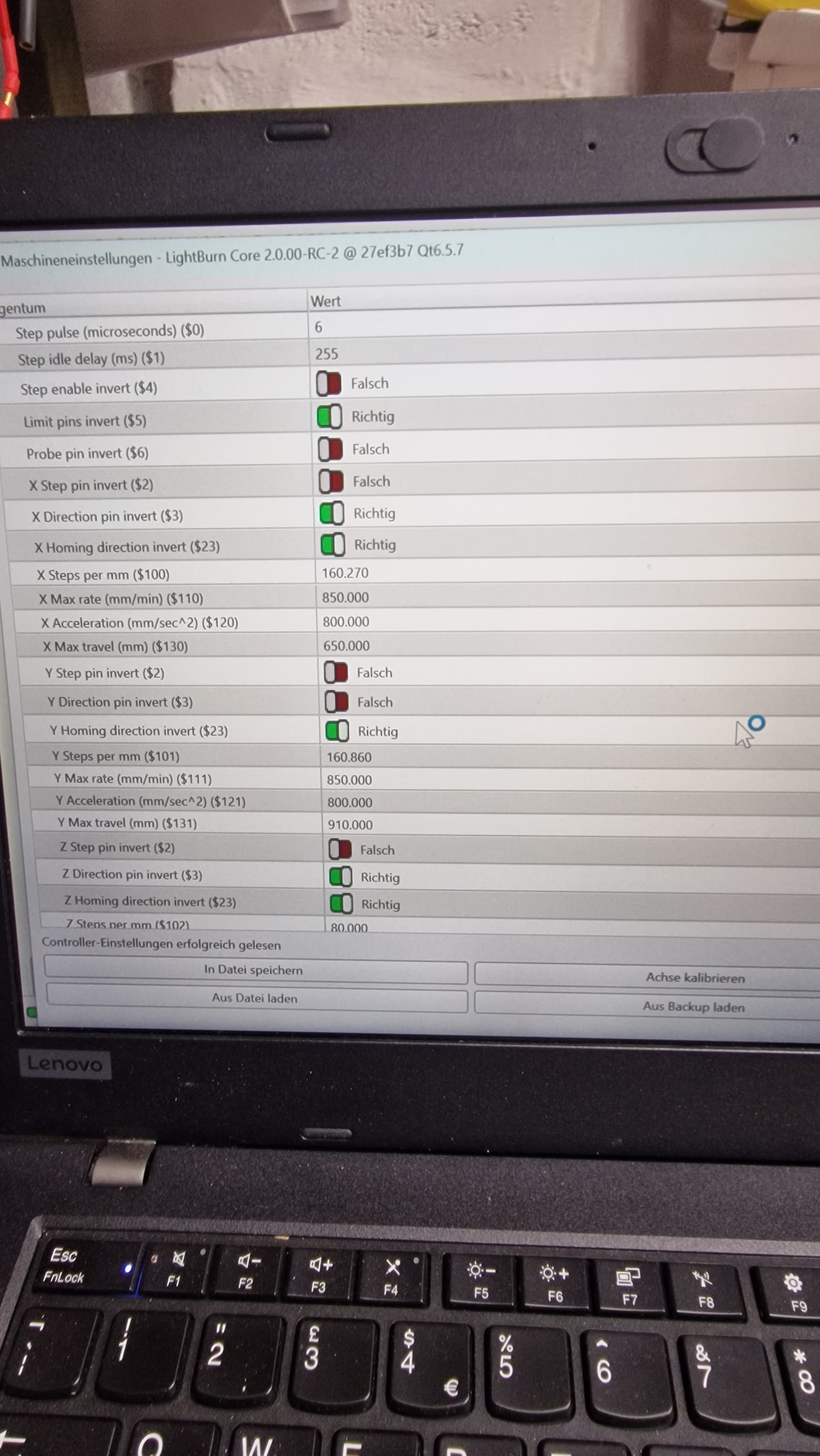
LigthBurn 2.0 now queries the controller for its $130 and $131 values
If there is a mismatch, as in your example, the message will be displayed.
In this case, your firmware is reporting your machine axis are reversed
X650 Y950, which makes sense to me
How did you configure it in Device settings?
Also did you enable the Rotation of the XY?
Could you please post a picture of the Device settings showing the origin and bedsize?
I was able to replicate. If XY rotation is enabled on Device settings - the Bed size vs Firmware validation triggers error.
Reported internally. Thank you
1 Like
Roswell, while I understand the passion in your comments and all the input is appreciated, this tone has to be dialled down significantly before it spirals into back and forth that are - in no way - productive.
Let’s all be cordial and friendly.
The goal is the same for us all - better experience and better software for everyone.
9 Likes

On 2.0 - could you go to
Laser Tools - Device settings
Take a screenshot of the initial 2 tabs please.
I love the new switch to select mode after drawing a shape!
2 Likes