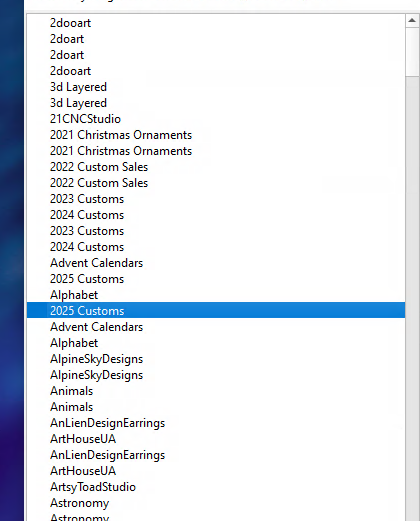
Something I just noticed is that my art lib’s are duplicated and sometimes even triplicated. Because I have multiple computers with instances of LB, I sometimes need to refresh the library list by Loading all of them again. under 1.07.08 this works well and adds the missing libraries. 2.0 seems to add them all again to the list.. Now my libraries live on a external drive, that drive is linux shared to my windows computer and mac. I fixed it by, editing the prefs.ini and removing the art libraries completely. Maybe we need to add a button to Unload ALL along with that Print option
So I can report this correctly, would you be able to provide a step by step on the method you use to “loading them all again” That leads to the libraries to become duplicated.
Want to be sure I follow your steps for replication
Use the Load button, Ctrl select first one, scroll down to bottom and Shift select the last one. Hit Load and wait. Since it’s on a network drive, it can take awhile to load all of them
Thanks for reporting. To confirm, we just released a new RC today (LightBurn v2.0.03-RC3 Release Candidate) within the last few hours. Have you updated to this latest release candidate?
Hi Rick, thanks for your reply. Yes I have installed the latest v2.0.03 Release Candidate.
I may have misworded my last comment, I recall successfully getting AprilTags to work on an earlier version v 2.0.0.1 (Possibly between patch releases) I installed the subsequent patches then noticed that the latest patched version v2.0.02 did not give any success with AprilTags, due to this I installed v2.0.03-RC-3-a60933a this afternoon which still does not allow AprilTag success.
I hope this makes better sense, if there is anything I can do to assist you please say.
Thanks Garry
UPDATE: I have installed earlier releases but still cannot find the version where the AprilTags worked for me.
Thank you for this update, helpful indeed. @JediJeremy and AprilTags are best friends (Sr Dev and our resident camera wizard), so want them to see your latest comments.