So the good news is that we’ve added new features to automatically apply different alignments for different material thickness. The bad news is they’re a little complicated to set up and it’s not well documented yet.
The key idea is that we can now store multiple alignments in a single camera settings file, but also synthesize new ‘in-between’ alignments. When you do an alignment, it’s named (and tagged) with a height value that comes from adding the current Support and Material heights together.
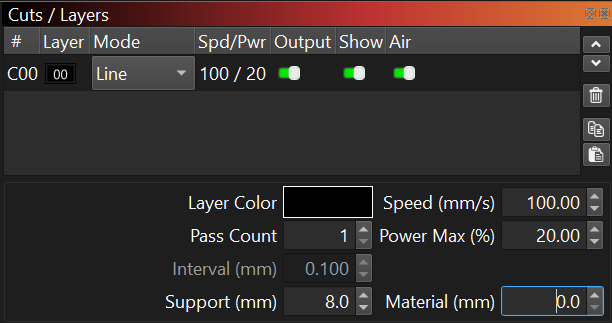
Now we remember the height the alignment was done at. Typically you have to set those numbers before you do the alignment pattern burn, but if your Z-axis isn’t motorized you might have to remember to do that step.
If your machine doesn’t have those fields then that’s a problem we should talk about. It’s supposed to turn up when needed (when you have a Z axis) but there are situations and devices which turn it off.
If you do multiple alignments at different heights, they will build up in the list and you can manually choose between them, no need to save and load files anymore - everything is managed within the camera.
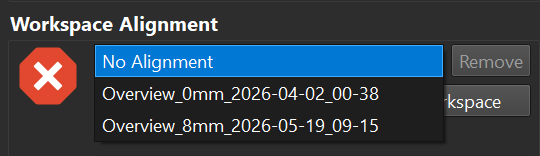
Re-alignments replace the previous alignment at the same height, but different heights will add to the list.
You can manually choose the current alignment that is in effect, but we’ve added a new option called “Interpolate Alignment Height” which you can find in the ‘Advanced Settings’ expander:
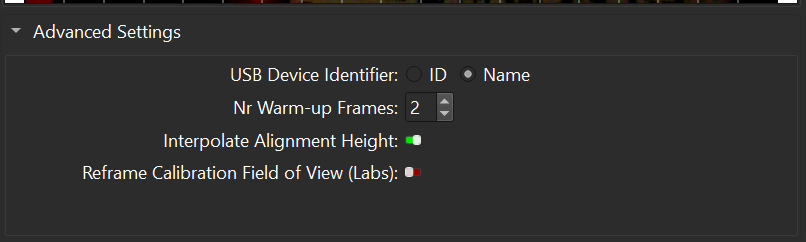
If you turn that on AND you have multiple alignments, then LightBurn will automatically select the alignment that matches the current height. But even better - if you ask for an in-between height it will proportionally blend together the two closest heights. It can even extrapolate the alignment past the original heights. (a little bit)
This synthesis isn’t perfect. The expectation is you will align at a couple of important heights (at least two) where you want the most accuracy, and let the interpolator do “good enough” when you’re in-between.
Unfortunately we don’t have a good way to ‘assemble’ a new multiple height alignment from a set of existing alignment files. The height information is entirely missing from the older camera files (in your case it’s probably stored in the filename) and there’s no way to edit/reassign heights in the app after importing. (yet)
There are secret ways to edit prefs.ini and the camera settings file to “frankenstein” all your old settings files into one, but it’s probably going to be faster and more reliable to do a new set of alignments using the new tools.
(however if you really, really want to try: load the camera settings files with a text editor and look for “ImageAlignments”: [ ... ] which is a list of { ... } object entries, and hack away by copying and pasting entries from other files while setting MaterialHeight and AlignmentName as appropriate for the appended entries. So long as you don’t make a JSON syntax error and they’re all based on the same calibration, you probably won’t crash the app.)