LightBurn v2.1.00 RC-6 Release Candidate

Yes.
You can already import and use an existing .COR files, even if they were made with an external tool with 64x64 points.

**Edit**

I fact checked my statement with a developer, and it turns out that some calibration tools only save the raw measurements in the .COR files.
Other versions convert those into the lookup table that the hardware uses. We only support the ‘hardware lookup table’ versions at this time

It’s not currently possible to use EzCad’s .COR file and still change the field size in LightBurn due to the nature of these files.

We have plans for an advanced 25-Point calibration. It’s on the roadmap, but we can’t give you a timeline for when it will be ready!

Absolutely.
Among others, you convinced us to implement a phased rollout.

From the 2.1 Release notes:

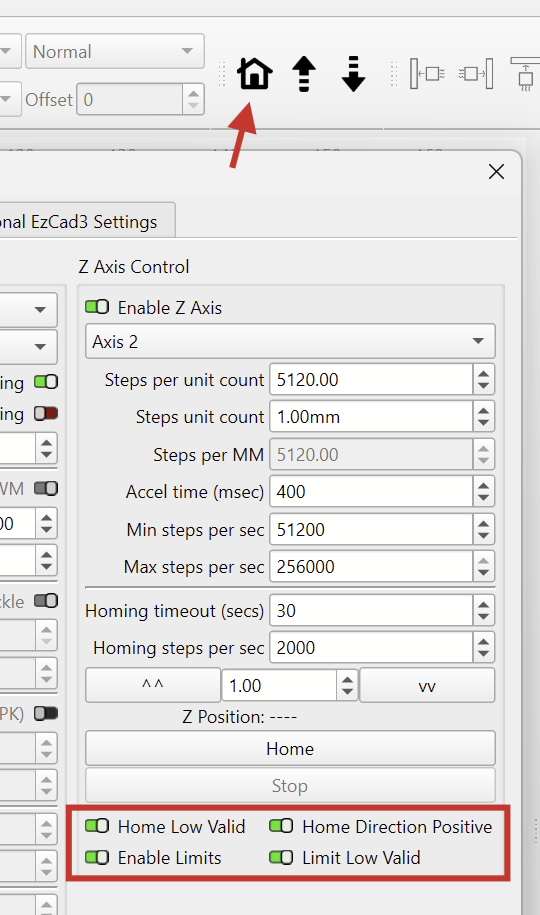
You should find the Z-Axis options in the “Ports and Laser” tab in the Device Settings:


On some controllers, the axis assignments are incorrect (only jogs down), and on the RC-6, the Home Direction Invert switch doesn’t always seem to work.
A new RC version will be released soon that fixes this.

2 Likes

I can’t confirm this.
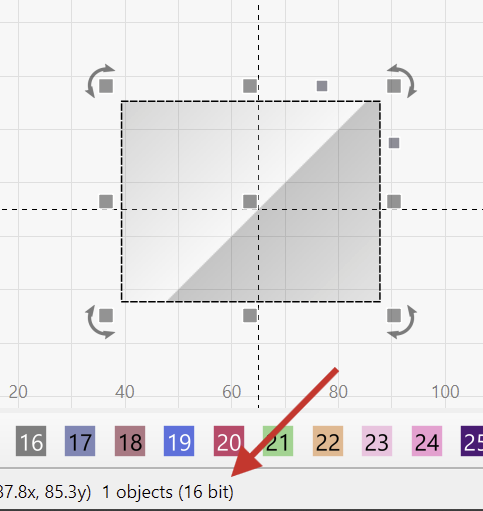
Are you sure your source image is, in fact, 16-bit?

LightBurn displays the bit depth of the selected image in the status bar here.
The bit depth stayed at 16-bits, even after cropping and masking the image.

1 Like

I fact checked my statement with a developer, and it turns out that some calibration tools only save the raw measurements in the .COR files.
Other versions convert those into the lookup table that the hardware uses. We only support the ‘hardware lookup table’ versions at this time

How do i see the difference ? We usually use the CalibrationWizard which comes with EZ3. This should be pretty much standard for the most users.

I dont have that red options in my RC6 ?

I don’t have details about which versions of the CalibrationWizard create which type of COR file.

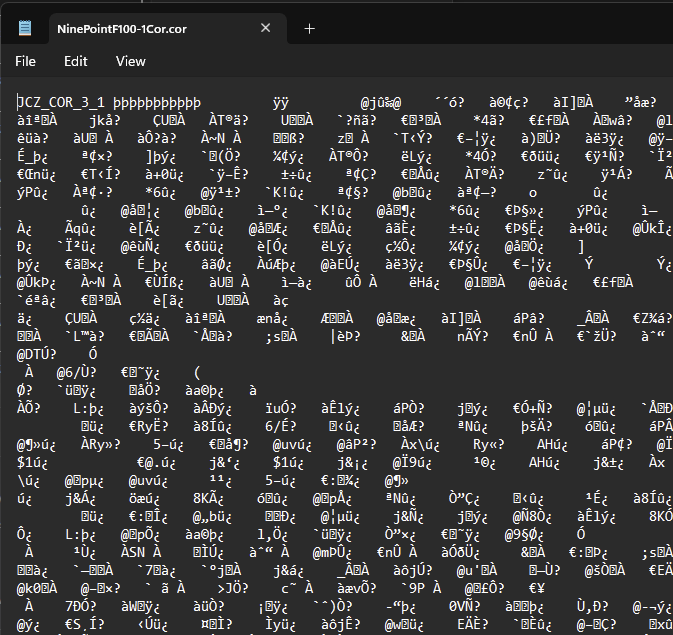
They can be opened with a text editor. LB supported ones look like this. That’s “the lookup table that the hardware uses”.

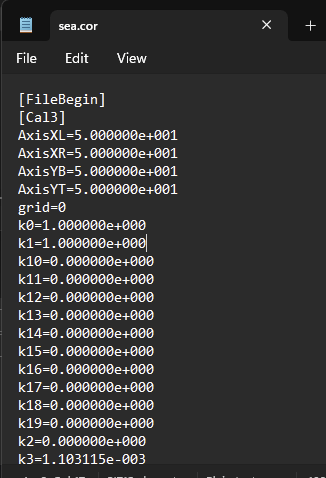
Unsupported ones look like this sea.cor file. (Shipped with a Monport galvo).
Those are the mentioned raw measurements.


It’s possible that only the SeaCAD calibration tool does this!

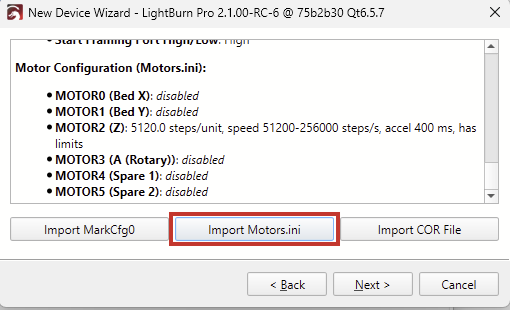
Did you load the Motors.ini configuration file when you added the laser?
I’ve found that the toggles don’t appear otherwise.

As I mentioned, I’m afraid the Z axis will still only move down. A new RC will solve that.

Nope, i assumed that this will pop up without any loaded configuration. But i will try, Thank you !
But this settings should be always visible otherwise you cant access them when you want to start “fresh”.

I agree.

Here's an example `Motors.ini` file

[PARAM]
m_nUnitType=0
m_bTableMoveX=0
m_bTableMoveY=1
m_nAasMode=2
m_nAxisMoveDelayMs=0
m_dStepDist=10.000000
m_dFocusPos=-390.000000
m_dRotateCenZ=0.000000
m_dOriginX=0.000000
m_dOriginY=0.000000
m_dOriginZ=0.000000
m_dOriginA=0.000000
m_bEnableHandwheel=0
m_bDisableCancelMotorMoving=0
m_bDisableDoorIoStopMoving=0
m_dSpecialPosX=0.000000
m_dSpecialPosY=0.000000
m_dSpecialPosZ=0.000000
m_dSpecialPosA=0.000000
m_bDisableShowProgressDlg=0
m_bMotorUseInterSoftInvert=1
m_nGoHomeOuttimeSec=100
m_bUserListCmd=0

[MOTOR0]
m_bEnable=0
m_bInvert=0
m_bOutNeg=0
m_dDistPerRound=10.000000
m_dPulsePerRound=12800.000000
m_dMinVel=0.000000
m_dMaxVel=100.000000
m_dAcceleration=100.000000
m_dDeceleration=100.000000
m_bEnFeedback=0
m_dPosErrFollow=1.000000
m_bEnableSoftLimit=0
m_dMinSoftLimit=-100.000000
m_dMaxSoftLimit=100.000000
m_bEnableHome=1
m_bHomeLowValid=0
m_bHomeDirPos=1
m_bHomeFindIndex=0
m_dHomePos=0.000000
m_dHomingFindVel=100.000000
m_dHomingLeaveVel=100.000000
m_bEnableLimit=0
m_bLimitLowValid=0
m_dBacklash=0.000000
m_bMarkFinishGotoStartPoint=0
m_bHomeFinishGotoPos=0
m_dHomeFinishGotoPos=0.000000
m_bEnableAccurateHome=0

[MOTOR1]
m_bEnable=0
m_bInvert=1
m_bOutNeg=0
m_dDistPerRound=10.000000
m_dPulsePerRound=12800.000000
m_dMinVel=0.000000
m_dMaxVel=100.000000
m_dAcceleration=100.000000
m_dDeceleration=100.000000
m_bEnFeedback=0
m_dPosErrFollow=1.000000
m_bEnableSoftLimit=0
m_dMinSoftLimit=-100.000000
m_dMaxSoftLimit=100.000000
m_bEnableHome=0
m_bHomeLowValid=0
m_bHomeDirPos=0
m_bHomeFindIndex=0
m_dHomePos=0.000000
m_dHomingFindVel=100.000000
m_dHomingLeaveVel=1.000000
m_bEnableLimit=0
m_bLimitLowValid=0
m_dBacklash=0.000000
m_bMarkFinishGotoStartPoint=0
m_bHomeFinishGotoPos=0
m_dHomeFinishGotoPos=0.000000
m_bEnableAccurateHome=0

[MOTOR2]
m_bEnable=1
m_bInvert=0
m_bOutNeg=1
m_dDistPerRound=2.500000
m_dPulsePerRound=12800.000000
m_dMinVel=10.000000
m_dMaxVel=50.000000
m_dAcceleration=100.000000
m_dDeceleration=100.000000
m_bEnFeedback=0
m_dPosErrFollow=1.000000
m_bEnableSoftLimit=0
m_dMinSoftLimit=-100.000000
m_dMaxSoftLimit=100.000000
m_bEnableHome=1
m_bHomeLowValid=1
m_bHomeDirPos=1
m_bHomeFindIndex=0
m_dHomePos=0.000000
m_dHomingFindVel=50.000000
m_dHomingLeaveVel=30.000000
m_bEnableLimit=1
m_bLimitLowValid=1
m_dBacklash=0.000000
m_bMarkFinishGotoStartPoint=0
m_bHomeFinishGotoPos=0
m_dHomeFinishGotoPos=0.000000
m_bEnableAccurateHome=0

[MOTOR3]
m_bEnable=0
m_bInvert=1
m_bOutNeg=1
m_dDistPerRound=360.000000
m_dPulsePerRound=12800.000000
m_dMinVel=10.000000
m_dMaxVel=100.000000
m_dAcceleration=100.000000
m_dDeceleration=100.000000
m_bEnFeedback=0
m_dPosErrFollow=1.000000
m_bEnableSoftLimit=0
m_dMinSoftLimit=-360.000000
m_dMaxSoftLimit=360.000000
m_bEnableHome=0
m_bHomeLowValid=0
m_bHomeDirPos=0
m_bHomeFindIndex=0
m_dHomePos=0.000000
m_dHomingFindVel=100.000000
m_dHomingLeaveVel=1.000000
m_bEnableLimit=0
m_bLimitLowValid=0
m_dBacklash=0.000000
m_bMarkFinishGotoStartPoint=1
m_bHomeFinishGotoPos=0
m_dHomeFinishGotoPos=0.000000
m_bEnableAccurateHome=0

[MOTOR4]
m_bEnable=0
m_bInvert=0
m_bOutNeg=0
m_dDistPerRound=10.000000
m_dPulsePerRound=12800.000000
m_dMinVel=0.000000
m_dMaxVel=100.000000
m_dAcceleration=100.000000
m_dDeceleration=100.000000
m_bEnFeedback=0
m_dPosErrFollow=1.000000
m_bEnableSoftLimit=0
m_dMinSoftLimit=-100.000000
m_dMaxSoftLimit=100.000000
m_bEnableHome=0
m_bHomeLowValid=0
m_bHomeDirPos=0
m_bHomeFindIndex=0
m_dHomePos=0.000000
m_dHomingFindVel=100.000000
m_dHomingLeaveVel=1.000000
m_bEnableLimit=0
m_bLimitLowValid=0
m_dBacklash=0.000000
m_bMarkFinishGotoStartPoint=0
m_bHomeFinishGotoPos=0
m_dHomeFinishGotoPos=0.000000
m_bEnableAccurateHome=0

[MOTOR5]
m_bEnable=0
m_bInvert=0
m_bOutNeg=0
m_dDistPerRound=10.000000
m_dPulsePerRound=12800.000000
m_dMinVel=0.000000
m_dMaxVel=100.000000
m_dAcceleration=100.000000
m_dDeceleration=100.000000
m_bEnFeedback=0
m_dPosErrFollow=1.000000
m_bEnableSoftLimit=0
m_dMinSoftLimit=-100.000000
m_dMaxSoftLimit=100.000000
m_bEnableHome=0
m_bHomeLowValid=0
m_bHomeDirPos=0
m_bHomeFindIndex=0
m_dHomePos=0.000000
m_dHomingFindVel=100.000000
m_dHomingLeaveVel=1.000000
m_bEnableLimit=0
m_bLimitLowValid=0
m_dBacklash=0.000000
m_bMarkFinishGotoStartPoint=0
m_bHomeFinishGotoPos=0
m_dHomeFinishGotoPos=0.000000
m_bEnableAccurateHome=0

All these values ​​must be correctly assigned to the options. A lot happens there, and we would need to set sane defaults if the config file is omitted

I’ll ask whether the toggles can be made visible either way.


Update:
Yes, that shouldn’t have happened. We’re adding it to the list. Good find, @rox!

Win10 32G.
Today RC-6 ate up all my PC memory after I clicked on the Device Settings icon.
Lightburn_not responding.mp4.txt (1.6 MB)

A little more info if needed:
I have permanently blocked internet access to most (99%) of Microsoft’s services. Some services and applications are blocked on a per-session basis and as needed.

Would it be possible to add an import/export filter for EPS files?

I’ve been using EPS files since the mid 90s and I have a few 1000 of them. The greater majority of them I created during my career as a graphic designer.

Yes I know I can covert EPS files with any one of the softwares that I have installed. But it would be a lot easier to have this option included in LB.

Also, many downloadable laser files that are available to purchase or for free usually includes EPs files, so there must be a need.

That’s hungry!
Could you send us the offending device profile in the .LBZIP format for investigation?

How to export

1 Like

I can see three feature requests on Fider, with roughly 100 votes combined.
We use Fider to determine what we should develop next. As always, it’s a matter of balancing effort against return.

EPS files can be deceptively complex. Encapsulated PostScript isn’t just “another vector format” like SVG. It’s basically a program in PostScript.
They can include logic, loops, conditionals, Fonts, and all of that with different “dialects” (CorelDraw, Illustrator) - It’s not easy.

I’d recommend looking for a batch-conversion tool to convert all your older EPS files to the well-supported SVG.

1 Like

Since there is a good number of people looking to be able to import EPS files, have you considered this along with GhostScript?

MIT License

Copyright (c) 2025 Churnie HXCN

Permission is hereby granted, free of charge, to any person obtaining a copy
of this software and associated documentation files (the “Software”), to deal
in the Software without restriction, including without limitation the rights
to use, copy, modify, merge, publish, distribute, sublicense, and/or sell
copies of the Software, and to permit persons to whom the Software is
furnished to do so, subject to the following conditions:

The above copyright notice and this permission notice shall be included in all
copies or substantial portions of the Software.

THE SOFTWARE IS PROVIDED “AS IS”, WITHOUT WARRANTY OF ANY KIND, EXPRESS OR
IMPLIED, INCLUDING BUT NOT LIMITED TO THE WARRANTIES OF MERCHANTABILITY,
FITNESS FOR A PARTICULAR PURPOSE AND NONINFRINGEMENT. IN NO EVENT SHALL THE
AUTHORS OR COPYRIGHT HOLDERS BE LIABLE FOR ANY CLAIM, DAMAGES OR OTHER
LIABILITY, WHETHER IN AN ACTION OF CONTRACT, TORT OR OTHERWISE, ARISING FROM,
OUT OF OR IN CONNECTION WITH THE SOFTWARE OR THE USE OR OTHER DEALINGS IN THE
SOFTWARE.

I’ve heard of GhostScript. InkScape uses this too.

Did you ever try the library?
I wonder how well this works. If we were to integrate it, we’d be partly responsible if something isn’t being parsed correctly. It would be interesting to hear @LightBurn’s stance.

I used Ghostscipt a lot in the early 90’s. The CAD program I was using had it integrated into it for importing EPS files and PDF files.

The device in use with laser disconnected:
Device_in_use.lbzip (51.4 KB)
.
.

Today when doing a Preview from the file in this post, I got this:

..
..

This time I grabbed some relevant files:
Report.wer.txt (8.1 KB)
WER7CBA.tmp.WERInternalMetadata.xml.txt (3.6 KB)

When this happened I noticed Lightburn uses mostly 2 Cores (from 8+8).

Thanks @bernd.dk. @girish took a look, and we both have not been able to reproduce this here. Please provide any details you notice when presented with this warning that might help us track the cause. We are aware this is happening for you, but IIRC, this is the only report for this behavior we have received.