To be fair, I used it as a free trial. I ended up buying it for my Galvo_Fiber Lase and it was the best choice I made. I love the features it has.. Just buy it, its not that dear.
2 Likes
Yes. It works with v2.0.05. I like the new camera feature but I cannot use the autofocus with the wecreat 45w.
Do you have a macro configured?
Check (grrr1) this thread:
If you input M130XY (grrr2) M130 the focus happens where the laser head is.
The Autofocus sequence is being performed by the firmware on the WeCreat.
LightBurn only sends the machine the M130 command.
If the laser head hits the laser bed rather than the material, the WeCreat will re-home. On smaller objects, working close to the edge of the material, this can happen. (You should see an error message in the Console Window)
The “Focus” macro from the WeCreat device profile sends this command M130X200Y150, which will always perform the sequence roughly in the middle of the workarea.
Since that’s not always where your material is, I prefer M130 and jog the laser over the material before initiating it. Framing the design will do that for you, and you can also use “Move Laser To Selection”.
As Rick mentioned, for an upcoming RC, we added a dedicated WeCreat GCode flavor that solves some firmware issues and greatly improves compatibility.
2 Likes
Thanks
type or paste code here
```Thanks for the infoWill v carve be core or pro?
You do what you got to do. I understand, and as users I/we decide whether it is worth it to us.
Vetric is not even an option for me. Lightburn when I got it was nice price point and very nice software.
I’m not doing much carving and use Carbide create and openbuild. A pain to go back and forth between software, but for occasional carving the price is right.
It is reported that V-carve will be in the Pro version, at a later time.
1 Like
3 posts were split to a new topic: Framing doesn’t work on BSL DBK22B
In 2.1 still constant power mode cannot be used with Custom GCode controller. Generated GCode is always with M4 instead of M3, toggle Constant Power Mode at layer settings is ignored. Is this intentional, can it be solved?
Here is example with simple line with sublayers, one with dynamic power and one with constant power. Using GRBL controller produced GCode is OK, but with Custom GCode M3 is not used.
CustomGCode.gc (357 Bytes)
GRBL.gc (401 Bytes)
TEST.lbrn2 (3.1 KB)
To use M3, change the GCode Flavor to GRBL M3 and enable “Variable Laser Power” in the Device Settings:
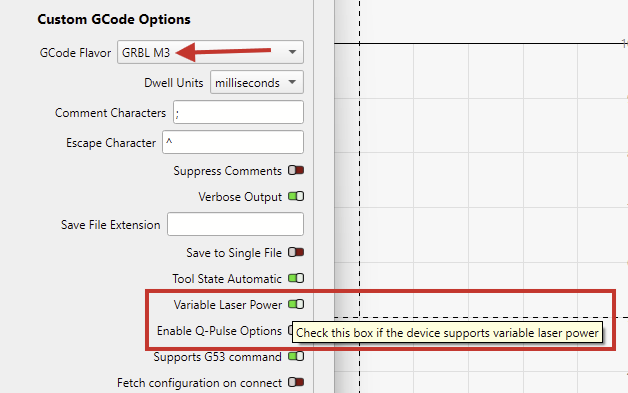
Which of the three lasers are you setting up here, and is GRBL M3 what the manufacturer suggests to use?
This docs page might be relevant:
Grbl M3 always uses M3 so dynamic power (M4) cannot be used even if Variable Laser Power is enabled, with same file, using Custom GCode with GRBL M3 and variable laser power enabled this is output:
;LightBurn Core 2.1.00-RC-6 @ 75b2b30 Qt6.5.7
;Custom GCode device profile, absolute coords
;Bounds: X20 Y20 to X70 Y20
G00 G17 G40
G21;Restore metric mode
G54

G90;Restore absolute mode
M3
;Cut @ 4999.998 mm/min, 50% power

M9
G0 X20Y20
;Layer Line
G1 X70S500F5000
;Cut @ 6000 mm/min, 60% power

M9
G0
M3
;Layer Line
G1 X20S600F6000
M9
M5
G90;Restore absolute mode
M2
I’im using Algolaser Delta, which has grblHAL based firmware and trying to use custom commands for Air Off and Air On which cannot be used on standard GRBL controller, and Custom GCode is missing constant power for it and also GCode clustering. Also GCode clustering cannot be used with Custom GCode.. Some info about that is in my old post https://forum.lightburnsoftware.com/t/looking-for-recommendations-for-a-new-laser-frame/132980/10?u=ztomic
Joke’s on me, that’s correct.
The “GRBL” device profile and the “GRBL” flavor default to using M4. The “Constant Power Mode” in the Cut settings can be used to override this and use M3 instead.
Do you mind explaining why you would want to use M3 in the first place?
Then, the grblHAL GCode Flavor will provide a better starting point.
It also defaults to M4 for the “Tool On” command.
We are aware of this, and it’s on the list. I’ll try to move it along.
For some precise cuts and engravings I must lower accelerations to 300 to compensate mechanic issues (when using whole area at X axis engravings are shrinked on left and right side so distance between cut and engraving is not constant like in the middle of working area and it is too visible on small items. I have tried already all what I can, overtightening X axis belt, playing with roller tensions and nothing helps except low acceleration), and due to low accelerations on corners or starting points for some speed/power combinations there is no laser output on material so for that cases I use constant power at layer.
I used that for custom gcode, generated GCode using that is attached to my post above
Any update on @LightBurn’s stance?
Also, I have an old CD with Corel Draw 11. I installed it on Win11 (surprised that it worked) and there was an option to install Ghostscript.
RC6 crashes due to a simple “misoperation”.
100 lines 10mm long, but set to fill and not to line…
An “error” is pointed out but by continuing anyway, LB crashes. This can be repeated.
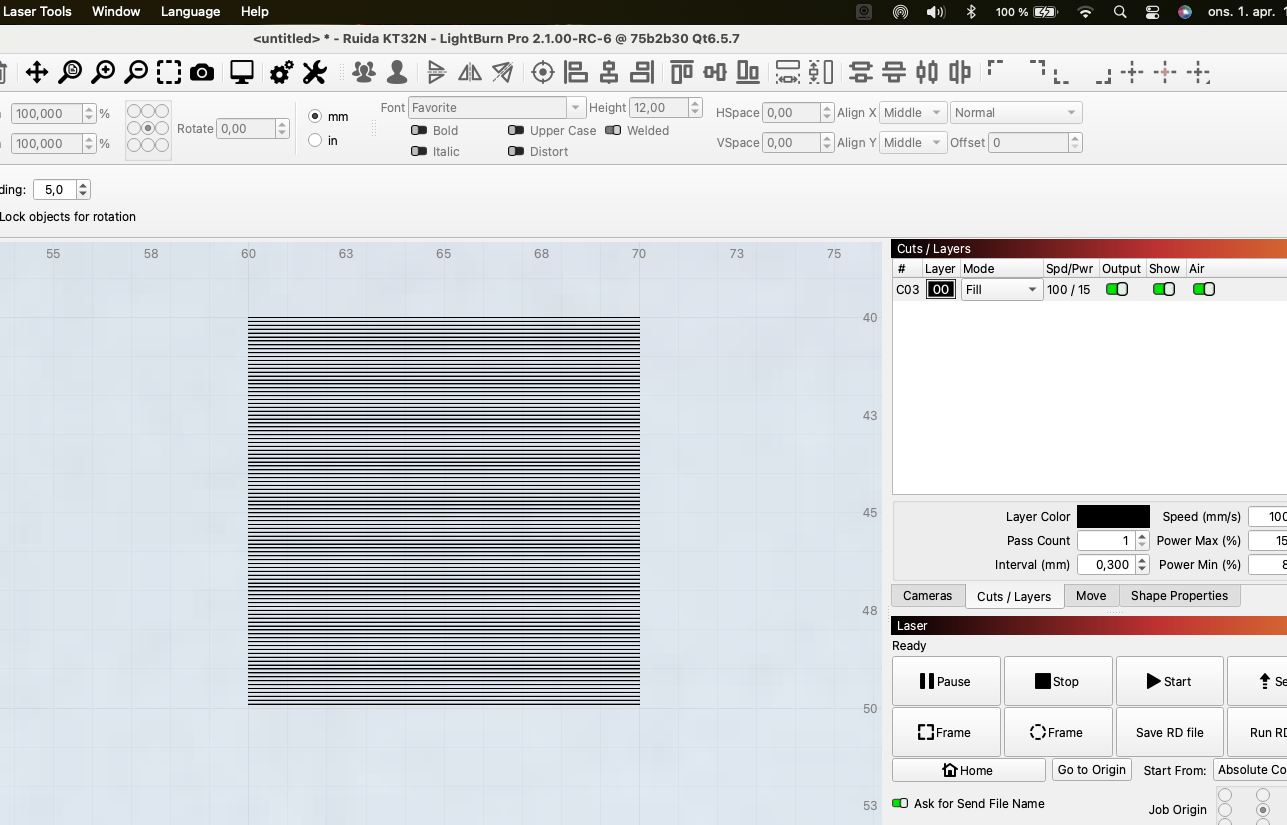
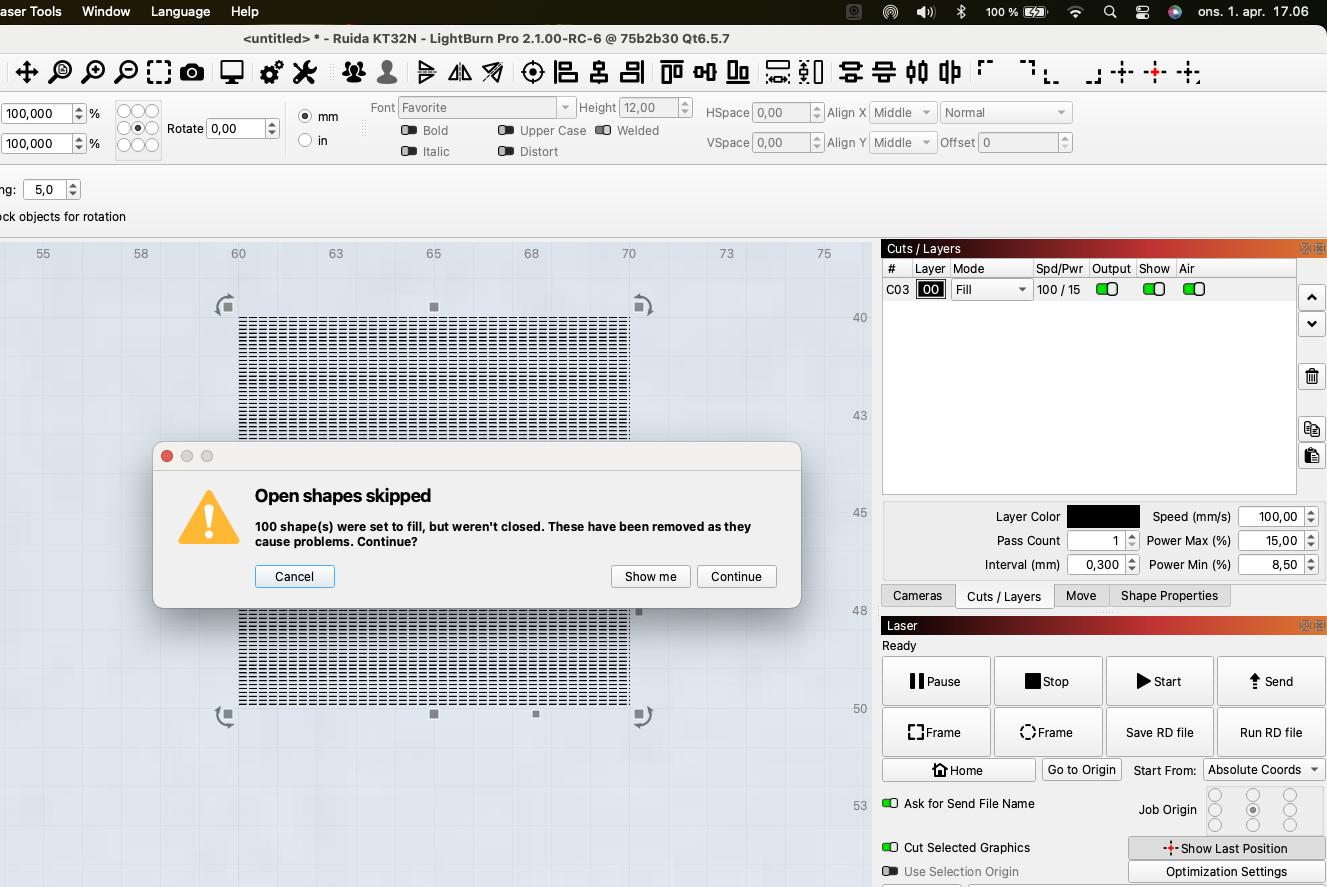
LB-Crash-01-04-26.txt (201.5 KB)
txt must be changed to pdf if the Mac crash report is of interest.
GhostScript is AGPL, meaning to use it for free we’d have to open source LightBurn, which we won’t. To use it commercially, we’d have to license it, and every link regarding pricing is “contact sales”, which suggests it won’t be cheap.
Given the availability of free online converters, it’s not a high priority.
1 Like
Fixed for the next update, thank you.
2 Likes
Your response make a lot of business sense, thanks for your reply.
Ho riscontrato un problema sulla Release Candidate riguardo la funzione di Testo Variabile, non permette di inserire i numeri di inizio o altro. Risultano non digitabili.
I encountered an issue in the Release Candidate regarding the Variable Text feature: it does not allow for the input of starting numbers or other values. The fields appear to be uneditable.
I guess what confuses me is that auto focus works in ver 2.0.05 but not in the 2.1.00 RC-6 release