I’ve been emailing back and forth with Com Marker about probably needing a new motherboard. I had the 6w Omni X but swapped it out for the 12w for the larger cutting area. The switch has been rough - 2 steps forward and 1 7/8 steps back lol. I know the rotary setting changed from whatever it was in the Com Marker manual to 1600 now. Still having the same issues I had before I swapped lasers as far as jumping around. Slowly experimenting in the dark…
Same issue here 3200 for me but a lot of slippage
What do I need to tell them to send me the new board. the translation can be hard
Hey Guys,
Same issue here with my Commarker XE thats only been out of the box 6 days… Commarker Studio worked OK for 3 burns with the R5 Chuck Rotary, then started forming skips and lines. In Lightburn, the rotation tested correctly with the steps set at 3200, but failed on burning a mug…gravity won because of the handle. Just sent email to Commarker Support.
Definite resolve of rotary problem with lightburn (for now) is to change the motherboard. I did it, one guy from here also did it. Now everything works perfect. For over a month I had 0 problems. Guys from Lightburn working of software solution but as for now, changing the MB fixing it instantly. It is not huge deal to change it, some leap of faith and it can be done.
Yeah I’m not at my machine right now so I might be misremembering the settings for Com Marker Studio vs Lightburn as far as 3200 vs 1600. But yes, same experience with vertical line issues no matter what settings in Com Marker Studio, and all over the place in Lightburn. And my trial has expired while trying to deal with this so I can’t experiment as much as I’d like - as much as I know I’d like to ultimately use Lightburn, I can’t justify purchasing software that doesn’t work with my laser (yet). And that is by no means a knock on Lightburn - just the state we seem to be in with new, currently semi-incompatible hardware. Im also at the bar right now so idk
Got a response from Commarker. They sent a link to a new revision of their Studio.
ComMarker_Studio_omnix_win_v1.0.21_20251119. No firmware in the package for the Omni XE.
Currently running v1.0.17. software on my PC.
Will test it out later today or tomorrow.
Not the path I want to go down with a 1-week-old device.
You can extend the free trial from within LightBurn, at the startup window.
If that doesn’t work, email us your Trial ID at support@lightburnsoftware.com - We’re happy to give you more time to test.
As @jrhaim mentioned, the motherboard swap is a proven fix.
We also noticed, that the rotary has ample holding torque, if you use ComMarker’s program first, and then switch to LightBurn without restarting the laser!
We are in the process of determining what to send to the laser to adjust the motor current via software.
Get them to send the new board and run with lightburn where able to. LB is superior in every way and the community is not only huge but most helpful. The lack of autofocus is a non issue as it’s so easy to manually adjust for precision and flexibility.
Your laser is limited by Studio as it runs on 87 octane and LB feels like jet fuel.
One example of this is the X is actually capable of 15,000mm/s but Studio is capped at 10. Commarker stated this when I found two different spec speeds on their website. What else is limited by them, I want performance without the training wheels.
Bottom line you want LB, kind regards.
New motherboard received and installed. Went back and forth with support as their idea of install instructions was a couple pictures with instructions to be careful… after several back and forth did get a better picture with details for what each wire bundle was connected to . Hope this helps others.
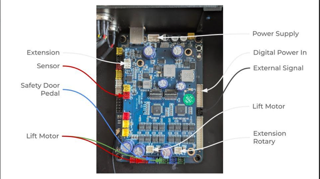
By the way, motherboard fixed rotary issue. Now just working the parameters for the Omni X to get a silver finish engrave on a makerflo tumbler… have gotten beautiful variants of Bronze…