Rabbit QX-1290 with a 90W (?) laser
Cutting/Engraving 1/16” Impact Acrylic Engraving Plastic (rowmark lasermax)
Saving .rd file to shared drive, file accessed from technician computer and transferred to USB, USB inserted into machine to run
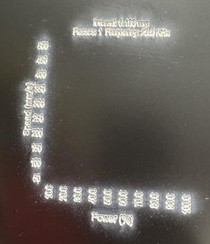
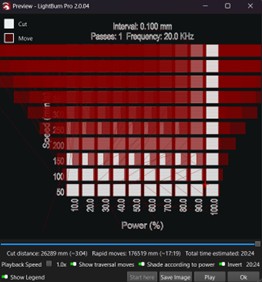
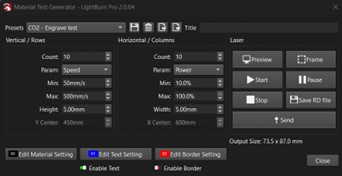
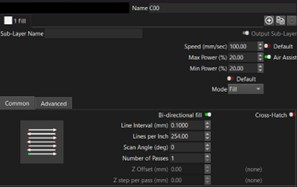
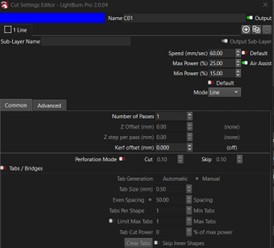
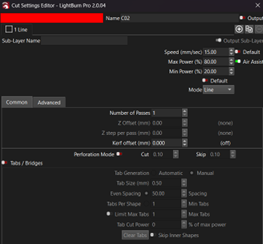
This is how the first run of the material test went. I used the CO2 engrave test pre-sets as-is. The text came out (yes, the next test run will have a much higher speed than 60mm/s), but none of the squares were etched. The technician running the machine reported that the gantry and head were moving as if it were lasering, but there was no output.
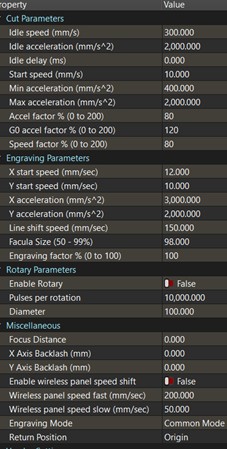
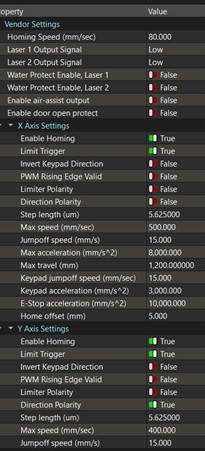
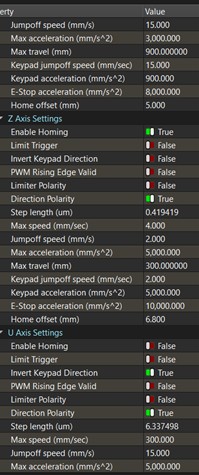
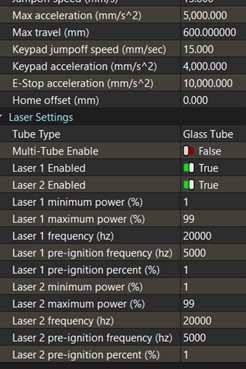
I found this thread from last year; the user was experiencing an almost identical issue. However, their issue was that their material setting was not set to fill, which mine was set to by default. I have tried to provide screenshots of all the information people requested to help troubleshoot the issue (only 4 images posted due to me being a new user, the rest I will attempt to put in the comments). The one piece of information I wasn’t able to find was what the S Value is for my machine, since I’m not entirely sure what that is.
The problem is likely between the chair and the keyboard, I’m afraid. I am a CAD Designer who typically uses BricsCAD/AutoCAD. Through work, I currently make .rd files for our machine using RDWorks. I am trying to get my company to switch to Lightburn since it is a much more functional program. I am new to this, self-taught, and mostly figuring things out through trial and error. I would appreciate any advice on how to get this to work, though I may have some silly questions.
I will be back to work and back to working on this on Monday, which is when I will be available to answer questions. Hopefully some experienced input will be able to save me from RDWorks.
Thank you all!