Millmage 3D Roughing

I did not see this posted. I have Millmage Pro 0.9.01

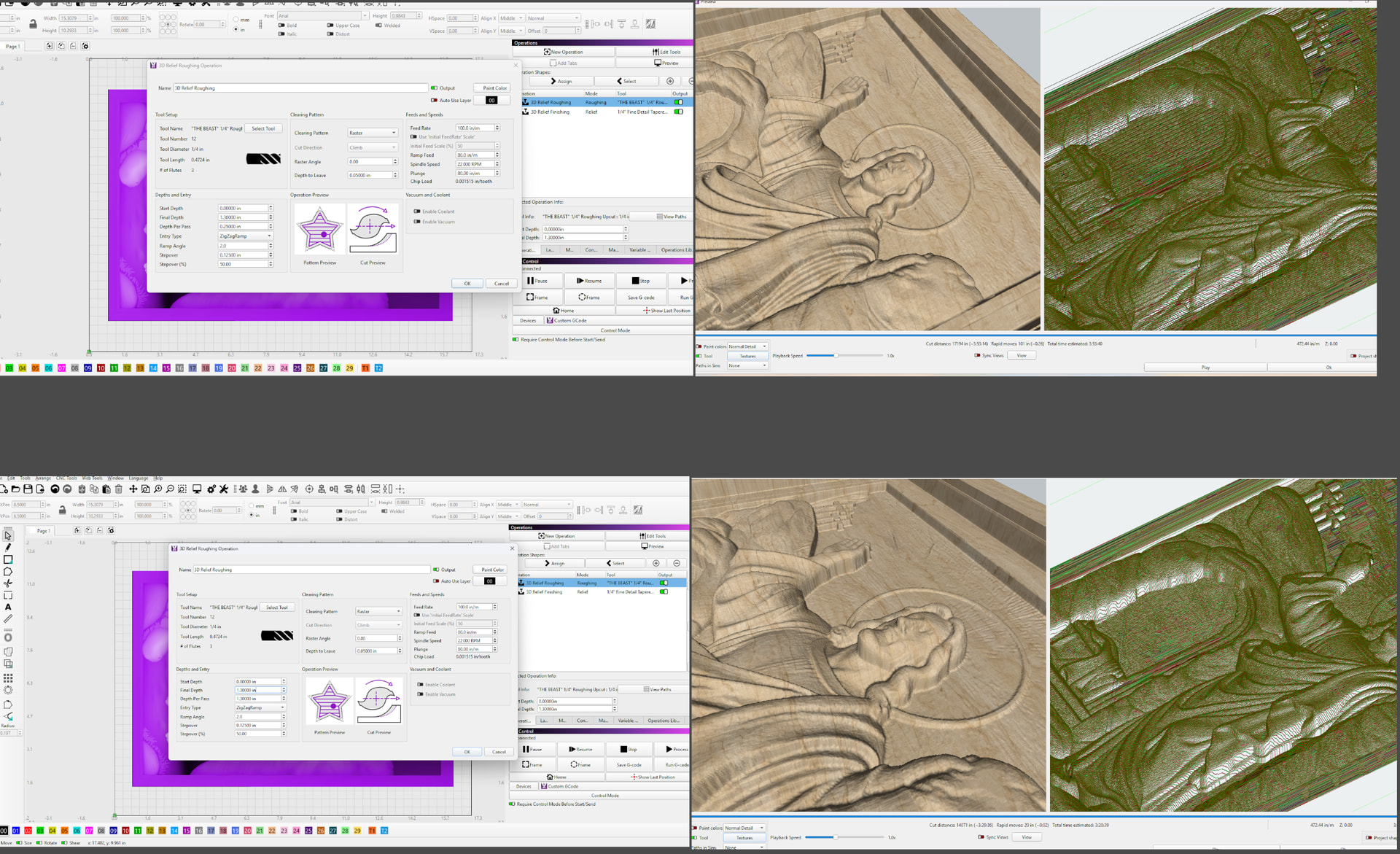
The roughing pass takes off a bit of the top of the model unless I do the roughing pass at full depth.

If I run the roughing pass at full depth, the model is perfect.

If I run the roughing at .25 or .125in per pass, Jesus comes out with a flat nose. It is worse at .125 inch

Hi Jack, yeah that looks like a bug.

I just ran some tests and it looks like the model is being clipped by the tool diameter - pass depth, but needs further investigation.

To avoid this for now, try setting the ‘Depth Per Pass’ of the roughing pass to be at least the same as the tool diameter.

i have had that also , with my png maps, , i have found by adding exposure and lightening image it carves perfectly , its like the image it to flat due to some of the grey scale, and MM cant see the detail

This was a bug introduced recently by an over-eager dev, trying to do “noise reduction” in the height maps to reduce processing overhead in the roughing pass. It ended up removing peaks and shouldn’t have been added in the first place. It’s fixed for the next update.
You guys have put the pedal to the metal. Congrats.