I bought millmage core and running on a low rider v4 with the jackpot 3controller. I am not using millmage to control the cnc at least not yet. Ive create my gcode and hit the save gcode button and save it to my sd card. Insert card into the low rideer and turn it on, the file shows up on my tablet but i get no run button like i do with estlcam. It shows the file only. If i click on the file then all it wants to do is download the file to my tablet.
It looks like you need Jackpot help instead of MillMage help. If there is ANY valid GCode in that file, you should be able to run it.
Why are you not using MillMage to control the machine? I did a Google and found this…
Yes, MillMage officially supports FluidNC
for full machine control and G-code generation. [1, 2]
Connection and Setup Details
- Device Selection: You can set up FluidNC controllers directly, or select the standard GRBL dialect/profile type within MillMage since FluidNC uses the GRBL command structure. [1, 2]
- Network Connections: When connecting over a network, users on the LightBurn Software Forum note that FluidNC supports TCP/Telnet connections (typically using port 23) for direct software control. [1]
- Compatibility Range: It is listed natively across official MillMage Documentation alongside GRBL, grblHAL, and Smoothieware. [1, 2]
I will use that eventually but just got this cnc built and wanted to play quickly
What are the advantages of controlling the cnc with millmage?
- Direct control of CNC motion, both manual and automatic.
- Easy to make adjustments for materials and tooling.
- Design and run from the same environment.
- Make 1-button Macros to jog the spindle out of the way.
- Easily test partial runs on sections of the design.
- Can control multiple machines from one location.
- No fiddling with SD memory cards or thumb drives.
- And basically just plain easier to do projects from start to finish.
Did I sell you on it? 
I think you did
i have a lowrider 4 and have been running MM on it for over a year via WIFI with no issues
if you need hand to set it up let me know
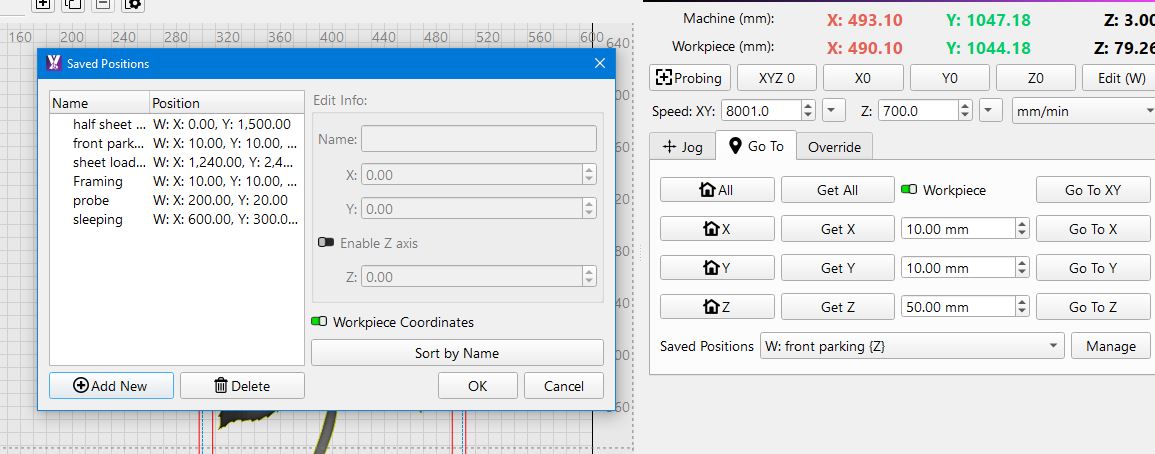
Haha! My CNC table is so small that there is no place to save a position. Personally, I have two relevant positions, [1] Home, and [2] Out Of The Way. 
Thanks Terry, I might hit you up for help in the future. Aaron posted the fix on the low rider site. Unfortunately vacation will get in the way of testing for a while