Omni XE rotary in LightBurn returns to field centre between every slice (laser stays on) — ~40% slower than ComMarker Studio, which runs it perfectly
My setup
- ComMarker Omni XE (6W UV) and an older Omni 1 (5W UV), running side by side
- ComMarker R5 rotary (chuck type) on both
- LightBurn Pro 2.1.03
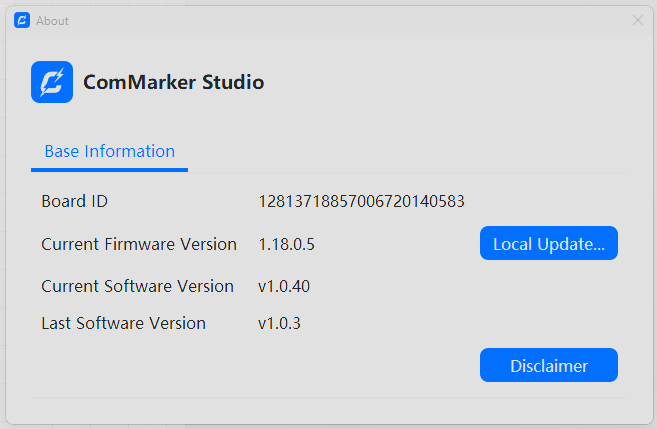
- Omni XE firmware 1.18.0.5, ComMarker Studio v1.0.40 — ComMarker have confirmed in writing that my machine already has the latest mainboard
- 9-point calibration done on both; flat engraving is perfect and correctly aligned on both machines
The problem
When I run a rotary job on the Omni XE in LightBurn, between every split/slice the following happens:
- The slice finishes marking.
- The galvo mirrors travel all the way back to the exact centre (0,0) of the lens field.
- The main UV source stays on during this — I can see a single focused dot parked at centre, exactly like clicking “centre point” when framing. To be clear, this is the UV beam, not the red dot.
- The machine pauses while the rotary advances.
- The mirrors then travel all the way back to the workpiece to start the next slice.
That constant return-to-centre-and-back round trip, on every single slice, is what’s adding roughly 30–40% to total job time.
Running the identical file with identical settings on my Omni 1 in LightBurn, none of this happens. The galvo stays over the work region and flows continuously from slice to slice — no return to centre, no visible pause, and no beam parked at centre. It’s dramatically faster as a result.
The key evidence: it’s flawless in ComMarker Studio
Here’s the part that I think points at the cause. I ran the same rotary job on the Omni XE in ComMarker Studio, and it works perfectly — fast, no return-to-centre between slices, no pause, no beam parked at centre. Identical in speed and behaviour to how my Omni 1 runs in LightBurn.
So the machine is fully capable of the correct behaviour, and this isn’t a hardware fault on my unit. The breakdown is specifically:
| Combination | Behaviour |
|---|---|
| Omni 1 + LightBurn | Correct / fast |
| Omni XE + ComMarker Studio | Correct / fast |
| Omni XE + LightBurn | Returns to centre each slice, beam on, ~40% slower |
What I’ve already ruled out / tried
- Latest mainboard — confirmed by ComMarker, so this isn’t the older-board torque/slippage problem from the other thread. Crucially, I get no slippage — my engraving comes out correct every time, it’s purely a speed/efficiency problem.
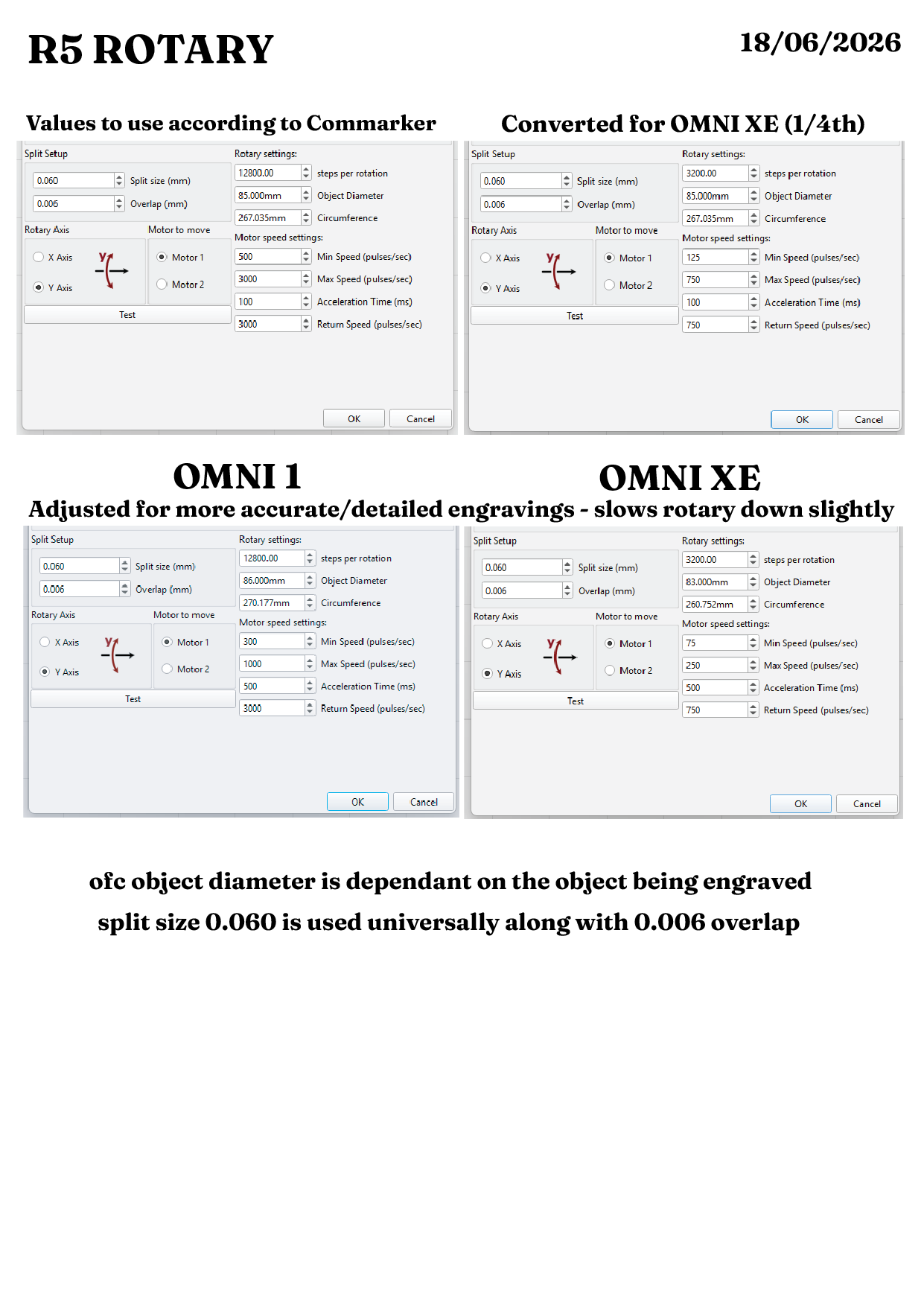
- Steps per rotation — 3200 gives exactly one turn on the Test button (the manual’s 12800 is wrong for this machine, as others in the other thread also found). I’ve tried other values too; none change the return-to-centre behaviour.
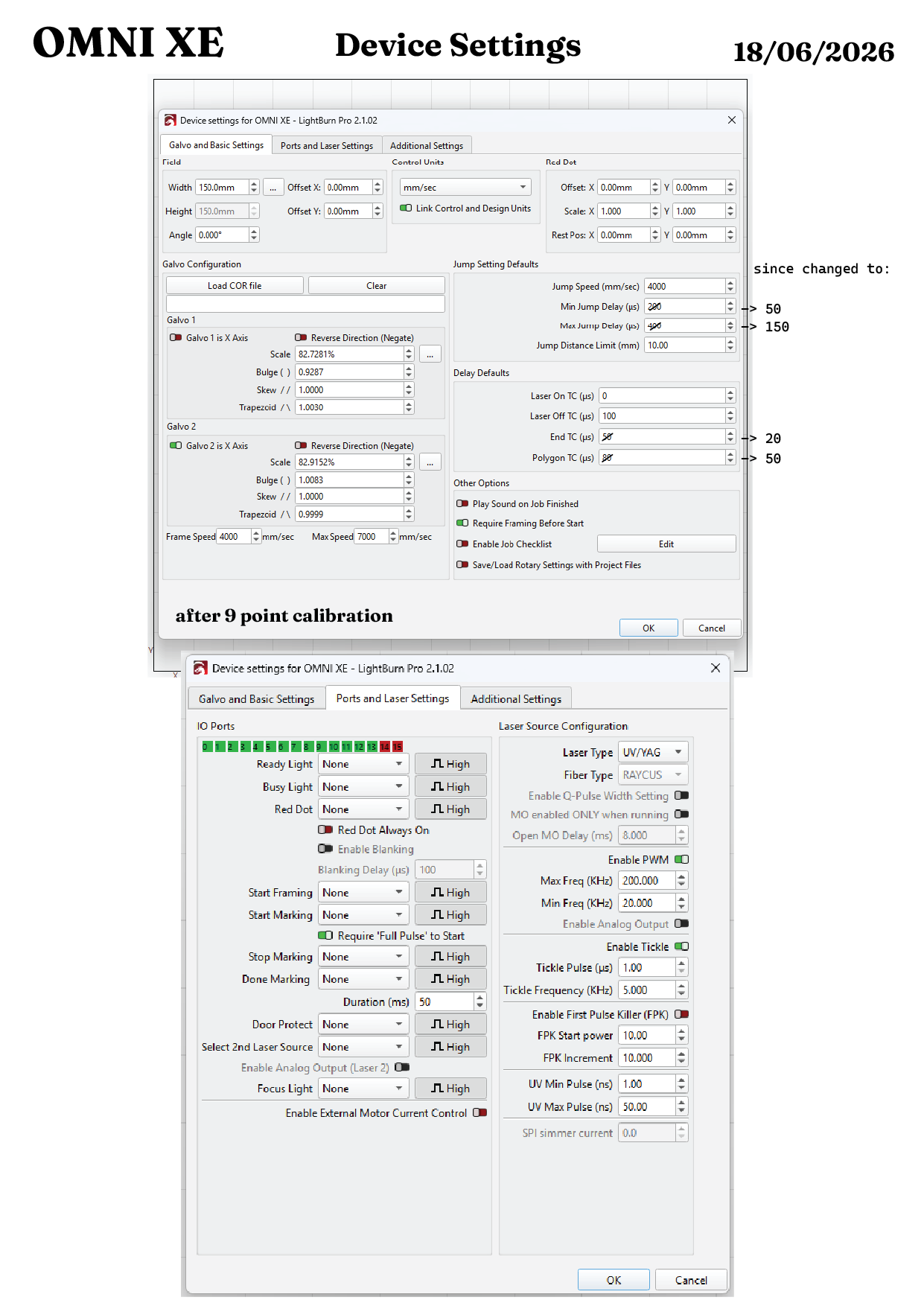
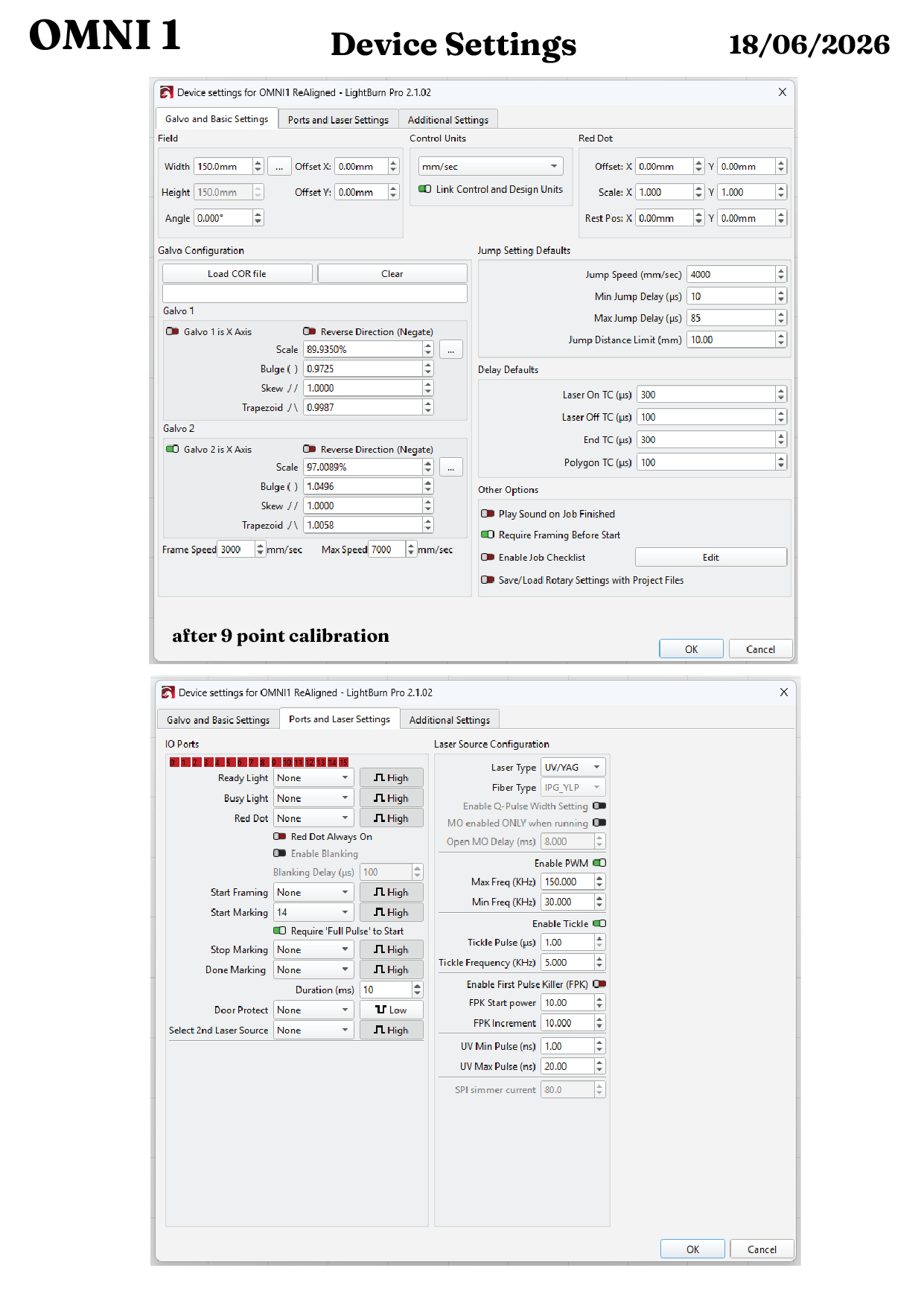
- Settings — I’ve experimented with various settings, including jump delays, TC / delay defaults, etc.. and rotary speed settings, to no effect.
- The “wake-up” workaround — run a rotary move in ComMarker Studio, close it, reconnect in LightBurn without power-cycling. This is the fix cited both by the LightBurn team (for torque) and by ComMarker support. It does not fix my issue — the return-to-centre and the slowdown persist afterwards.
- Raising speed in material settings — only degrades engraving quality; doesn’t touch the traverse, since the wasted time is in the non-marking moves.
My read
Because it’s flawless in Studio and only misbehaves in LightBurn on the XE, this looks like a LightBurn-side difference in how rotary slices are sequenced for the Omni XE controller — specifically inserting a return-to-rest (field centre) between each slice, with the source still enabled, instead of holding position over the work region the way it does on the Omni 1 (and the way Studio does on the XE).
I saw the team’s earlier note that the X/XE controller likely uses a TMC2209-class stepper driver configured over UART, and that you were investigating what Studio sends to the machine. I’m wondering if my symptom is a milder, newer-board manifestation of the same underlying “LightBurn doesn’t fully replicate Studio’s rotary handling on this controller” root cause — the newer board gives me the holding torque (so no slippage/gibberish), but the inefficient inter-slice sequencing is still there.
My questions
- Is there a LightBurn setting that stops the galvo returning to field centre between slices on the Omni X/XE? I haven’t been able to find one that changes this.
- Is the beam remaining on during that return-to-centre travel expected, or a separate gating quirk on this controller?
- Given the newer-board torque fix apparently doesn’t address this, is this being tracked as part of the same Omni X/XE rotary investigation, or is it worth logging separately?
Happy to run any diagnostic tests, capture logs, or provide files.
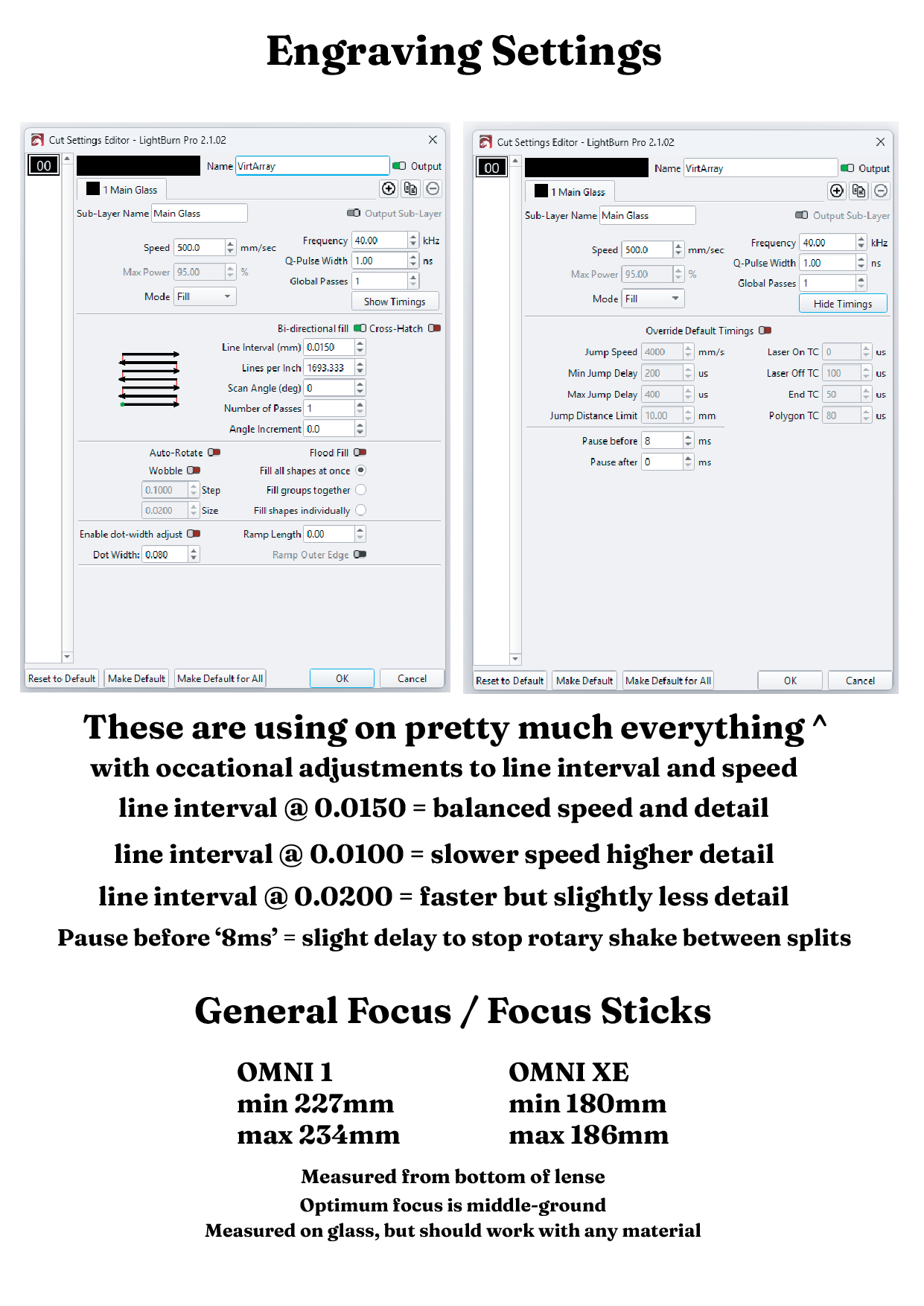
Attaching some images below showing my settings (this is my own internal backup, you can ignore some of the additional text on there)
- Device Settings screenshots — both machines, both tabs
- R5 rotary settings — Omni 1 and my XE conversion
- Material settings — used on both machines
- ComMarker Studio version/board info
- Side-by-side video of the two machines running the same job (although I started them at different times).
Hopefully you can see the issue on the video, if not I can supply a new video showing the issue even more
(Omni 1 on left, Omni XE on right). https://drive.google.com/file/d/1-NG6AhjVjymtVsKWyAwa1ZHfIC-9-XgW/view
I’d really like to get to the bottom of this, as it’s genuinely affecting my business — it limits how much work I can take on and how quickly I can turn orders around.
Thanks in advance,
Adam