I had a similar mechanical (rather than the gcode) problem.
I realised it was my speed, the laser wasn’t having enough time to complete commands, maybe try it at half-speed and see what happens ?
I had a similar mechanical (rather than the gcode) problem.
I realised it was my speed, the laser wasn’t having enough time to complete commands, maybe try it at half-speed and see what happens ?
Ah yes…..(quietly puts the hammer away) 
Ok, so was causes being able to engrave fill a square but not engrave a simple vector picture/? both the same size, 152mmX152mm.
Objects are vector graphics. Expressed as mathematical equation.
Images are made up of dots at various power levels, laid down line by line.
Draw a square on a fill layer.
Put a picture next to it. Press preview and zoom in
ok, the vector picture i have is black and white. The square is plain black. what is causing my machine from not engraving the vector? is it the software or the pc?
Yes, the ‘… On or near line 0’ note is usually caused by an incorrect setting.
One other setting that can cause this error is selecting an incompatible device profile which in turn generates incompatible GCode.
With this project open in LightBurn, click File then select Save GCode and save the file somewhere convenient.
You can post the GCode file in a reply here or send it to me privately if you’d prefer to keep it confidential.
With an Image in the file, the file-size might not allow it to attach or send through the forum. If this happens you can use a file hosting or file sharing service like Google Drive or Dropbox..
You can post the link to share the file here or send the link to me if you’d prefer to keep your work confidential.
Please post an example of a file that will not run. Upload the LB file, and screen shots of….
Preview window with traverse moves shown
Console output
Cut/Layers window
Machine settings
Program settings
We need to diagnose each failed job on its own.
This is the file ….
networth-financial-logo-icon-logo-full-color-rgb-894px@72ppi USE.lbrn2 (95.6 KB)
Screen shot of preview….
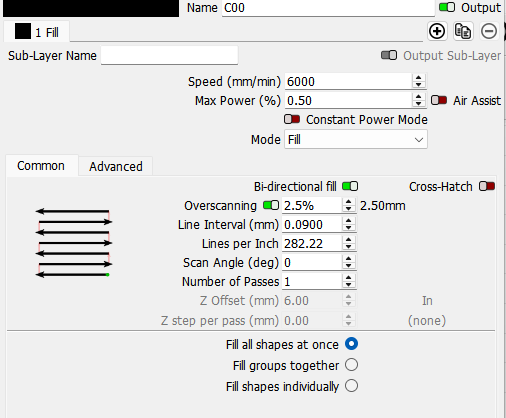
Screeen show of cut layers window…
Your power is on 0.5%. Nothing will engrave at such a low power setting.
And the speed is set to Ludacris speed!
Get your power sorted at a speed of 2000mm/m and then tune. Most machines can move 2000mm/m and get decent results. Very few will do the same at 6000 mm/m.
0.5 is the lowest my CO2 machine will fire. I am engraving on leather. Even if I engrave on acrylic or Romark these settings work well.
Is this a joke thread, like an early April Fool’s ? ;+}