Trying my first burn, can someone please tell me how to get my work area back on the grid I need to set it to 400x440 but can’t find where to do it. Many thanks.
Not exactly sure what you’re asking but maybe this helps. If you don’t see these icons go to settings (the gears icon) and turn off beginner mode.

If this isn’t what you need, a screenshot of your screen with a better description would be helpful.
Sorry, but thanks for the quick reply, the grid seems to keep changing and I end up getting the message that the cut is out of bounds. I need to set a working area. I’ve taken a screenshot, now can’t see how to attache it, no paper clip icon. I give up
After that @thelmuth point, I will add to check if do not accidentally change "Grid Contrast " setting to Off

Use this icon to upload the screenshot:

Your profile mentions you are using a grbl controller.
Be sure to read this doc- GRBL Configuration - LightBurn Documentation

I think I misunderstood what you meant, sorry.
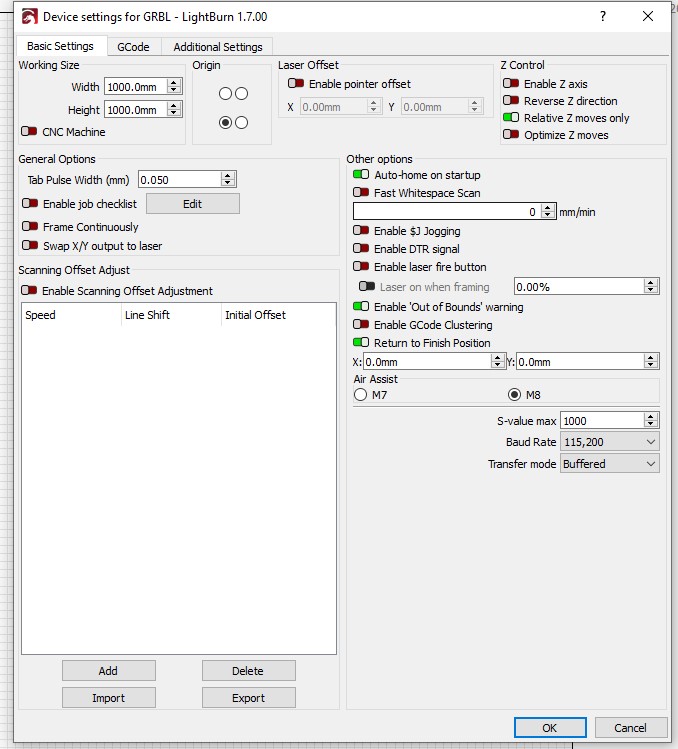
What you might need to do is put the actual size of the working bed in “Working size” in “Device Settings”

After you follow @Kuth advice above, if that doesn’t resolve all your issues, please post a screenshot of your cut settings dialogue box. Double click on the layer to bring it up.
Also, post a screenshot without the black box in the bottom left so we can see your laser tab and settings.
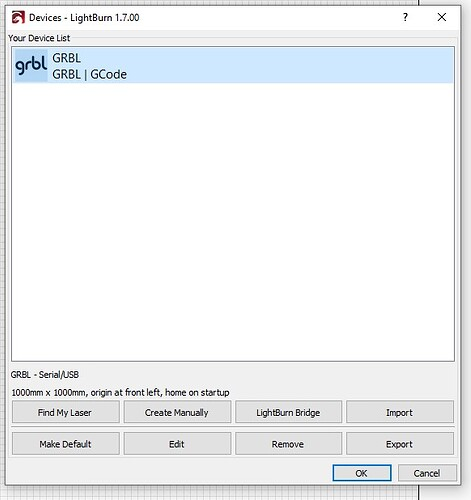
Did you set up the laser properly when you installed it? Click on devices button then click on your laser and it will give info at the bottom.

KuthLuis Jardim I copied the sizes from your screenshot into my boxes which were both at 1000mm, went back to my screen no different, but when I went back to the boxes they had both gone back to 1000 is there something I should have done to save them at the lower number?


Is your machine set up properly in devices like I showed in my last post? If not, you need to edit your device and make the changes there.
I don’t see any issues in your cut settings.
Thanks Tim, I’ll go see if I can find the device button

From this screen click the edit button. That is where you change your machine settings.
OK, thanks everyone for your help but I think I’ll forget about the laser, too complicated for me.
Don’t give up so easily, maybe you can find someone local to you to come help in person.
I’ve spent 3 days on trying to get it going this was a last resort. No enthusiasm left but thanks anyway.