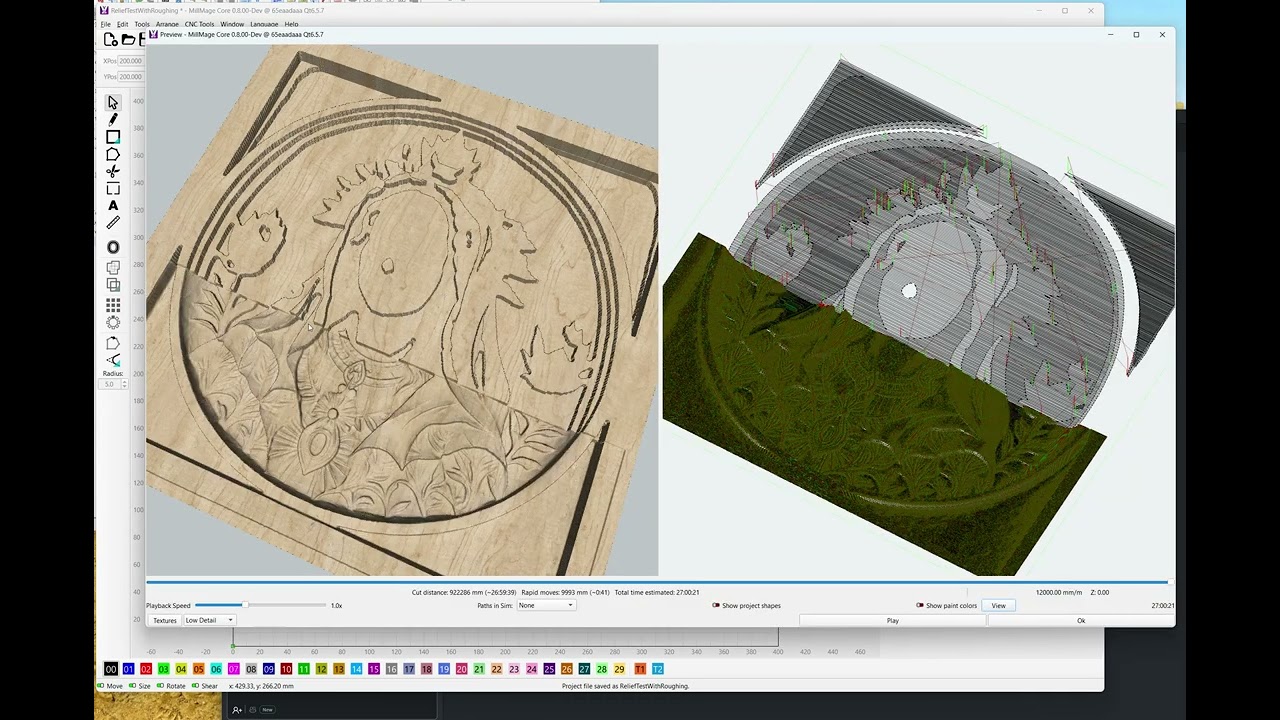
This is “manual roughing” for the moment, while I’m planning the feature and checking my math. The relief pass is working, but needs a little cleanup, and I’d like to have options for optimizing the gcode output, smarter image sampling (for speed).
This is “manual roughing” for the moment, while I’m planning the feature and checking my math. The relief pass is working, but needs a little cleanup, and I’d like to have options for optimizing the gcode output, smarter image sampling (for speed).
This is exciting, it is happening!
Thank you for letting us peek behind the curtain.
How positively delightful. I’m so going to look forward to upgrading to a MillMage Pro license the day it becomes available. 
(I haven’t had time to really get going with MillMage yet, but I made sure to buy my Core license as soon as I got home from working a controlled burn on release day.)
For someone who has never needed or wanted to V carve .
I will now sit here patiently waiting. I actually now want to give it a go , keep up the awesome work 
Most of my projects are v carve, But then again most involve cutting stars on unions, and rounded stars just don’t look as good as stars with sharp points, IMO.
That looks really good so far. I’m excited at the thought of trying it out.
As a side note - will MM handle stl files in addition to depth maps (as shown) for relief carving? I want to create some of my own designs and creating a depth map would simply add an additional step and possibly require a separate application.
Yes, and on our list. Thank you. 
Came here looking for this exact answer. I often mill topographical maps and a lot of times they come in an STL format. Being able to handle STL files is a huge win for me and pushed me over the edge to pick up my copy!
Thank you @Sabotage37. For clarity, when I said “on our list”, I should’ve said “on our list to support targeted for release with our Pro version.”
Relief carving and roughing, along with STL to depth map conversion, will be included in the Pro version when ready.
Relief carving alone isn’t too hard, but generating optimized relief toolpaths, and good roughing passes with optimized retractions is a pain in the butt. Importing an STL and doing the conversion to depth map will require a bunch of new UI to support it.
I have the basics of relief roughing working, but still have a bunch of bugs and a bunch of improvements to make. I’ll try to post more progress as it’s happening.
Yes! We’re on the same page. Just a critical thing for me to have even if it is in the Pro version which is more than reasonable.
Thanks Rick!
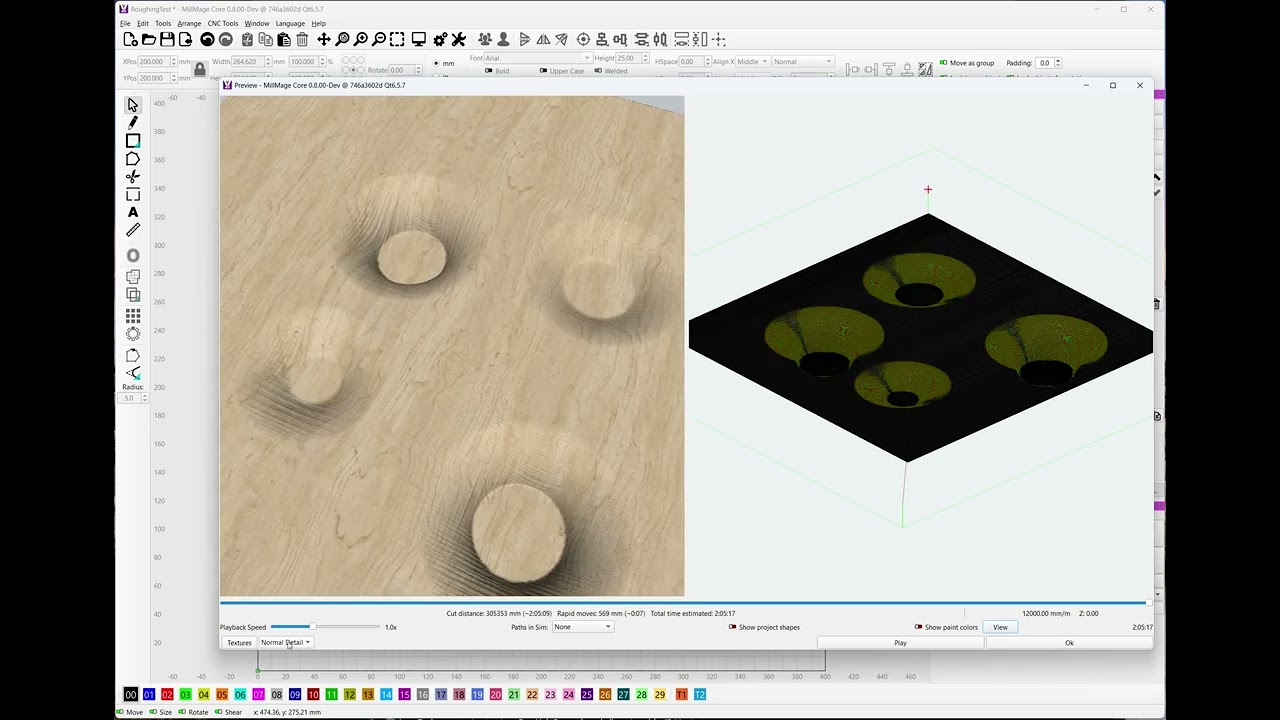
I now have fully automated roughing:
I have another question about the 2.5D relief finishing pass. Do you plan to support using multiple finishing tools in one workflow?
For example, starting with a 6 mm (1/4 inch) ballnose for larger, low detail areas, then switching to a 3 mm (1/8 inch) ballnose for more detailed regions, and finally using a 0.5 mm tapered ball nose only for the finest details. Ideally, the smallest tool would machine only the areas that actually require high detail, without re-machining surfaces that don’t benefit from it.
I didn’t, but I’m thinking about it now.
There are a couple complexities there:
It’s possible right now to do multi-tool manually (or it will be, once I’m done adding the boundary area code). Having the system do it automatically is an interesting idea, but I’ll need to figure out how feasible it is.
Thanks for the detailed explanation. I’ll be watching closely how the ideas and development around 2.5D evolve.
Doing an entire relief, say around 70 × 50 cm, with a 0.5 mm tapered ball nose and something like an 8% stepover would mean a very long machine run time 
I understand that lifting and repositioning between small regions adds time. I see the same behavior in Vectric, where toolpath optimization in this area isn’t always ideal. Maybe it can be tuned, I’m not sure. Even so, the time savings from limiting the smallest tool to true detail areas can still be significant.
Also, apologies for constantly comparing things to Vectric  I’m a VCarve Pro user looking for a capable alternative, and I’d really prefer not to upgrade to Aspire just to gain features like adding multiple STL models to a project. CNC is more of a hobby for me, while laser work is my main focus.
Really happy to see MillMage evolving and I’m looking forward to the Pro version.
I own Aspire - started with Cut3d, upgraded to VCarve, then to Aspire. Their tools are very good, and they have a 15+ year head start, so I get it.
I’ve mentioned to people in LightBurn that one of the things I’m excited about in writing MillMage is being able to (hopefully) fix the things about vetric products that annoyed me. Lots of excessive Z lifts, slow drops, retracting all the way out of a hole just to drop right back to the same place, etc. They may have improved those things since I last used it, but those were things that bugged the heck out of me when I was doing a lot of CNC work because it added so much unnecessary time.
Indeed.
One of the first things I did when I got my CNC router was making highly-detailed scale-accurate 3D terrain models. I use the highest-resolution terrain data available for the area from the USGS, rough it with a 1/4" ball, then let the machine run hours and hours with a 0.5mm (or sometimes down to a 0.2mm) tapered ball nose. It does give me fantastic results.
Hmm…
Mr. (Great and Powerful?) Oz, in no way am I trying to maker-snipe you or anything, but I have one thing that I’d love to have an expert developer’s perspective on. You see, I don’t just have my CNC router carve the terrain models, but I also use a diode laser attached to my CNC router to engrave the hiking trails directly onto the relief-carved surface. In order to do that, I’ve just done an absolute bodge job of taking the greyscale relief raster (16-bit PNG) into Python, stepping through the trails (SVG paths), and turning them into a bajillion G1XYZ steps. It… “works”… but it’s brittle and inelegant and like I said, a total bodge.
So, I’m not saying this should be a feature, and even if it were, I imagine it would be far down the feature tree, but just out of curiosity, how theoretically difficult would it be to be able to overlay something (like shapes or paths of an SVG) on the 3D surface of a relief carve? Is it something that could potentially be a workable concept, or is it one of those things that’s really easy to describe but a total bear to try to implement? Just wondering, and this seemed like a fairly innocuous place to ask.
(Also, it doesn’t escape me that I’ve never updated my bodge from the Python 2 code that I ran in QGIS on my now-mothballed Win10 computer. I guess it’s time for me to bodge it all over again and at least update it to Python 3 for current QGIS so I can get some carving and trail lasering back on my list.)
It’s quite possible - Vectric Aspire has features that let you project other paths onto their 3D models, and I imagine we’ll do similar when we’re further along, so you could use a V-bit or even a pen tool to mark lines on a model.
The plan is to allow a laser as a “tool” in MillMage, so you could do simple vector engraving as well.