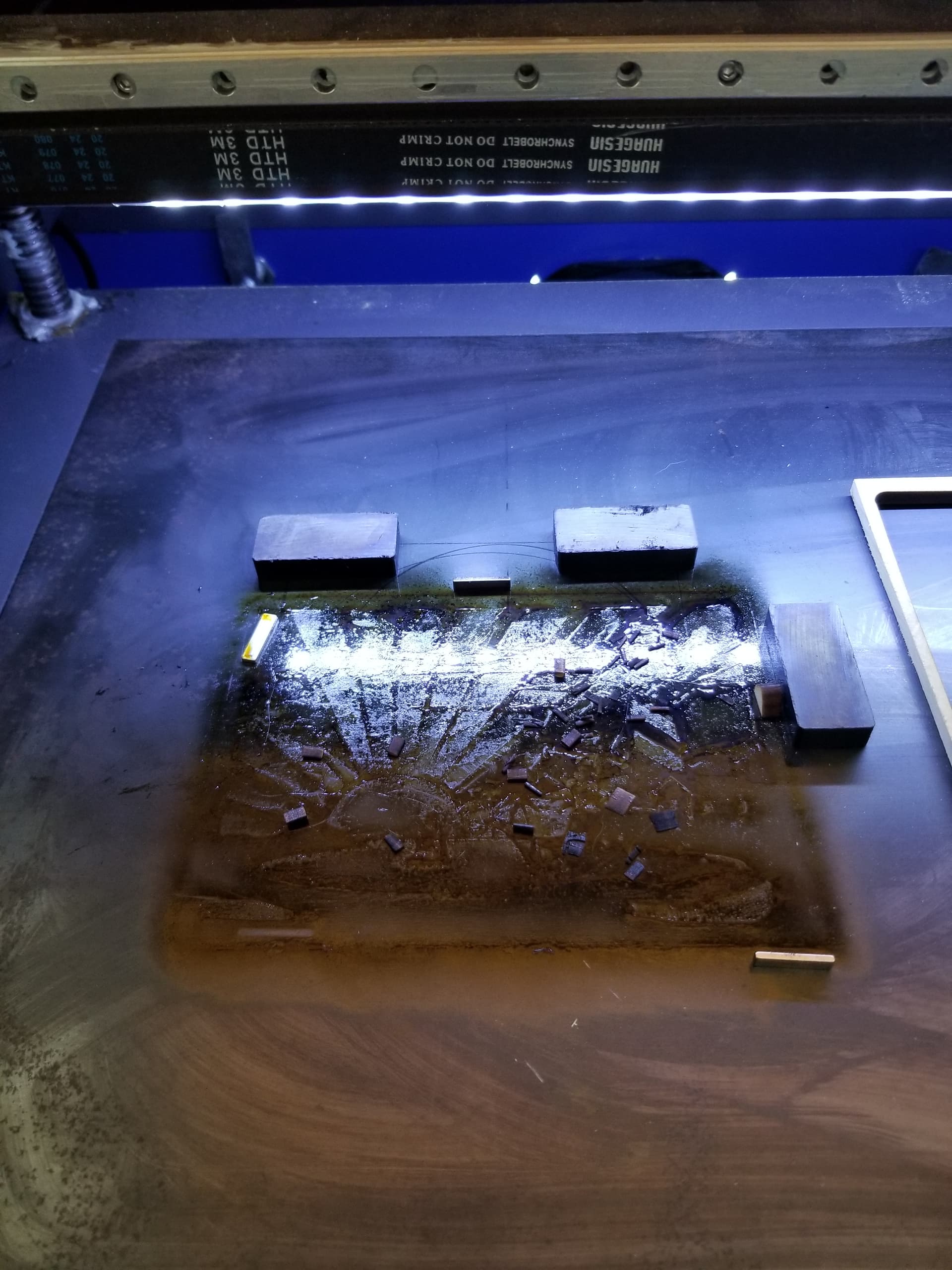
Replace Honeycomb with Steel Sheet

Yet another ‘replace the honeycomb’ bed topic…
Today I tested a small piece of steel sheet on top of the honeycomb bed as a test while cutting a piece of 10mm acrylic.

To say the least it was informative…
Being new to lasers every day is a ‘wow’ moment, today I saw flames… WOW…
I was well aware of acrylics and flames so I never leave the cutting with my fire extinguisher in hand while watching…
Trying different setups, the first was placing 10mm acyrlic paper on bottom only and setting my cut power n speed to my normal honeycomb setting…
As soon as the laser hit the acrylic, 2mm in the flames started, took appropriate action, all was fine, able to just blow it out…
I did not realise the puddling of melted acrylic under the paper would react…

Ok lets raise it up…not bad cuts ok, but the melting is still puddling on the steel sheet.
Oh using high forced air for the thick cuts, about 9psi.
Now when the parts cut free and fall they end up stuck in the puddling melted acrylic… Yuk!

I have concluded that the steel sheet has some issues if your usable parts are those falling out, into the melted puddles… in many cases they are…

So I thinking… use the wet paper towel trick, raise the acrylic up 10mm, no biggie, I’ve 3D printed some standoffs, they work fine, magnet on bottom all the good tricks used…

Still same issue, wet paper towels with melted acrylic build up on the parts as they fall onto the bed, now the parts are stuck to the paper towels…
and of course elevation of all the cut parts that fall is not practical, too many and too small…

I hate catch 22 scenarios, but I am now back to the Honeycomb, with raised acrylic…
High vacuum, and High air pressure… but it seems I will need to clean the honeycomb
after each job, which consists of cutting 10mm thick 120 pcs of 50mmx50mm squares.
The laser bed is 35 x 55 130W laser…

If cleaning the excess molten drip from the job is part of the proceedure so beit…
I hate Cleaning… mostly taking the dang honeycomb bed out… cripes…

I would love to hear anyones thoughts, or better yet a better mouse trap to deal with the acrylic drip build up…!

Laser stuff… who knew ! :slight_smile:

I tossed my honeycomb bed. It seems like it’s perfect, but it doesn’t work as expected.

It destroyed my air flow. Had a sheet of rolled steel made at the local steel fabrication for $12.

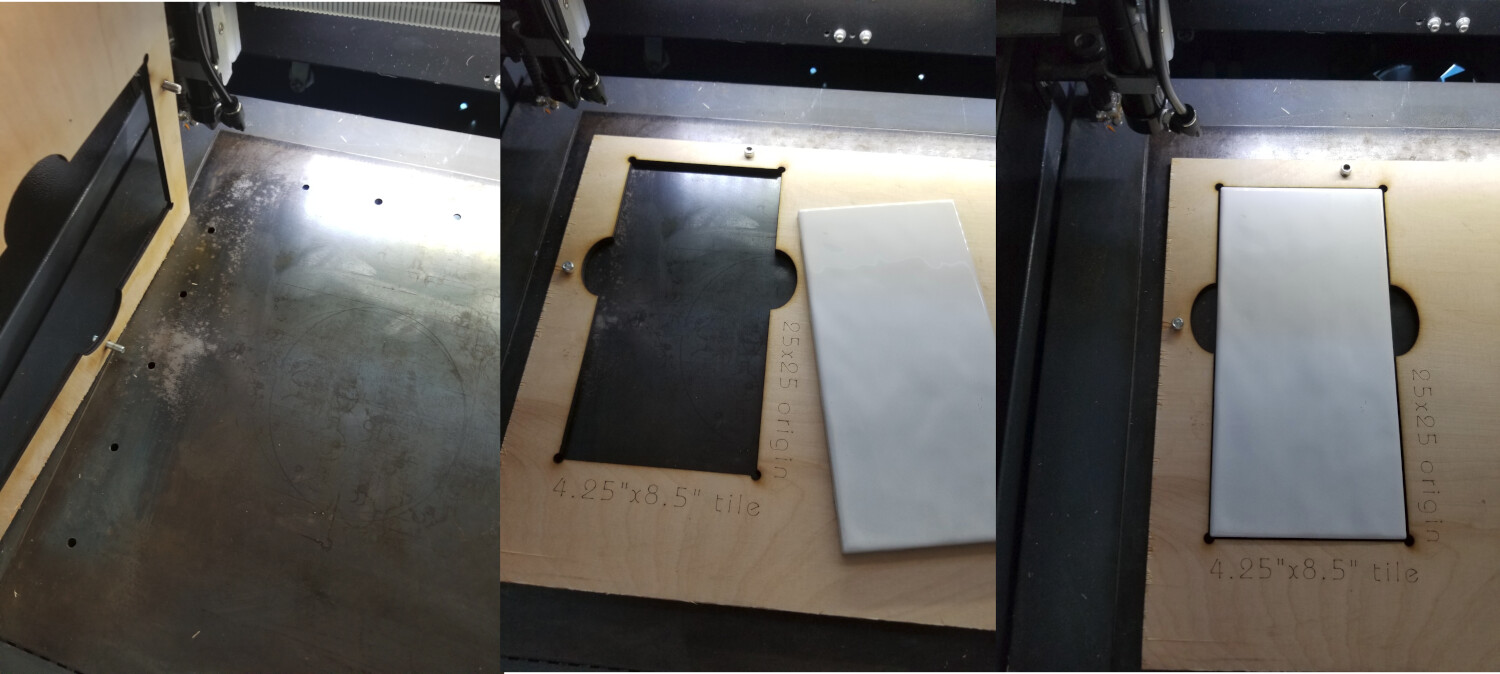
I have alignment holes drilled into it.

Here’s a couple of videos from Russ Sadler on honeycomb beds and acrylic.

Good luck

:smile_cat:

2 Likes

A good cut through acrylic shouldn’t produce any molten plastic, because the stuff pretty much sublimates directly from solid to gas.

Perhaps running at a higher speed will improve the results. My CO₂ machine cuts 6 mm acrylic at 10 mm/s and 60% of its (alleged) 60 W. At 130 W, you should be cutting at least that fast through 10 mm acrylic at half power.

It may also need a longer depth of field to cut thicker material. For 10 mm acrylic, a 3 (or 4) inch lens might be better than the usual 2 inch lens, so the beam entry and exit have pretty much the same power density.

That longer lens will let you to center the focus at the middle of the sheet, so it’s focused all the way through.

The machine seems to be pretty much working, so some fine tuning may get you where you want to go.

Having the pieces fall through is a nuisance, but very small, very thin tabs can be helpful.

3 Likes

Jack… great idea the alignment holes…

I watch all of Russ’ videos, he is a great source for no-nonsense info…

You didn’t mention, are you cutting / etching ? Acrylic ?

I am thinking of getting a knife edge bed that will sit on top of the honecomb.
I don’t have an air flow problem, as I hooked up a 700cfm exhaust fan with speed control
and the Monport 130w has two bottom 6’ exhaust hoses, so air draw is pretty good…
And this is why I am worried about the solid sheet blocking that flow…

I’ve seen some knife edge beds and just the blades for sale, but need to do more home work…
I have 50 sheets of acrylic coming in Dec and need to start cutting Jan 1, so I have some time to sort out the thick acrylic cut best plan.

Cutin one or two pieces is no issue, but set up to cut 50 is a 2hr+ job…
I think I will scale back to smaller jobs maybe keep them under 30 mins each and
try to manage that way…

Still the smaller knife edge system that drops onto the honeycomb bed may be a path for me…

Anyone else doing this ?

As @ednisley writes, you probably need some fine tuning of your cutting settings for acrylic.

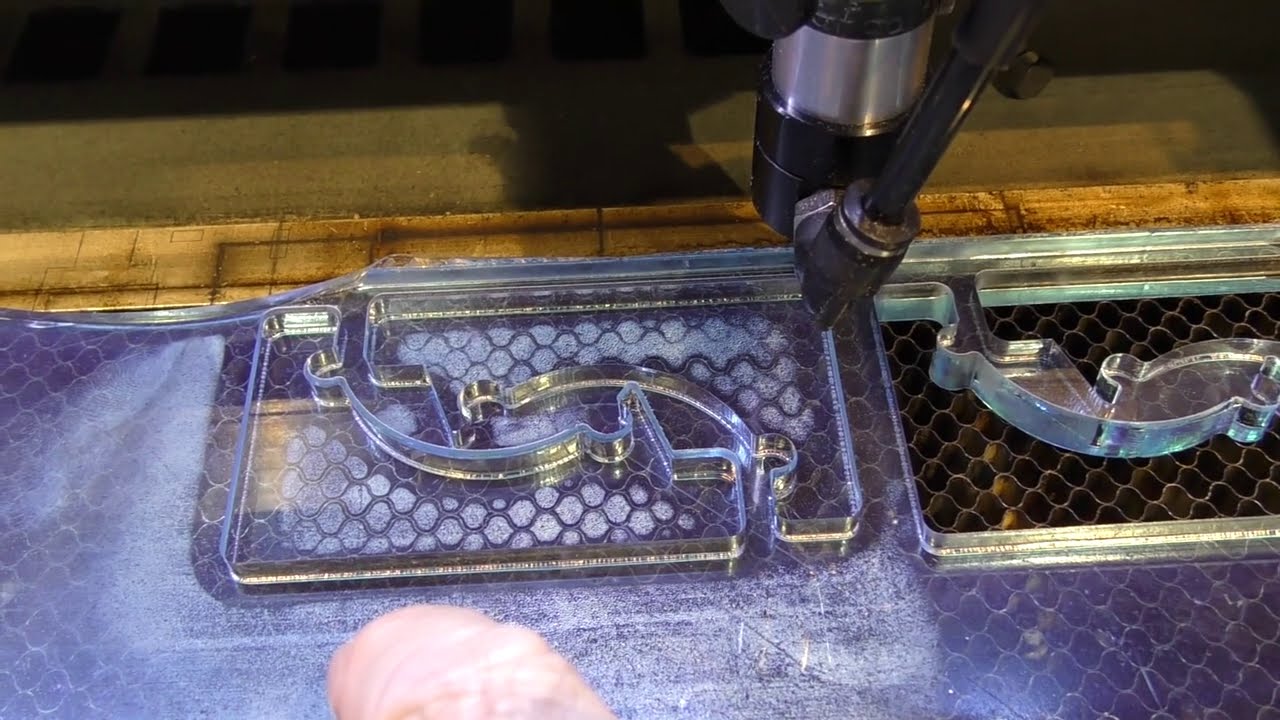
Picture shows 2 pieces of 8mm Acrylic, cut with my 60(50-55?)Watt OMT laser, on my original (steel) honeycomb bed.

If you have a fire during laser cutting, your ratio of extraction and supplied fresh air does not match.

Btw. Russ Sadler openly admits that he still uses his honeycomp for daily work, including acrylics. :wink:

Hey Ed…
Yea I’m using 2.5" lens APC, also tried the 4", kinda overkill for the 10mm stuff…
I did dial in the power and speed, went with a little slower pace 7mm/s, at 45%pwr
this gave the next cut that would allow the part to fall away, 40% was ok but had one small piece that was sticking, tried about 15 cuts and settled on 7/45 mix…
The puddling was the sheet steel and direct contact, gave it a try with no expectations
and was not disappointed :).
Did raise it off the sheet but still got the condensation from the blow down, I’m running 9psi air assist to help the cut… so back to the honeycomb bed…
It made a huge difference, the cut edges are the clean, also had to find that sweet spot as 15psi was excessive and put lines back on the cut edge…

So my final set up for the Cast acrylic 10mm seems to be 7mm/s 45%pwr 9psi air assist 10mm height off the bed, and lastly I set the focal point to 1.5mm into the surface…

Still in the honeymoon mode with the new laser, so playing is a great learning experience…

Verily it is written: Blessed is he who expects nothing, for he shall not be disappointed. :innocent:

So that’s vapor condensation, rather than melted acrylic: it goes directly to gas as expected, blows out of the cut as best it can, hits a cold surface, and condenses back into plastic.

FWIW, I did a some sign engraving (on previously cut blanks) and the vapor condensed on its way to the exhaust port:

The honeycomb worked great, with cardboard baffles in front to direct the incoming airflow over the sheet, then down through the honeycomb in back. Had to vacuum the fuzz off the honeycomb, though.

Interestingly, the condensate was white, rather than the orange sheet color.

Moral of the story, I suppose: you gotta give that stuff a path away from the scene.

Awww so cool… Great Pic Ed…

Looks like the “Andromeda Strain” for us old folks :slight_smile:

I plan on doing clean up duty, ugh, but if a vacuum does it that would be great !..
I have my bucket and brush handy tho…

1 Like

Well, my take on the honeycomb issue is as follows:
Me, being a cheap a?? miser I went the following route that seems to be working well for me.

24X24 Sheet of steel. I did find a stamp cut metal; I don’t remember what they call it but resembles honeycomb for on top as shown below.


A closer look below.

This so far is working well for me, plus I have extra stamped metal if needed.

For what it’s worth.

I’ll tell you my position with the honeycomb beds. In theory they seem great, but in reality they collect debris in the cells, which is one of the reasons you get fire. You can’t adjust air flow/mixture within the each cell and even with air assist, very little air actually gets through the kerf of the laser beam in the material.

I asked Russ about air pressure settings with acrylic because I was getting better results with almost no air. He advised that I use only enough air to keep the lens clear/clean and let the laser do the work on the acrylic. He added that air assist with acrylic was detrimental because of the faster condensing issue… Every fire in a laser using acrylic seems to start in the honeycomb, this is my own observation and I’m sure everyone has a position on this. Common sense says where you have something that can burn and a high heat, that’s the most likely place for a fire to start.

My honeycomb lasted about 2 days before I swapped it out for a steel sheet. I have tried to use it for various jobs, but found it to be much more trouble that it was worth.

The main thing I’ve learned about keeping my machine clean and operational is air flow needs to be in as straight a path as possible from the intake through the exhaust. With honeycomb, the air flow went through the honeycomb, not over the engrave or cut area, which is where it’s needed. Trying to cover up areas where I wasn’t working was a real pain and nothing ever seemed to fit.

Smaller pieces fell though the honeycomb, meaning I know had to get into the bottom of the machine to find these smaller parts. I have of yet to find any advantage whatsoever to using honeycomb. Not to mention it’s almost impossible to clean out each of the cells in the honeycomb without a steam cleaner or soaking it in a solvent.

Using the metal plate I get condensation of most of the gasses on the plate and can be removed with little work, solvent and rag. It didn’t help mine was aluminum, which precluded using magnets that I commonly use now to raise the material off the bed.

This is a short video of my machine with stock fan and the lid completely open cutting 5mm sub flooring.


Most of my use is engraving, but if I engrave wood or acrylic, I usually do a final cut it in the final step. If I’m doing mirrors or porcelain tile, I never cut that.

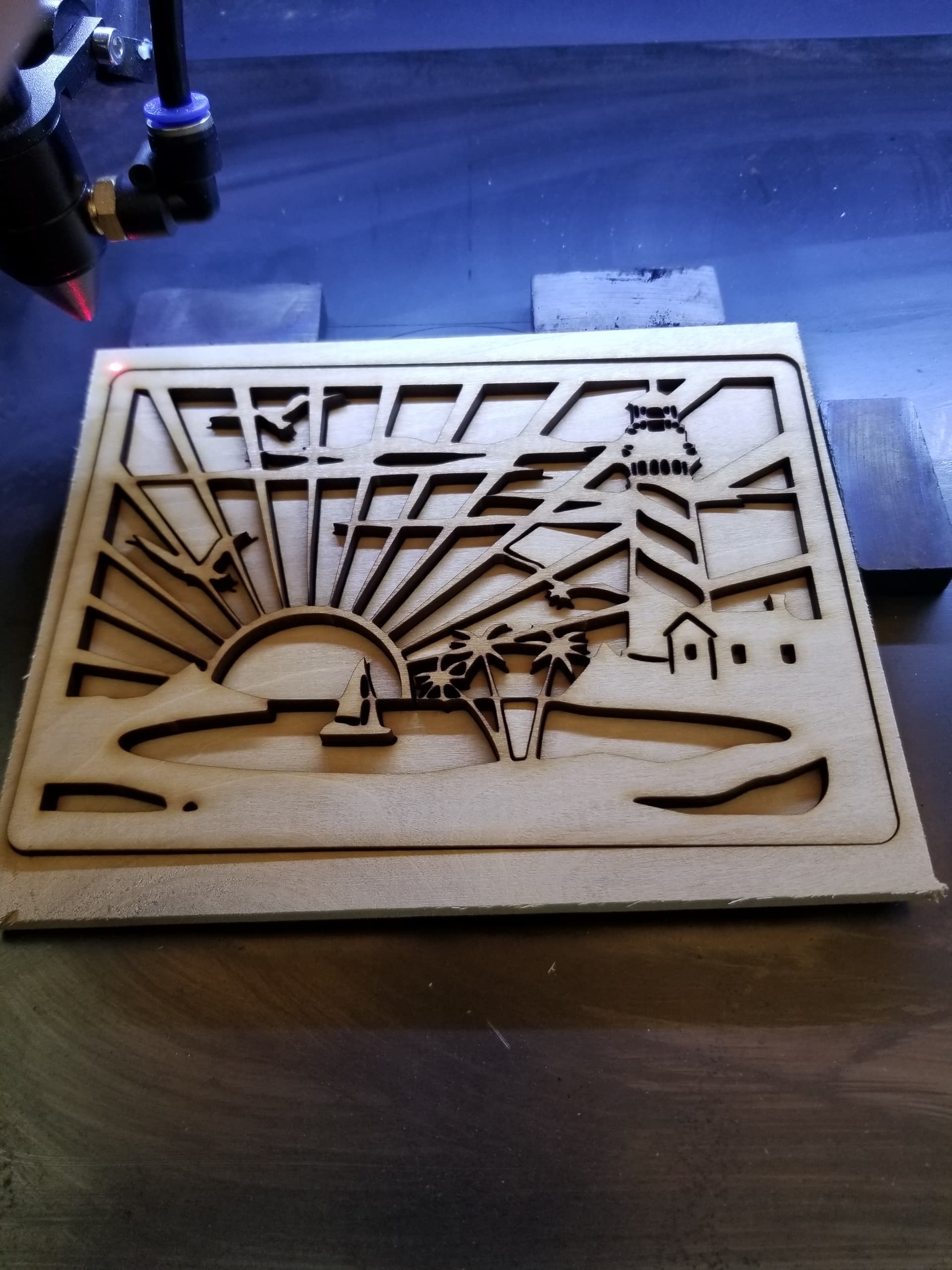
Here’s a couple of shots from way back, I did about a dozen of these lighthouse cutouts.

Here’s most of the debris.

I’m aware that Russ still uses honeycomb beds, never have asked him why since he knows the dangers.

I have to disagree, although the basic idea is correct, but with honeycomb, the cell is pretty much a closed area and you don’t have the ability to change it’s air ratio. This is where the fire usually starts to begin with.

Don’t follow you here, you should be selecting lenses based on the current material thickness. If you are cutting 10mm you should use at least a 4" lens, this has a depth of focus (dof) of just over 10mm. A shorter lens will result in a slight edge taper from the optics. Of course you have to focus 1/2 through the material.

A 2" lens has a dof of < 3mm. With 10mm material, you are out of focus for 7 of the 10mm, which can’t be good for your cut. You can compute this with various on-line calculators.

I like having holes to align jigs, makes it easy as I’ve never had an led pointer on my machine… Actually it came off within a week … every time I changed lenses it had to be dealt with.

As with all of these responses, other than the math, they are generally opinions, so you have to use the operational components that work best for you.

Good luck – have fun

:smile_cat:

All good info Jack…
Was the debris from one cut ? Seems like alot…

I like the idea of easy cleaning on the steel plate, and thought about it more this morning,
since I have a friend with a machine shop, he can cut me a piece of stainless no cost and I will use it on the front half of the bed leaving the back honeycomb open to act as an air draw from the front… Who knows it might work…Cause I do like the wipe and clean factor.

As for the 2.5" lens and the 4" they both cut equally well, but since the small
angle I get with the 2.5" is not significant on my job, its easier to use the 2.5"…

As for the air flow my stock air is about 5psi maybe a bit more, so after cutting about
15 pcs with varying speeds/power/air assist My best cut came from the setting I mentioned earlier in my post… but it is funny you mention no air, because to confirm the 9psl air assist was actually helping, I turned it off with just stock air and the cut was not as clean,
So I did verify, for my set up that it did indeed help, after all it was a little less than an extra 3psi assist…

But everytime the folks chime in, there is always new material to consider and review,

:wink:

Whatever works for you is the best way to handle it.

There was about a dozen of the objects cut which is why there is considerable build up.

Good luck with the stainless, let us know how it works for you.

:smile_cat:

Ah that buld up is not bad,

You repeat ignorance endlessly, but that doesn’t make it any more true. With 2 days experience with a tool, you allow yourself to advise and explain about the honeycomb laser bed to others…

Tell us about YOUR experiences with YOUR substructure in YOUR laser machine, then that’s fine, but please be kind and finally stop talking about something you don’t have the necessary experience for.

My production process with MY honeycomb is: I take a whole sheet of 0.8 mm Plywood (or xx mm acrylic), place it on my honeycomb bed, start extraction and send the job from LB to my CO2 laser machine. When the job is finished, I take the items out of the laser and the rest from the sheet. With the acrylic objects, I peel off the protective film, and with plywood objects, I sometimes wipe the edges afterwards with 99% isopropyl alcohol. The parts are then ready for assembly.

If there is smoke/evaporation on the upper side of the workpiece during cutting operations, either the intake/extraction or the cutting settings are not correct.

Smoke/evaporation, especially from acrylic, condenses logically on surfaces that are colder than the condensation. In my machine, this condensation takes place primarily in the exhaust duct, outside.

After acrylic cutting, MY honeycomb is just as dry as when I cut plywood, MDF or HDF, i.e. I continue with production without drying or cleaning the surface of MY honeycomb bed, i.e. I put new expensive material on the bed which cannot/must not be sanded or discolored in other ways.

If you put a piece of acrylic on blocks and use the wrong cut setting you get the finest fire directly under the acrylic, no honeycomb is needed for that, try it :wink:

These are only My modest experiences with honeycomb, gathered for a few years in my small business.


In the pictures you can see a few reflective marks, which are easily wiped off, but apart from that there are no fire or smoke marks, neither on the top side nor on the bottom side.

2 Likes

Bernd…
the acrylic sheets you cut look great… looks like 3-5mm thick…
Gives me hope that dialing it in will give some good results…
Very nicely arranged on the panels also, great job… I can tell you done this a few times.

Oh Also I noticed you cut the acrylic with the plastic wrap left on !
I read different opinions that the papaer is ok on bottom only, yet the plastic should be taken off both sides as it melts into the acrylic being cut…
But I see yours looks ok… !
can you share…
:slight_smile:

In the pictures it is 3mm clear acrylic and 2mm opal acrylic. I always have the protective film on the plates, not out of conviction but for purely practical reasons. However, I peel off the film on very small parts because it can be cumbersome to peel off the film. …I usually use a sewing needle for that.
Note that there are zero marks or contamination on the items, if there were any you would not be able to remove them either, as with wood e.g.
In addition to 2 and 3mm, I mostly work with 5 and 6mm acrylic, with the same fine results. I have moved the opening for my extraction to the left side and the smallest diameter is ø110 in my extraction system, consisting of an adjustable 230V centrifugal fan, intended for industrial use. My weakest point in the system is the pipe dimension, which should be ø160. But, even if I can’t use the fan’s full capacity, I’m reasonably satisfied.

Nice…I see all these good looking acrylic cuts…
Hopes are high :slight_smile:

My stack of acrylic will get here next month, then I will have material to really work with…
3,5,8,10,15mm sheets clear and black…

With 130 watts you have many options, it will be exciting how it goes with 15mm acrylic on such a strong machine. I also tried to cut 15 mm acrylic but probably won’t be able to handle a bigger order, my machine just isn’t suitable for this.

If I have to come up with a recommendation for your test series, try to cut the fastest as possible with at least power. Try cutting a block and put it up to high so you can follow the cutting process through the thick material you will easily see when your laser beam “can’t keep up” and cut crooked. It is generally very interesting to experiment with clear acrylic.

1 Like

Good thoughts, I plan on watching the drag at different speeds and power settings…

I did take two 10mm blocks and glued the with weldon 3 and cut then with no issue…
Dont recall the settings but it did a good job…’

All Fun… just need to,watch for the firey red flames :slight_smile:

1 Like

Maybe pitching it after a few days isn’t quite what I meant. I did see the failure of it in a day and replaced it with metal to get the air flow and less debris distributed across the machine. For the first year, I couldn’t make myself pitch it into the trash, everyone loves them, so I assumed they’d be good somewhere.

I’d change to paper, tried the honeycomb… saw videos with different approaches.

The best I got with the honeycomb was no better than the steel sheet and in most cases, if engraving I had to do a lot of work to get debris off areas that didn’t collect them with the steel.

After a year of trying everyone’s suggestion, I think I finally pitched it and use the metal plate all the time now.

I did mention, that they should use whatever works for them, which seems relatively conservative. My main issue with honeycomb is I loose the correct airflow to make cleanup not such a problem.

So it is my experience and I don’t see any new or creative ways to use honeycomb…

Just because Russ still uses them, doesn’t really push me any direction from the fact he still uses RDWorks.

:smile_cat:

Anyway, the suggestion of works best for you still holds.