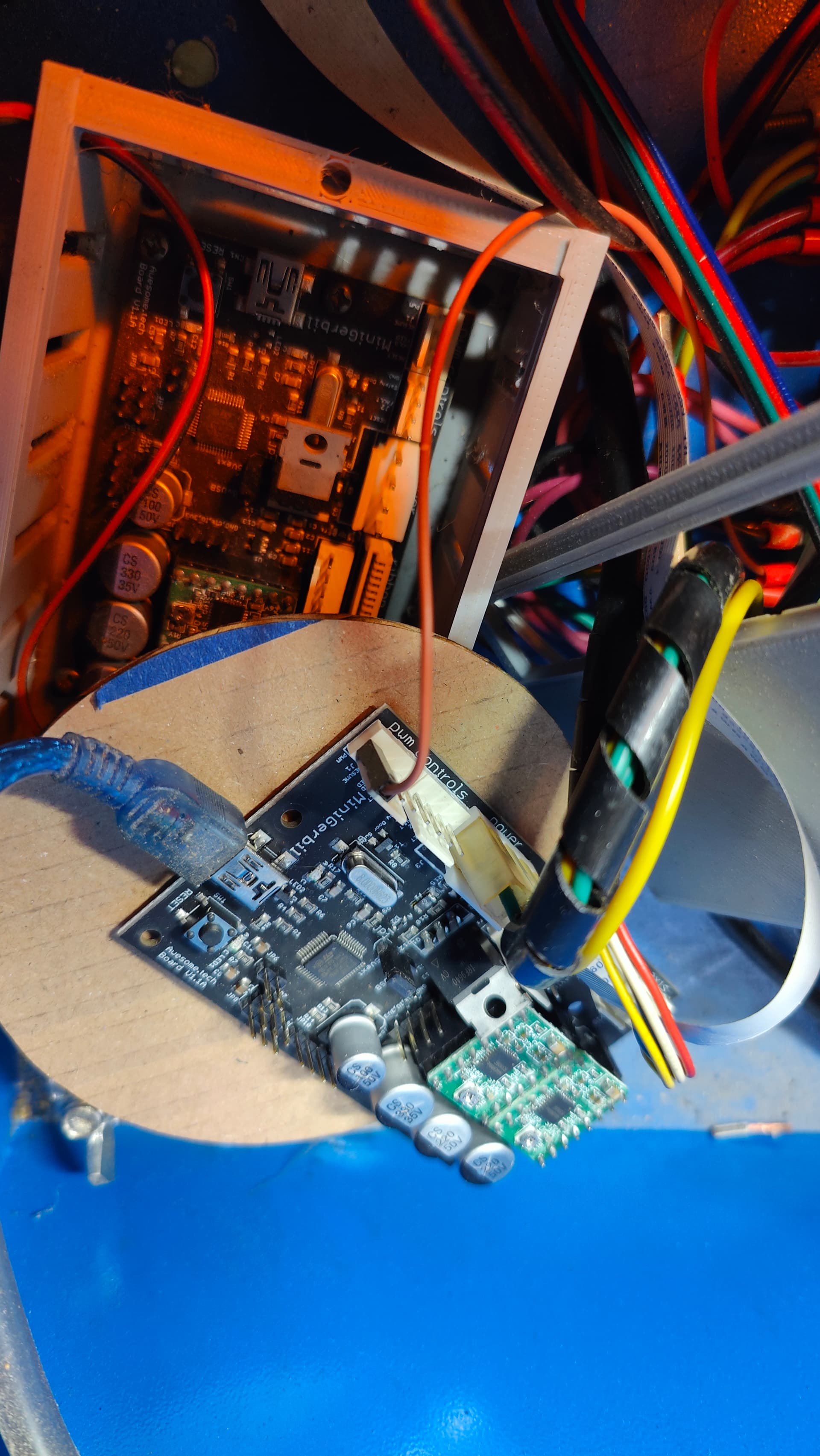
Hi
Getting my rotary setup and it turns correctly. Steps per mm all good. Some reason when i stary a job LB burns a line into the object before it actually starts. Any suggestions?

Hi
Getting my rotary setup and it turns correctly. Steps per mm all good. Some reason when i stary a job LB burns a line into the object before it actually starts. Any suggestions?
Does this happen with flat engraving as well, or only rotary engraving?
What type of firmware is your laser running?
Rotary only.
Stream completed in 0:00
[VER:1.1f.20190214:]
[OEM:Awesome.tech . MiniGerbil:]
[SER:0x000007.Date:20190214:]
[OPT:VMZL,15,254]
Please type $$ into your console window while your laser is connected and copy/paste what it responds with in a reply back.
$0=10
$1=255
$2=0
$3=1
$4=0
$5=1
$6=0
$7=0
(ATC M6, pulse/ff)
$8=100
(ATC Tool Td, milliseconds)
$9=100
(ATC M6 Td, milliseconds)
$10=1
$11=0.010
$12=0.002
$13=0
$19=0
(Softstart, milliseconds)
$20=0
$21=0
$22=1
$23=3
$24=2000.000
$25=600.000
$26=250
$27=2.500
$28=5
(Spindle freq. 0 to 15)
$30=1800
$31=1
$32=1
$100=157.000
(x:stp/mm)
$101=157.000
(y:stp/mm)
$102=160.000
(z:stp/mm)
$103=160.000
(a:stp/mm)
$104=160.000
(b:stp/mm)
$110=12000.000
(x:mm/min)
$111=5000.000
(y:mm/min)
$112=5000.000
(z:mm/min)
$113=5000.000
(a:mm/min)
$114=5000.000
(b:mm/min)
$120=4000.000
(x:mm/s^2)
$121=1000.000
(y:mm/s^2)
$122=3000.000
(z:mm/s^2)
$123=3000.000
(a:mm/s^2)
$124=3000.000
(b:mm/s^2)
$130=230.000
(x:mm max)
$131=320.000
(y:mm max)
$132=200.000
(z:mm max)
$133=200.000
(a:mm max)
$134=200.000
(b:mm max)
ok
Please set up a simple project like a rectangle set to Line mode, then save the GCode twice, once with rotary mode enabled, and once with it disabled, then share both files here (you may need to change the extension to “.txt” to upload them).
Norotary.txt (1.2 KB)
Rotary.txt (1.2 KB)
i am so sorry. the PWM cable was loose. I hadnt realised.
The commands in these files are identical except for the motion commands that we’d expect to be different due to the difference in flat versus rotary engraving, so whatever’s going on must be on the machine side — I’m at a bit of loss as to what that might be, but someone else may come along with a suggestion.
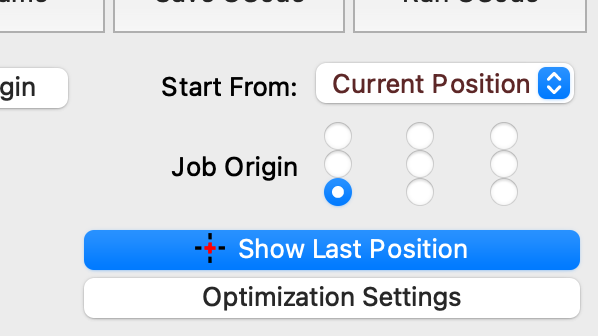
On thing you can try is setting the Job Origin to the lower left corner. That’s where the Fill will start by default, so that should eliminate the jogging motion before starting the actual engrave.
Thanks for letting us know what the issue was — I was stumped. 
its actually still doing it brefily even now i have secured the pwm cable.
take a look just before the jobs starts:

If securing the loose cable helped before, but you’re seeing a recurrence of similar behavior, that strongly suggests that there is still an issue there. It could be that it’s come loose again, is loose on the other end of the connection, or the power supply itself is failing.
The cable is 100% secure. power mode was on all time before which is because the cable was loose.
Behaviour is fine after the initial burn at the start where as before the laser never turned off again because the cable was loose. Something else is wrong here.
Same issue with my spare controller:
I’m not saying the connection is necessarily loose exactly where it was last time, but if tightening the connection resolved the problem for a while and now it’s come back (in slightly different form), that tells us that the issue is with the power supply to the laser head. Either the wire or the supply itself.
I’ll change the power supply tomorrow and report back. I have a spare one.
Quick update.
Tested machine using laserweb and it does not do it using laserweb.
Appears it only does it with LB
LB: (Burns on start)

Laserweb: (Does not burn on start)
Any help would be appreciated. Its clearly an issue in lightburn as it doesnt do it in laserweb.
thanks
Did you try the new power supply?
We can compare the GCode produced by laserweb to the GCode produced by LightBurn, if you can share it here.
I havent changed the power supply yet because the issue doesnt happen in laserweb.
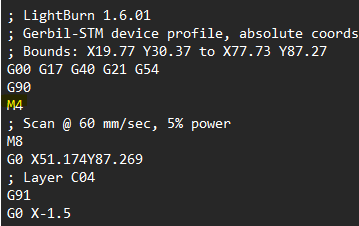
I am no gcode expert but i can see a M4 command in LB just before the job starts.
Lightburn.txt (128.2 KB)
laserweb.txt (1.2 MB)
Yes, it looks like Laserweb is sending the M4 command after the first move. However, sending the M4 command at the start of the GCode is standard for all GCode LightBurn produces, and the laser should not fire until it receives G1, F### S### commands as well — which means there is something wrong on the machine side that is not exposed when you use Laserweb, but that’s not quite the same as the GCode produced by LightBurn being wrong.
You can try saving manually editing the GCode so the M4 command is just before the first G1 command:
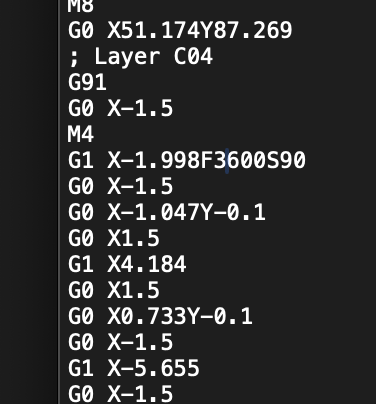
Then clicking Run GCode in the Laser window to select and run the edited GCode.