When starting a new drawing in Adobe Illustrator, if you define a custom document/artboard size larger than 227 inches in height or width you end up with a special “large-sized canvas” document type which allows an extended max size of up to 2270 inches. This is great but it seems there are limitations with the format, including issues when opening these documents in many other programs with the artwork coming out 10x smaller.
See:
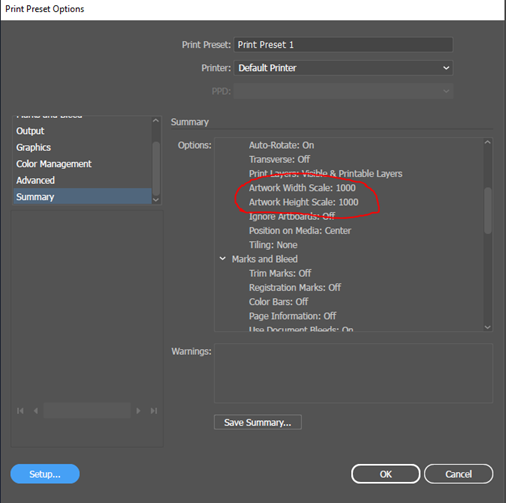
I have also just noticed in Illustrator, that if you later edit and resize a large-sized document to something much smaller it will retain it’s ‘large-canvas’ document type, so you cannot easily tell if you will potentially run into scaling issues. To check, in Illustrator, try looking in File>Print>Summary at the “Artwork Width Scale” - do you see 1000 here?
It looks to me like there is a ‘LargeCanvasScale’ property present (in the current Illustrator’s .ai file format) which could possibly be read and accommodated for by LightBurn when importing, I’ll ask our developers about this.
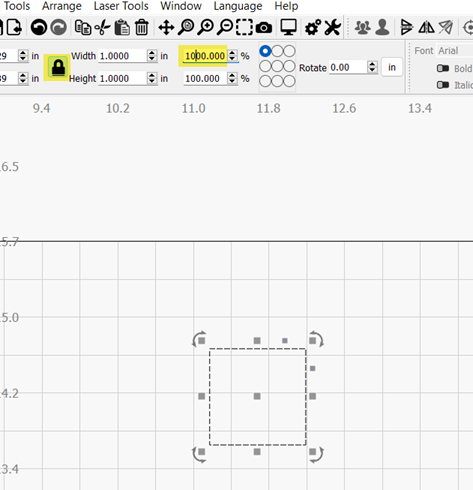
But for now, to quickly rescale your imported artwork, select your imported artwork, and (with the aspect ratio locked) change either the width or height scale from 100% to 1000% then press the tab or enter key, or click in the workspace e.g.