I have 2 machines on seperate Pc that the speed settings do not stay entered. Is it just mine or is this normal? I find it very annoying that every time i fire up a pc and machine I need to enter settings.
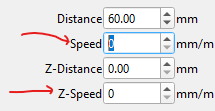
So are you saying this speed setting is not remembered after you close and restart LightBurn? For two separate PC’s?
Is that the only device setting that is not “sticking”? What version of LightBurn are you using? 2.0.04?
As LightBurn closes, settings like this should be saved in your user profile: C:\Users<username>\AppData\Local\LightBurn\prefs.ini file.
Here are are a few reasons I can think of right now that might prevent this from happening:
-If you had multiple instances of LightBurn open (File>New Window), the last instance you close will overwrite the prefs.ini settings. Changes made in an earlier closed instance will be lost.
-If LightBurn is not being closed normally. If the PC is being switched off abruptly, or LightBurn is force-closed, then no changes will be saved.
-If you have an aggressive anti-virus program, it could preventing LightBurn from saving changes. (Try temporarily disabling).
-If the location of your user profile folder is not typical, not in a local drive, or is cloud-synchronised, or for some reason (like at public computers) it might get cleaned or reset after use. (Go to File>Preferences>Open Prefs Folder to check the location close LightBurn then refresh the folder (F5) and see if changes are made to prefs.ini)
-If you have a “defaultprefs.ini” file in the same path as your LightBurn.exe ("C:\Program Files\LightBurn". (It would be unusual if this was the case, since this file has to be manually created)
I have also seen this behaviour, but it is not 100% consistant. Sometimes it saves, and sometimes not. I have yet to determine what makes the difference. I am a creature of habit, so I do opens, closes and file saves the same way every time.
Only one instance of Lightburn running. I can save file and turn off machine and pc at night, The next day when I boot pc and open Lightburn, the speed settings are not there. I have to manually enter speed settings every time i open lightburn.
Only running windows anti virus. Yes running version 2.0.4.
Is it just those particular speed values that won’t change? The distance values will save?
Please paste your LightBurn support data (go to Help > Generate Support Data ), in an email to support@lightburnsoftware.com with the subject line “Attn. Nic” and include a link to this forum topic.
The distance values are not saved either. I do not know if these are relates as I have seen others post on this, but I have also lost the capabilities to minimize and close the program….

Other programs I use on the pc are normal. I tried changing resolution and screen size which did not help. To close the Lightburn program I have been clicking the windows button the i am able to see the tool bar at bottom of my screen.
To close LightBurn if the top window bar is hidden use the shortcut to File>Exit (Ctrl+Q), Or ‘Alt+F’ and then ‘X’ , then restart LightBurn with the ‘Shift’ key held down (ignores layout preferences in prefs.ini).
Device settings are clearly not being saved/restored, perhaps no settings at all are being saved to prefs.ini?
To confirm if nothing at all is being saved; after opening LightBurn again try making changes to the layout , for example move the color palette to the top. Close and restart LightBurn to see if the layout changes persist?
To see if the file was actually written to by LightBurn, open the Windows ‘Terminal’ , and paste in:
Get-Item "$env:LOCALAPPDATA\LightBurn\prefs.ini" | Select LastWriteTime
The results (LastWriteTime) should reflect the last time LightBurn was closed, for example:
PS C:\Users\nicle> Get-Item "$env:LOCALAPPDATA\LightBurn\prefs.ini" | Select LastWriteTime

LastWriteTime
-------------
7/11/2025 10:33:30 am
Try reinstalling your current version v2.0.04, and you may need to also restore your preferences from backup. If you were using LightBurn last week without issues there should be an automatic backup available to restore:
Restoring Your LightBurn Settings
Another option is to download and install the latest Release Candidate 2.0.05-RC-2, which should also help with the “can’t minimize” layout issues.
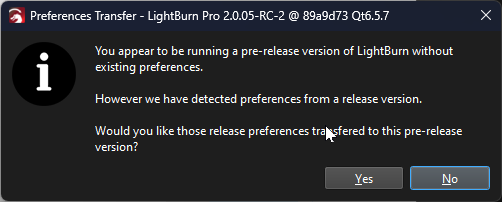
It will install to a separate folder (C:\Program Files\LightBurn_PreRelease) , when you see this message box choose ‘No’ to start with fresh settings, and have a go at setting up your device again from scratch, and let us know how you get on.
You can get those back by using WinKey+UpArrow. This maximizes the window.
I cannot confirm nor deny this. I almost always keep Continous Jog turned on.
I noticed tonight that once the Speed is set, then opening new instances of Lightburn contain the Speed setting. Open and close that first instance does not save it.
I lose my speed setting for the move window every time I close LB. I’ve tried opening, setting it, closing it, and it’s gone again. This is a new problem that I first noticed a month ago or so. I have the lasted official release.
Same here. It seems if I load a previously saved project, the Speed setting comes in with it. But not sure if that is 100% of the time.
Same Here. This just recently started. Using the most recent version 2.0.05. In my case, even when opening a previously saved project, the speed and increment settings go back to 0. Kinda irritating.
1 Like
This topic was automatically closed 30 days after the last reply. New replies are no longer allowed.