Alan what are you using as your start and end Gcode. I think that might be part of my problem.
Start:
M106 P0 S255
M3 S0
End:
M5
G0 Z330 F6000
The touchscreen (in developer mode) shows 0.5% when fired and it will burn stuff, when its set 0.5% in Lightburn, you can’t even see it. Very odd.
There is a setting in Luban to only fire half of the lasers. I wonder if that is the difference. But in Lighburn at setting the laser to 0.5% I can see the blue dot when framing. at 1.0% it leaves a trace on baltic birch…
Still no luck in getting the air assist to turn on/off when actually running a materials test. I can turn it on and off in the console with M8/M9, But even if I just export he gcode from the mat test there is still no M8 command in the code. I just have to turn the air assist on first, then set up the material test and run it (text and all), then turn air assist off at the console screen.
Hi David,
Can you please share the Lightburn setting you used with the 40W, I just got mine and I am not an expert, I am struggling in getting it running with LightBurn
Running LB 1.7.06 here, with the 40W blue.
Looks like I have the same issue, while I have M8 selected in device settings, and air assist turned on for the layer, I’m not seeing “M8” or “M08” in the output file. Manually adding M08 in the start gcode does turn on the air, and M09 turns the air off.
Why would lightburn not output the air on and off commands after I’ve explicitly told it to do so in two different places?
Are you using the correct machine profile in Lightburn?
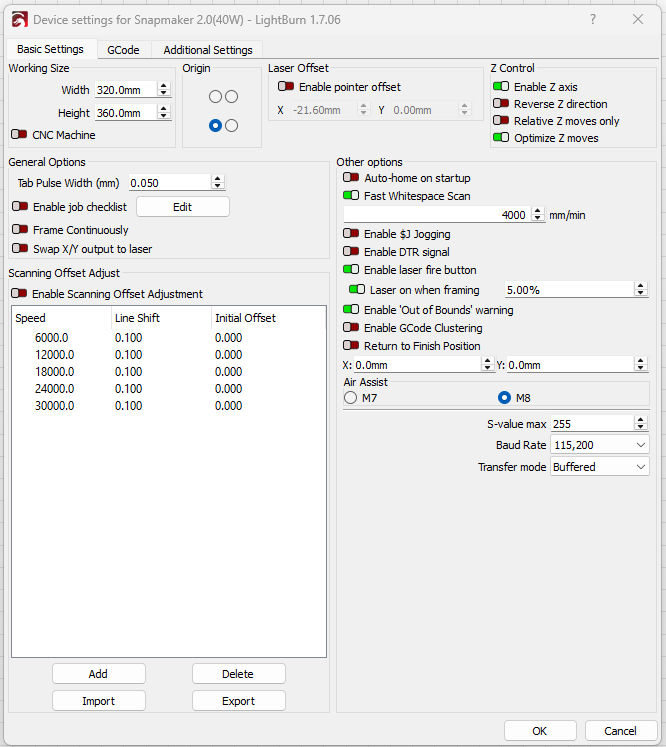
You have to use either Marlin or GRBL, the “Snapmaker” profile does not output M8/M9, even though the options are there in the settings. If you’re lucky, maybe we can poke… say… @Colin to pass this info along?  Or you can email support@lightburn.com or a request here: https://lightburn.fider.io Though being more machine specific, I don’t think the feature request is quite appropriate.
Basically the fix is for Lightburn to enable M8/M9 output. Kinda like originally it couldn’t do inline. Things evolve
Yup, worked that out W LB support saturday.
What gets me is that they decided not to output the air commands, but left the switches enabled at the UI. So you do the right thing, it still doesn’t work, and nothing indicates “oh, we disabled that for you”… What’s the harm in allowing unsupported commands? The machine should ignore them, and you always have the option of disabling those if they cause you issues.
I just set up the 40W which I haven’t used in a while and air assist used to work fine. Like you’ve said it now seems to be broken regardless of the profile I use.
Exactly what did you get worked out with Lightburn that I assume fixed the issue?
I’m using version 1.7.07
The first step was to not use the snapmaker profile. My understanding is that they turned off the ability to enable air assist, but didn’t grey out the options, so you turn it on in the layer and in the device settings, but it still doesn’t happen.
So: Go to laser tools, Manage devices, and use the plain GRBL profile. I named mine SM350-40W You may need one for each laser head to handle the different X/Y offsets from the focus point to the actual laser position. I’m not 100% on that yet.
Once you’ve done this, use this profile and your air assist will work, HOWEVER you’ll find parts of the burn missing. It will go through the motions with the laser off.
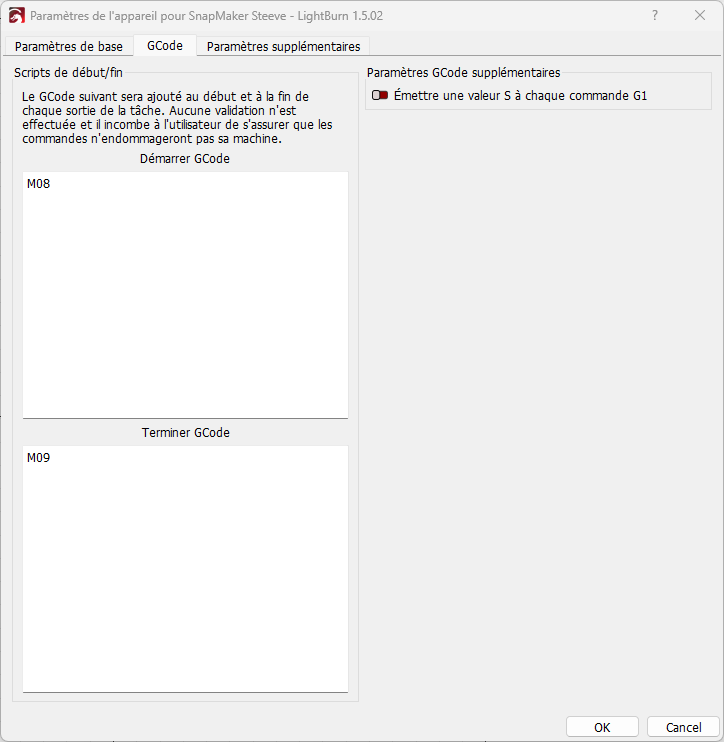
Now in the Laser Settings, Device Settings, Gcode tab, turn on (upper right) “Emit S value with every G1 Command” No idea how we’re supposed to know that, but once this is done, happy burning!
I found a new bug, you’ll want to use GRBL-M3 instead of the plain GRBL profile. I chronicled my findings here:
Ok, bizzarro, SMH time,
I set up a straight GRBL profile as noted and got no joy on the air assist.
Then I noticed that even though Air was toggled ON in the Cuts/Layers window, the individual layers had Air toggled OFF.
I went through the layers and toggled Air ON and the Air started working.
Soooo… I went and checked the Air settings in the individual layers with the other profiles, Marlin, GRBL-M3 and the Snapmaker GRBL profiles, switched them all to ON and now, regardless of which profile I use the AIR is working fine.
@Skreelink Do you have a good test file for this? I’ve implemented the changes already but I never did notice the issue before you mentioned it.
I have noticed that in the GRBL profile the air assist turns on and off during the burn for no apparent reason. I suspect this is during moves, but I am not completely sure.
It should only turn the air assist off either at the end, or maybe between layers, not randomly. If it’s just randomly turning off/on during use, the pump or wiring might be going out.
You can open a gcode file and search for M8 and M9 and count them and see where they occur. M8 turns it on, M9 turns it off.
As far as having a good test file for the offset, I do not have one on hand, no.
Grr… Now that I’m using GRBL-M3, I find that “run boundaries” doesn’t work.
It makes a tiny square in the lower left, regardless of the 11 x 11 inch job I’m working on. What happens when you run boundaries?
Using GRBL breaks boundary and the movement buttons. I’ve not found a solution because I do not use the run boundary feature.
Are you doing the job in imperial or metric?
The design is all in metric, but IDK what happens under the hood.
So at this point, us SM guys can pick which sort of bugs we want in the output…
Not what I was expecting to hear, with the SM being a pretty mature product.
And so far, I don’t see that any of this is SM’s fault!