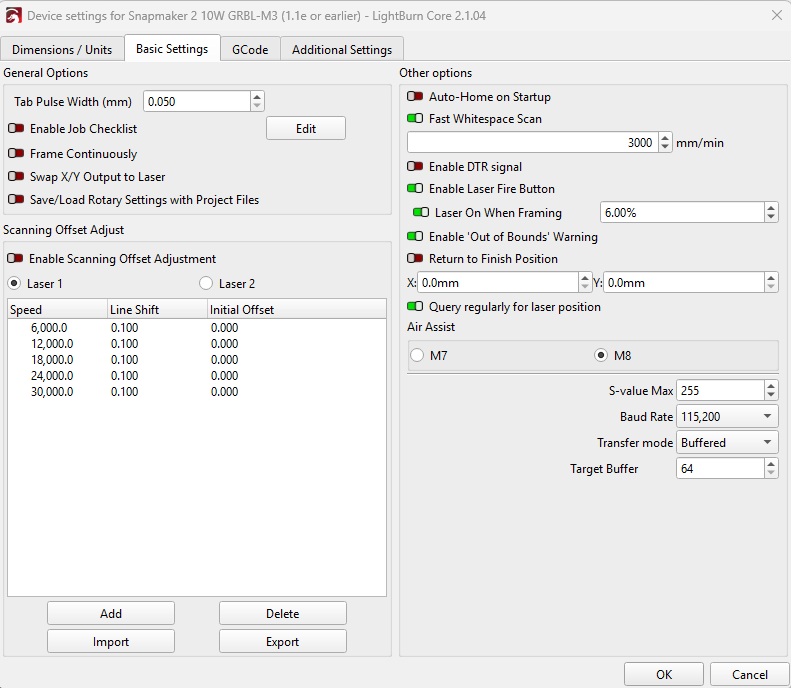
For the Snapmaker 2 A350, Lightburn Core 2.1.03, Device Settings, GRBL-M3(1.1e or earlier) profile, the Target Buffer Setting is set to 64. Can or should this be changed for better performance?
P.S. Running via USB cable
For the Snapmaker 2 A350, Lightburn Core 2.1.03, Device Settings, GRBL-M3(1.1e or earlier) profile, the Target Buffer Setting is set to 64. Can or should this be changed for better performance?
P.S. Running via USB cable
Better performance in what way? If your controller is a DLC32 type, it is already way faster than the machine.
Do you know what the target buffer is?
Yes, better performance, It never seems to run at the speed specified in cuts/layers.
Thought maybe the buffer size adjustment might be an issue.
I have no idea what the controller buffer is capable of handling via USB.
This is because every direction change requires some degree of stopping and restarting, or at least slowing down and speeding up. It is not physically possible for the laser module to travel at the programed speed continously.
The correct statement is that it is unknown how fast the controller can empty the buffer. What is well known is that the controller can accept data and process it at a much higher rate than the motors can move the module around.
Of course, I do not have your machine, so it may not be behaving like what I have experienced. Your controller might be 8-bit instead of 32-bit like many machines are now. Double the Target Buffer size and see if it improves your situation. If not, change it back.
To see if you might have a controller parameter out of whack, clear the Console window (right click), enter $$ and then copy and paste the entire result in a Reply.
The Snapmaker is running as fast as it can. In fact, it’s running faster (in technical terms, not really noticeably) than it’s natively supposed to. It chokes on itself from how Snapmaker set up the firmware.
This will not help, the controller in the Snapmaker series is running Marlin. However, it’s slightly modified and will run GRBL motion code, which is a lot cleaner, thus my earlier statement about it ‘technically’ running faster than native. Cleaner code is usually faster.
From what I understand, Marlin handles the command buffer differently.
GRBL will send an ok command back after it’s given a command and successfully parses it. However, if you know the buffer size (which Lightburn checks on connect) it can preload the buffer and then it knows every time it gets an ok from the controller, there’s an empty slot and can fill it so the controller never has to wait on commands to parse.
Marlin handles the buffer as follows. It replies ok when given a command, and puts it in the buffer of unparsed commands. Which then gets pulled when the machine gives the controller the ok to parse another command. If the machine is still processing a long command, then the buffer will backlog and then marlin will send a wait command, telling the host it can’t accept any more commands to the buffer.
Essentially Marlin takes this buffer step and controls it on its own, keeping its own buffer full. So in either scenario, Lightburn is still sending code as fast as it can and the machine is parsing it as fast as it can.
Now, for the actual Snapmaker 2.0… In my testing, the receive buffer can only accept 127 bytes. (but will only parse commands up to 96 bytes) This is another reason for using the GRBL profile. As the built-in Snapmaker profile generates a thumbnail, which, when sent over USB is over said 127 bytes and will cause the controller to refuse it and stop. This is not just a Snapmaker problem, it’s just the serial buffer limitation. It matches my XTool D1 Pro. Those findings can be found here;
As far as the command buffer itself, according to the controller source code it’s been limited tooooo… 4. However, if you run code via the control screen (HMI), either by uploading to, USB stick, or my drag/drop (or similar) run methods, the command buffer is increased to 8.
// The ASCII buffer for serial input
#define MAX_CMD_SIZE 96
#define BUFSIZE 4
#define HMI_BUFSIZE 8
#define INVALID_CMD_LINE  0xFFFFFFFFU
This was pulled from the source code found here. Given you get double the buffer size using the touchscreen, that will be the fastest way to run code.
EDIT: It can only hold 16 commands in the parsed motion buffer. So the controller can hold 20 commands via USB and 24 via HMI at any given time.
// The number of linear motions that can be in the plan at any give time.
// THE BLOCK_BUFFER_SIZE NEEDS TO BE A POWER OF 2 (e.g. 8, 16, 32) because shifts and ors are used to do the ring-buffering.
#if ENABLED(SDSUPPORT)
  #define BLOCK_BUFFER_SIZE 16 // SD,LCD,Buttons take more memory, block buffer needs to be smaller
#else
  #define BLOCK_BUFFER_SIZE 16 // maximize block buffer
#endif
Thanks for jumping in with this detail. From what is posted, I has assumed it was a typical GRBL board.
I do not know the Marlin board, so thanks again for jumping in to help.
Sure thing.  Though one correction, the Snapmaker Ray actually runs an ESP32 GRBL 1.1f board. The 2.0 and Artisan series run Marlin.
And then there is the A 350, not in your list… 
The A150/A250/A350/A250T/A350T are all part of the 2.0 series. The 150/250/350 dictate the size of the machine, but at the core, are all the same machine. The Artisan only has one size, but is the 3rd and currently final iteration of the Snapmaker 3in1 line.
EDIT: The Ray is a Laser only machine for clarification.
Basically all the information ends in; it doesn’t matter what that setting is. The controller in the Snapmaker is controlling the buffer itself and being a limiting factor. You can use any number in the target buffer.
Actually it does. The controller software is pulling information from that buffer. It expects that buffer to be a specific capacity. You can feed more data into the buffer in bigger chunks, but performance can possibly to suffer.
My question is why have you not changed it to see what happens. Are you expecting the machine to speed up? Is the machine stuttering (stop-starting) during a data transfer, which would indicate it is starved for data? You will not break anything by changing that number, so go for it. Adjust until you are satisfied.
I did a little reseatch for you…
In software like LightBurn, the target buffer setting tells the software how many planner blocks or bytes to send to a hardware controller (such as a GRBL-based board) to optimize data flow without overwhelming the board’s memory.
- Performance Impact: Changing this value rarely yields noticeable improvements if your board processes data faster than your machine can move. As discussed on the LightBurn Software Forum, “If your controller is a DLC32 type, it is already way faster than the machine.”
- Default Values: Many GRBL profiles default this setting around 64 planner blocks or matching the serial RX buffer size (e.g., 256 or 512 bytes) depending on the specific firmware build options.
In technicality, yes it matters. However, in the context of the Snapmaker itself, it doesn’t really. I was being hardware specific. 
The reason I said it doesn’t matter, is because of just how tiny the buffer is. From what I caught from the source code, the buffer can only hold 20 commands over USB, and 24 from the HMI (touchscreen). 16 in the plan buffer, and 4 or 8 depending in the parsed buffer. Also the fact that Marlin is set up to manage the buffer itself, vs Lightburn keeping the buffer full also makes it a bit moot.
Although I could be entirely wrong and those are swapped around. Either way it’s running as fast as it can. You can actually get slightly and by slightly, I mean, likely indistinguishable faster performance by running it via the HMI since you have access to a larger parsed buffer.
I was a programmer (applications developer) for years, so I tend to avoid source code now. 
My posting target was for him to mess with it so he knows the outcome.
I try to avoid when I can. Get that glazed, far off stare into the void looking at it when I need to for research. Especially when doing gcode by hand… so… many… numbers… Visualizing all the movements in your head can get tiresome as well. Least those functions are easier than programming languages.
But also, yes. I agree. Testing is the fastest way to get answers. It’s a simple change, put scrap on the machine, see what it does. Fire makes it interesting!