Hi everyone, I’m new to laser engraving and also new to LightBurn, so apologies if this is a basic question.
I’m designing small letter tags in LightBurn and setting the text height to 0.125 inches. However, once the engraving is done, the letters come out noticeably smaller than 0.125 inches. I double-checked that Rotary Enable is OFF, so it doesn’t seem to be a rotary issue.
I’m trying to understand what could be causing this. Is this related to font settings, kerning, stroke width, DPI, scaling, or something else I might be missing as a beginner?
Any guidance on how to get the engraved text to match the intended height would be really appreciated. Thanks in advance for your help.
It’s hard to tell from a distance, but probably none of those. If the actual size is smaller than on screen, the issue is usually the settings / physical control of the machine. Make sure you are using the same units everywhere and that the laser control is correct. If you send the laser to move 10 mm in move window, does it do that? If you create a 100x100 square, does it come out at 100x100?
Thanks for the response. I am using inches consistently across LightBurn. I haven’t yet tested a commanded move distance from the Move window, but I did cut a 1 × 2-inch square, and it came out accurately to size. This scaling issue seems to occur only with engraved text, not with vector cuts or simple shapes. That’s what’s confusing me
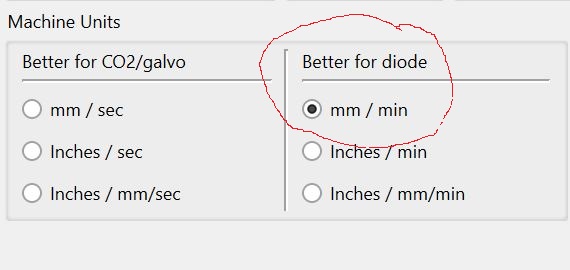
I’m using inches / mm/sec. Is this combination okay, or should I be using different machine settings? I’m still learning, so apologies if this is a basic question.
Interesting observation. I checked in both inches and mm. I never use the border scales and always use the input boxes instead. I did observe, without an explanation as to why, the following:
In the Inches image, nothing matches, font height, bounding box height, and the left grid scale. The grid scale is so coarse that I find it only useful for general positioning.
In the Millimeter image, the Font height matches the inches value, but does not match the bounding box height or grid scale. However, the grid scale and bounding box height do match.
I am sure I have presented nothing new here, but the real question is, “Is this creating a problem with your workflow?” I measured a test burn, and got 3.15mm which is pretty close to your 0.125” font size.
I too agree the numbers would be expected to match. But I use the Font size for text, bounding box for total layout size, and the grid scale for approximate placement of the work.
Is this a Galvo machine? I had to lower the C02 layer speed a LOT for my diode.