The Lightburn window (when not maximized), cannot be re-sized & continually locks to the top.
This is only happening with Lightburn (LB). No other windows.
Using a Mac mini and the most recent version of LB is being used (version 2.0.02)
Can only resize the window from the left or right, but not the top or bottom or corners. Any help is appreciated.I posted a video of the problem in the Lightburn Tutorial Group on Facebook
You have 3 laayers of window stacked on the right. Close Shape Properties or move and dock it with one of the other windows. The UI is taking up more space than you have available on screen.
Try this as a test. Press F12 or go to Window Menu>Toggle Side Panels and that will hide the side panels. You should then be able to resize.
Thanks for the reply Tim, but unfortunately that isn’t it. I did try.
When the LightBurn window is not maximized on the screen, I am not able to move (other than left or right) or resize the entire LightBurn window to whatever size is wanted. Instead, the height of the LB window remains fixed to the top bottom of the screen. If I attempt to move it away from the top ribbon bar, it moves back into place. Locked.
Would you try LightBurn 2.0.03RC4 and see if it fixes your problem? we’ve been tackling a few nagging window size bugs and believe they are now squashed: LightBurn v2.0.03-RC4 Release Candidate
It installs as a separate app, so your setting and preferences on your production release of LightBurn will not be touched.
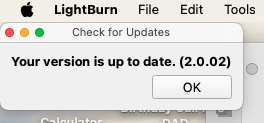
Thanks Colin. When I check for an updated version, it tells me I am up to date with version 2.02.02. (see attached). Is there a way for me to search for the suggested version?
I posted a video showing it on the Faebook post. When you remove the side panel that goes off the bottom of the screen you can resize the window and it stops snapping.
One dilemma though Tim, now the side panels are off and not visible. Once they are toggled back on, the window snaps and locks up top.
But wait, now I understand your first message about having three (3) layers on the right. Once I closed one layer (now just two), I can resize the window as needed.