I keep seeing change log items referencing “jogging fixes” or the like, but its still broken for grbl.
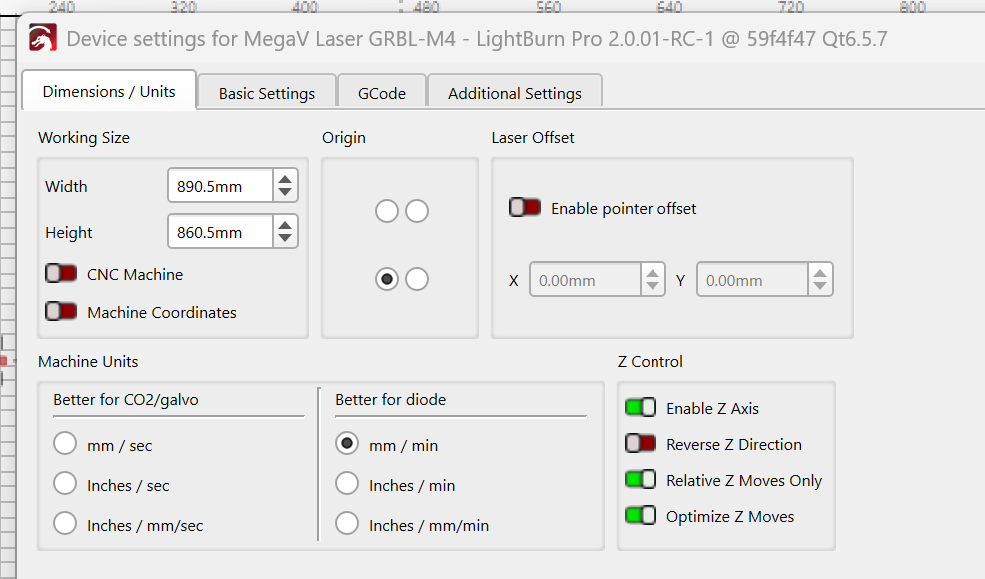
The basic issue/problem seems to be the $J= jog command args are using G53 in V2.x vs. the WCS (G54 usually) in V1.x. V1.x works, V2.x doesn’t. The soft limits grbl config ($20=1) influences if a grbl error 15 is thrown or not when attempting to jog X+ or Y+, but regardless of soft limit state, the direction of control point motion for X- and Y- jogging is wrong. As for soft limits, I prefer to operate my machine with it enabled.
My grb CNC has the upper back right corner as G53 (machine coordinate system or MCS) X0Y0Z0. I believe this is typical of grbl, and encourages users then to set a WCS (work coordinate system) such as G54 offsets to another point in the negative MCS space, again typically this is lower front left corner but can be anywhere. I believe this setup/config is typical for this flavor of controller and CNC processing. I use another Gcode Sender (UGS) for non-laser CNC work, aka when not using LB, and this machine config is certainly normal and compatible with that and other Gcode senders I know of. Again, this setup has worked with LB v1.x just fine, and in fact the LB doc recommended it for grbl machines and some others.
The new LB v2.x device controls of “CNC Machine” and “Machine Coordinates” do flipflop the jogging limit values and interpretation of control point position, but don’t change the fact that $J= jogging is always using G53 0 or positive value arguments which simply don’t work in the config described above.
setup: GRBL device, tried both inherited from V1.7x and new w V2.0.01-RC1, same results.
I’m running v2.0.02-RC1 now, since I don’t want to clobber my V1.7x install (which works fine) yet.
Win 11, GRBLv1.1i
when I ‘Show all’ in console, I see the continuous jog cmds from Move window UI arrows as:
Down: $J=G21 G53G90 Y0 F2000 – no error, motion is opposite direction, towards Y+
Left: $J=G21 G53G90 X0 F2000 – no error, motion is opposite dir, towards X+
In both cases of Down and Left UI clicks, motion is towards G53 Y0 X0 respectively, exactly as the jog command was given. My machine coord system 000 is upper back right corner. btw- I don’t believe the G90 after G53 makes sense as G53 is the machine coord system, adding ‘absolute’ mode also is redundant, there is no relative mode in G53.
Up: $J=G21 G53G90 Y860.5 F2000 – error:15, Jog target exceeds machine travel. Command ignored.
Right: $J=G21 G53G90 X890.5 F2000 --error:15, Jog target exceeds machine travel. Command ignored.
so applying the same logic, the G53 command is out of bounds on my CNC, non-zero values should be negative when G53 is used.
Further, I tried all combinations of the switches “CNC machine” and “Machine coordinates” in the device settings window, no change yielding correct continuous jog behavior.
My config has not changed from V1.7x other than my work area was X891 Y861 allowing for 0.5mm buffer from my G54 offset values. Those values failed also on V2.0.02-RC1.
btw- there is also a problem with “Show all” in console, LB seems to randomly drop the “show all” behavior while the switch state has not changed, still green. Toggling the switch enables “show all” behavior again, for awhile. I haven’t recognized the pattern causing it to misbehave.
$$
$0=10
$1=255
$2=0
$3=14
$4=0
$5=0
$6=0
$10=0
$11=0.030
$12=0.002
$13=0
$20=1
$21=0
$22=1
$23=1
$24=50.000
$25=1000.000
$26=250
$27=5.000
$30=1000
$31=0
$32=1
$100=57.337
$101=57.329
$102=200.000
$103=13.333
$110=8000.000
$111=8000.000
$112=2400.000
$113=8000.000
$120=400.000
$121=400.000
$122=400.000
$123=1000.000
$130=891.000
$131=861.000
$132=88.000
$133=2160.000
$#
[G54:-890.500,-860.500,-5.000,0.000]
[G55:-837.001,-612.568,-79.900,0.000]
[G56:-890.000,-222.205,-6.145,0.000]
[G57:-847.725,-764.552,-5.000,-1080.000]
[G58:-445.000,-430.500,-5.000,-1080.000]
[G59:-890.000,-861.000,-5.000,-1080.000]
[G28:-886.000,-5.000,-5.000,0.000]
[G30:-445.001,-660.044,-5.000,0.000]
[G92:0.000,0.000,0.000,0.000]
[TLO:0.000]
[PRB:0.000,0.000,0.000,0.000:0]
$G
[GC:G0 G54 G17 G21 G90 G94 M5 M9 T0 F0 S0]
attention: @soniclab (has replied to similar issues) @daniellb (recent jogging video)

 I also have brain farts more than I like to admit. I’m going to agree with you that MPOS 000 is redefined after a homing cycle, because prior to homing cycle, MPOS 000 is control point position at machine power-on, a point I made earlier as I now recall. In the case of my CNC, its redefined to the upper back right corner, but not the location of the homing switches, which I believe we squared away the latter point in a prior post exchange. And isn’t that post-homing cycle MPOS 000 corner inferred from the value of $23 ?, kinda where this rabbit hole began.