Quite the contrary, a screw drive machine has much more torque that is needed to overcome material resistance with a cutting tool. There was never a big screw-drive CNC machine without limit switches. Belts will slip, screws will not.
I agree that screws have a lot more power. But a 3018 uses nema 17 motors with only a bit of current. You’re going to skip steps rather than tear your frame apart  I should know, I’ve done it plenty
It took me a while to figure out why the jog buttons would not let me move left - I use the start from current position and use the cut selected image 100% of the time. Manually positioning and then jogging for minor movements - it now longer allows negative numbers. So the machine start up think the laser is at 0,0 and moving up or left does nothing. The only way, unless there is something I have over looked it to jog down and right and then reposition the laser manually.
Um. Your machine coordinates are in negative space?
If so just toggle the CNC machine toggle, that ought to restore jogging for you according to the way the buttons are laid out.
We were never supposed to allow a negative distance, that was a bug…
this is with a laser and manually setting the position no longer allows you to then jog up or left because negative numbers are no longer allowed. To get around this I have to pull the laser down and jog 40 or so up and left and then reposition so that the software will allow minor adjusting jogs. This has been my workflow for 3 years - it works flawlessly for what I do - I just have to remember to get the software to think it is no longer on 0,0.
What exactly do you mean when you say “negative numbers are no longer allowed”? In the Go To position fields?
Where is your X0 Y0 position set to be?
@goeland86 , Jon, you nailed the fix. Thank you !
I finally got around to testing LB V2.0.03 RC3 for the OP problem, it’s working great now.
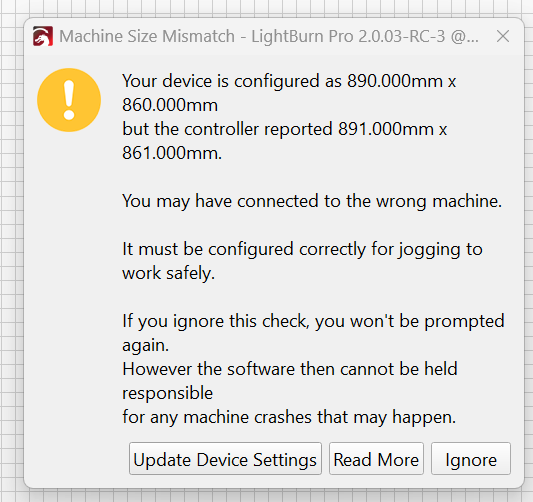
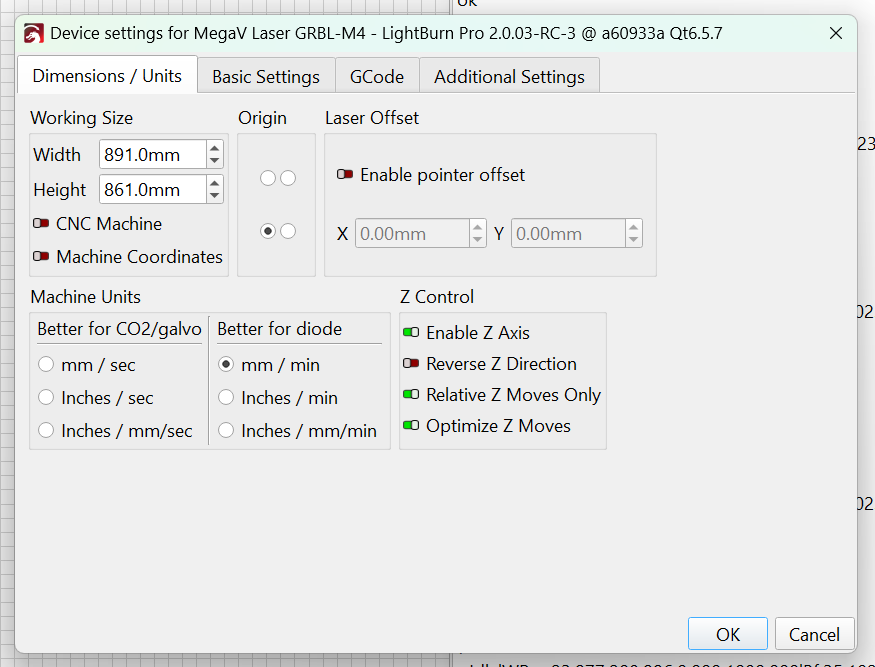
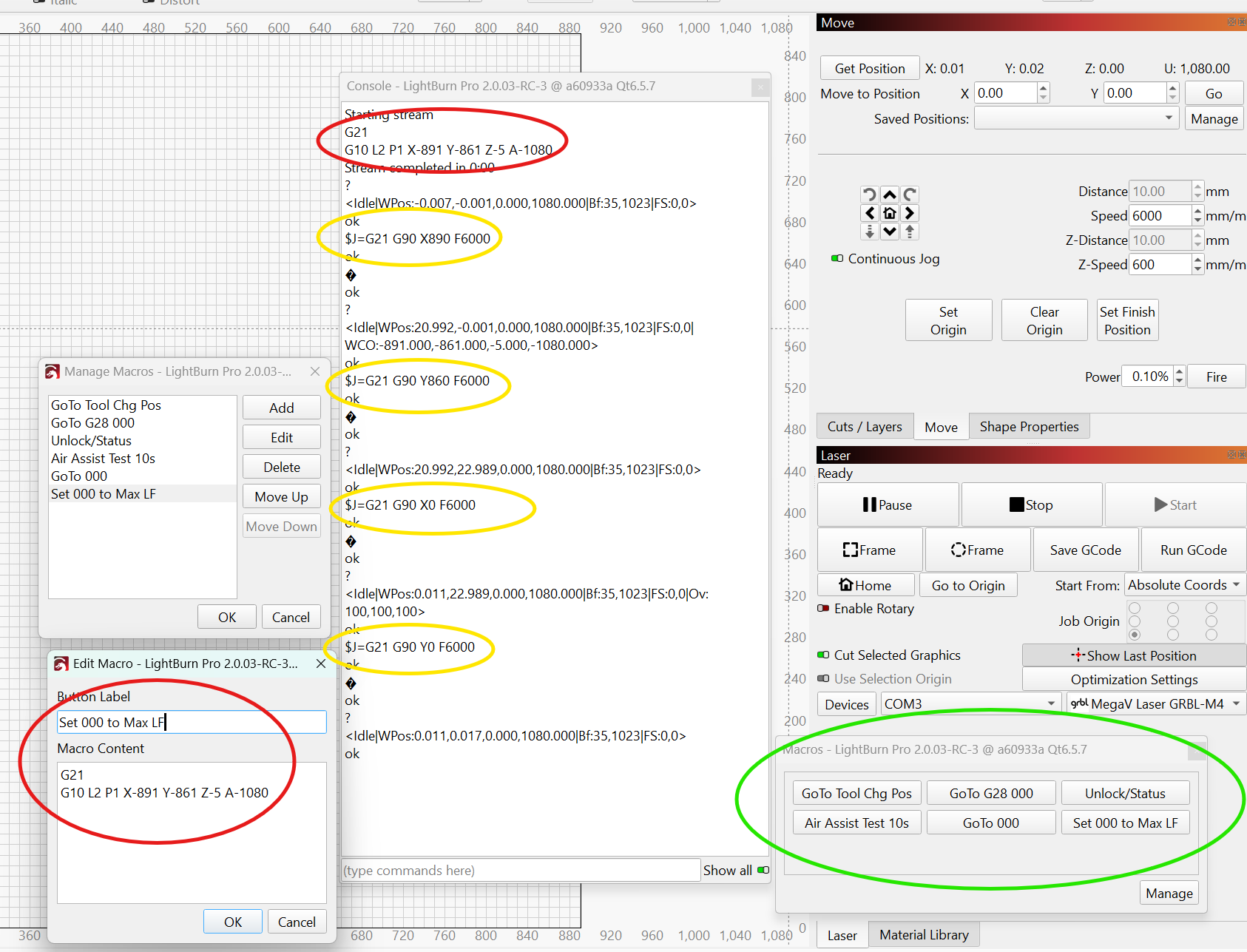
There are even some very nice sweeteners, such as fixing the pesky jogging error thrown when the working size was exactly the XY dimension in grbl config $130, $131, AND you made a nice warning dialogue popup upon first use to tell the user the dimensions don’t match ! I see the jogging boundry clamp is -1mm from defined working size, nice choice; that eliminates grbl rounding over the boundary dim when steps/mm are not evenly divisible by 10, such as the case with my machine. I use to keep working size intentionally different by -1mm and set my working area via G10 L2 P1 to allow a 0.5mm gutter on all sides to avoid the error. Well done. The Help on this topic is well done also. Machine Size Mismatch - LightBurn Documentation And all this works with grbl soft limits ON !
I’m providing some screen shots for others to see in case they may run into this setup. To be clear, I’m using my CNC 4 axis grbl machine for routing, plasma, and laser process. When routing and plasma, I use another CAM and UGS sender, laser is all LB. I’m fooling around with MillMage as time permits, as possible replacement for routing sw. I use LB CAD for all 2D work anyway.
my grblHAL config…
$$
$0=10.0
$1=255
$2=0
$3=6
$4=0
$5=15
$6=1
$9=1
$10=4094
$11=0.002
$12=0.002
$13=0
$14=70
$15=0
$16=0
$17=0
$18=0
$19=0
$20=1
$21=0
$22=3
$23=1
$24=50.0
$25=1000.0
$26=250
$27=5.000
$28=0.100
$29=0.0
$30=1000.000
$31=0.000
$32=1
$33=5000.0
$34=0.0
$35=0.0
$36=100.0
$37=0
$39=1
$40=0
$43=1
$44=4
$45=3
$46=0
$47=0
$62=0
$63=2
$64=0
$65=0
$100=57.288
$101=57.288
$102=200.000
$103=13.333
$110=16000.000
$111=16000.000
$112=3000.000
$113=15000.000
$120=800.000
$121=800.000
$122=700.000
$123=4000.000
$130=891.000
$131=861.000
$132=88.000
$133=2160.000
$341=0
$342=30.0
$343=25.0
$344=200.0
$345=200.0
$346=1
$376=1
$384=1
$398=35
$481=0
I’m glad to hear it!
Yeah we’ve been trying to get it all make sense and be more “CNC friendly”, because before that it was more oriented towards purpose built laser controls.
With MillMage in the works, and a shared communications layer, we added a whole lot of extra things into gcode support.
I admit we flubbed a bit on explaining the main changes for users with a multi purpose machine like yours, though. Hopefully it is a transition that was worth it. We don’t expect to change this anymore moving forward. At least not without a significant communication in the app about what’s changing and how to adjust profiles as needed.
Cheers!
Hi all,having read all the above posts (and thoroughly confused myself doing so),
am I correct in my assumption that there is problem with the move/jogging functions
there is in v2.0.02, it’s now fixed in v2.0.03-RC3+.
Can I now dump this version and download the working one or am I stuck with what I have
Having installed the latest version, it still has problems with the jog/move function
Jog Y+ a couple of times, jog X+ a couple of times, try to jog again and still the laser moves back to start.
Spent too much time on this, all I want to do is use the software with out all the hassle.
So, with regret, it is not for me.
I’ll look at it in a couple of months to see if it can be downloaded, installed and just used, then I will be very happy to buy it.
So, back to laserGRBL , where I can actually do some work
Richard
I truly understand what you mean!
One of the reasons for these changes in LightBurn version 2.0 is so that users do not necessarily need to know how to program an offset with an absurd command like G10 L2 P1 X0 Y0 Z0, and actually get work done instead.
Which “latest” version did you install?
As correctly mentioned by Lou:
2.0.02 is the latest “Release” version. This one still has the jogging bug, which this thread is about.
We addressed this in the mentioned v2.0.03-RC3 (RC meaning Release Candidate, Beta, if you like).
We recently announced a newer candidate for an official release, RC-4, which you can download to test on your machine.
You’re also welcome to wait until the dust has settled and an official release is available.
However, note that the correct setting for your specific device still needs to be found and that we might need more information about your setup to do this.
If your free trial has expired by then, email us the Trial ID, and we’ll be happy to extend it for you.