@Aaron.F and @goeland86 of LB support team asked that I open a forum thread for this new problem…
while collecting data on a recent jogging bug, I noticed another potential bug related to incorrect gcode motion. The new problem results in an alarm 2 thrown by grbl when cutting or framing in User Origin mode. I use all three ‘Start From:’ modes, it just depends on my table fixturing and job situation / condition. Current Position and Absolute mode work fine with the same settings config. btw, I run with soft limits ON which is why grbl throws alarm2 instead of crashing the rails.
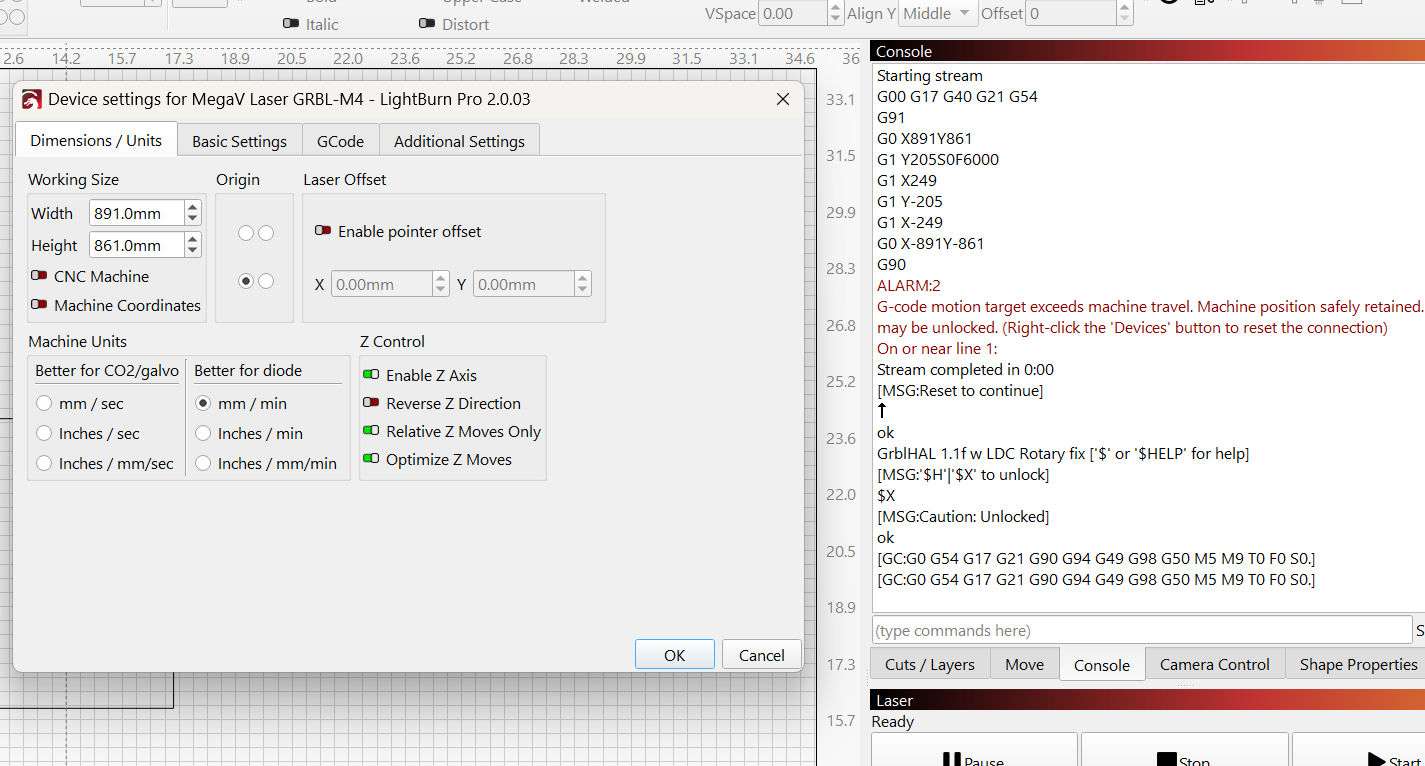
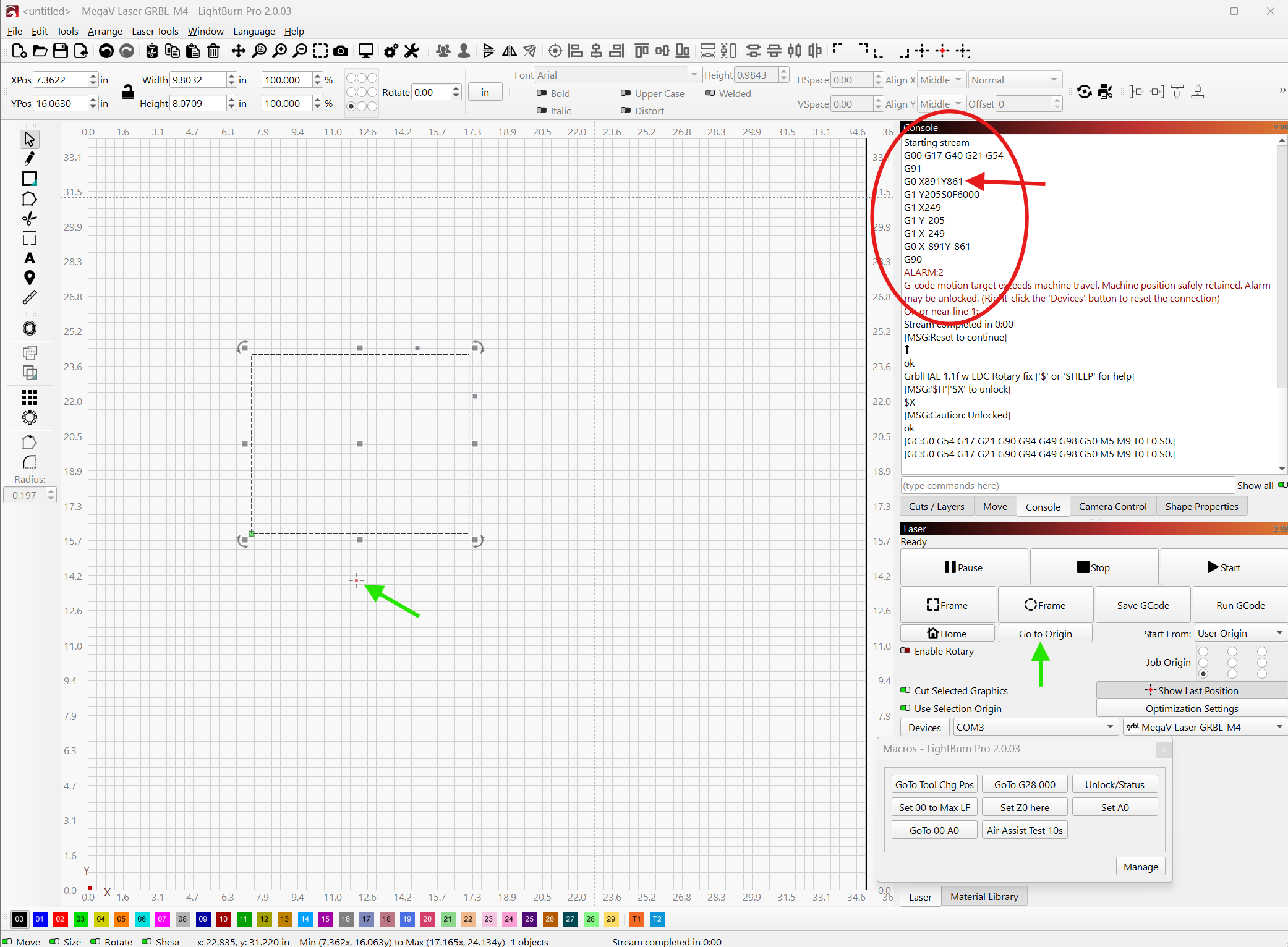
So the screenshots and console log were performing a Framing operation, the first two are Current Position and Absolute modes, the 3rd is User Origin with alarm 2. Notice the G91, then ‘G0 X891Y861’, both coords are out of range. The control point position at time of Frame click was the User Origin, so frame setup pos should have been G91, G0 X0Y0 coords, ie no motion. Interestingly, as I write this, I just jogged X-10mm from User Origin, tried to frame again, same alarm 2, but this time the frame setup pos causing error is: G91, G0 X901.002Y861. Notice X is adjusted 10mm more positive, still wrong by an amount of X work area dim + 10, which is consistent with already having control point at User Origin as the first case did. So the position error factor is work area dims of X and Y.
Although the screenshots are of v2.0.03, it also fails in 2.0.04.
Ok - looking through it from scratch, it’s clear that there is a problem when using LightBurn on a CNC in negative G53 coordinates using a G54 offset.
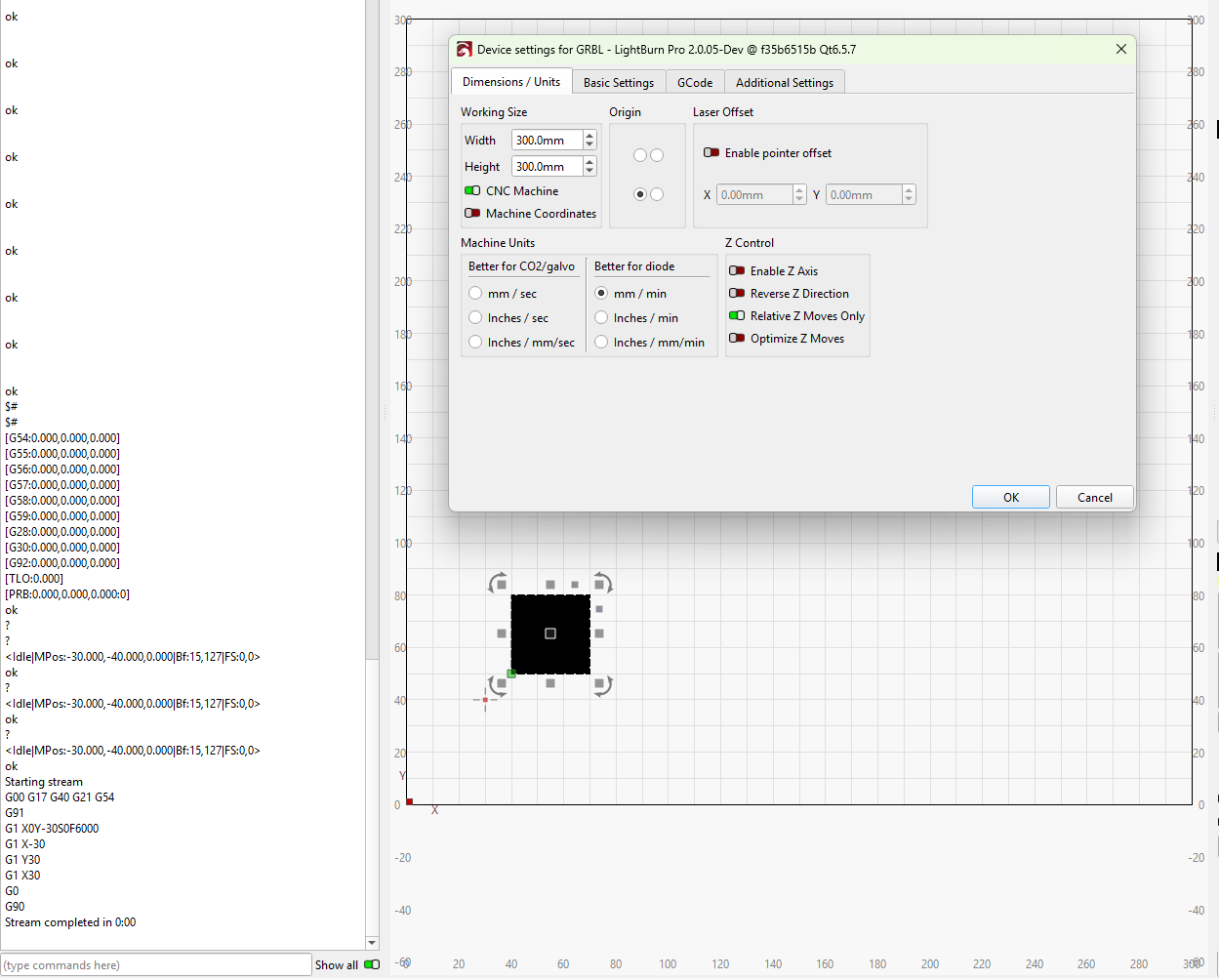
That said. A whole lot of work went into LightBurn 2.0 so that you can remove the G54 offset to make LightBurn work directly with a CNC machine. See the screenshot below:
Notice the important elements:
G54 is [0,0,0] - I cleared this with $RST=#
CNC Machine is toggled in the settings.
User origin was set to where you see the cursor in the window below the device settings.
The gcode block is what was output when I pressed the Frame button (the square one).
I realize LightBurn was not communicating this very well at all - and we realize this has been an issue. But I assure you that if you remove the machine-side coordinate offset, set the CNC Machine toggle to true, and reset your User Origin to the right position, your work will come out better for it.
You may also want to change the origin location from bottom left to top right, though that may rotate your designs 180 degrees around the center of the machine bed. But this is the best way to operate LightBurn 2.0 and onwards when using a CNC machine.
The G54 offset was a necessary evil for LightBurn 1.7 and prior - no more.
correct and correct. but it appears from your second post that you determined that already, just confirming.
agreed. So will it be fixed ? or does the rest of your post explain why it won’t be fixed ?
I tried your suggested workaround before I reported the problem. I agree that your alternate config method does work, but only in the ideal world where the only CNC CAM and control software I’m ever going to use is LB. That is not the case for me, and I find it unlikely for anyone using a laser on a traditional CNC where other mfg processes are also being used at times, such as routing and plasma. In those other cases, there is other than LB CAM and control sw being used, as is my case. Thus I have a mental and practical image of my work area where the work coordinate system is X0Y0 at front left corner of my table. So for that reason it’s uncomfortable to use back right corner for 0,0 origin only when doing laser. I also have machine coordinates for ‘fixture’ locations on the table, such as tool change position at G30 (front middle), and work area retract parking at G28 (back left near homing switches). Those are negative machine (G53) coordinates, which don’t translate to the correct locations UNLESS the 0,0 origin is changed in device settings to back right corner. Thus, neither position of device settings for machine origin is correct for my setup, a setup which was correct prior to v2.
It would be much easier for me to cease using the Start From: ‘User Origin’ option than to change the device settings and abandon G54 offsets as you suggest.
You could always use Machine Coordinates toggle such that we send all moves using G53 instead of G54, thus ignoring the G54 offset without needing to reset it.
I struggle to understand your work flow, and perhaps what you really need is G54 support in Lightburn the way it is used in routing software?
That is exactly what I desire and the way LB use to work, pre v2. I haven’t tested this on MM, but hopefully it does respect G54 offsets with all Start From: options.
If I’m the outier use case with LB, then I understand the LB position to leave v2 behavior modified from prior releases. Like I said, I can cease using the Start From: User Origin laser window setting, it’s an implementation of a WCS offset concept that is foreign to traditional CNC coordinate systems anyway, and as such I had trouble grasping it 6 years ago, but have since come around to finding it’s value in the LB laser niche. I can work without it though, not a big deal.
hey @bLouChip, we’re still discussing internally about this.
As far as we can tell, the issue really is linked to the fact that prior to the 2.0 release, LightBurn was completely oblivious to machine coordinates, and relied only on G54 workpiece coordinates.
This is no longer the case, and in fact we’ve made a specific effort to allow MillMage and LightBurn to share project files and use the G54 offset in MillMage for mixed projects.
That being said, the expected way (and I agree the communication around this was lacking), is to have LightBurn not use G54. or more specifically, use it when it’s set to [0,0]. Then you can set your design at the machine coordinate (G53) matching that of your workpiece if it was after milling, or use that as your reference for setting G54 for milling operations later.
If you prefer modifying your workflow to not use User Origin in this use case, that’s completely valid.
I still believe that using no workpiece offset for LightBurn, and then setting one for your plasma or routing operations is the more reliable approach to this. Especially if you have the freedom of making them use another offset than G54, like G55 or further. However I’m not you, and if you prefer a different workflow change, I can respect that.
@goeland86 , thank you and team LB for giving this issue a thorough look. Given the choices I have as is, I’ll continue with the G54 use as it maps to my other CNC processes, I’m fine with ceasing the use of the Start From: ‘User Origin’ option. The Start From: choices of ‘Current Position’ and ‘Absolute Coords’ are fine for my workflows. For the past 10 months or so, I have had installed an overhead camera to leverage the camera features of LB, and running jobs in ‘Absolute Coords’ is desirable if not mandatory in those cases anyway. I have also found that I can still use ‘Set Origin’ and ‘Return to Origin’ if I ever want to use a temp ‘waypoint’ on the table, I just can’t run from ‘User Origin’.