Rotary ccw jog alternates direction each click

using LB v2.0.03 ga., grbl v1.1i 4 axis with chuck config., LB device GRBL
The rotary cw Move button works fine, correct direction every click.
The ccw button alternates rotary direction of motion on every click. very odd. See the alternating gcode cmds in the console log.

Starting stream
$$
$0=10
$1=255
$2=0
$3=14 ## Z and A reverse direction
$4=0
$5=0
$6=0
$10=0
$11=0.030
$12=0.002
$13=0
$20=1
$21=0
$22=1
$23=1
$24=50.000
$25=1000.000
$26=250
$27=5.000
$30=1000
$31=0
$32=1
$100=57.337
$101=57.329
$102=200.000
$103=13.333
$110=8000.000
$111=8000.000
$112=2400.000
$113=8000.000
$120=400.000
$121=400.000
$122=400.000
$123=1000.000
$130=891.000
$131=861.000
$132=88.000
$133=2160.000
$#
[G54:-890.500,-860.500,-5.000,0.000]
[G55:-837.001,-612.568,-79.900,0.000]
[G56:-890.000,-222.205,-6.145,0.000]
[G57:-847.725,-764.552,-5.000,-1080.000]
[G58:-445.000,-430.500,-5.000,-1080.000]
[G59:-890.000,-861.000,-5.000,-1080.000]
[G28:-886.000,-5.000,-5.000,0.000]
[G30:-445.001,-660.044,-5.000,0.000]
[G92:0.000,0.000,0.000,0.000]
[TLO:0.000]
[PRB:0.000,0.000,0.000,0.000:0]
$G
[GC:G0 G54 G17 G21 G91 G94 M5 M9 T0 F100 S0]
?
<Idle|WPos:627.808,194.450,-36.000,-1068.978|FS:0,0>
Stream completed in 0:00
g91 g0 a360 ## correct motion
ok
g91 g0 a-360 ## correct motion
ok
Starting stream
$J=G91G21 Z0 A1 F4000 ## correct motion from cw button
Stream completed in 0:00
ok
Starting stream
$J=G91G21 Z0 A1 F4000 ## correct motion from cw button
Stream completed in 0:00
ok
Starting stream
$J=G91G21 Z0 A1 F4000 ## correct motion from cw button
Stream completed in 0:00
ok
Starting stream
$J=G91G21 Z0 A1 F4000 ## correct motion from cw button
Stream completed in 0:00
ok
Starting stream
$J=G91G21 Z0 A-1 F4000 ## correct motion from ccw button
Stream completed in 0:00
ok
Starting stream
$J=G91G21 Z0 A1 F4000 ## wrong motion from ccw button
Stream completed in 0:00
ok
Starting stream
$J=G91G21 Z0 A-1 F4000 ## correct motion from ccw button
Stream completed in 0:00
ok
Starting stream
$J=G91G21 Z0 A1 F4000 ## wrong motion from ccw button
Stream completed in 0:00
ok

This is not related to your issue, since I guess it’s a LB bug in your case. But which version is this? This is not a standard grbl firmware, right? Or are you using grblHAL? $3=14 is not possible with a standard grbl firmware.

Your right, non-std. I’m told by the mfg MillRightCNC that they developed this grbl v1.1i 4axis (XYZA) in 2019, forking from the github grbl v1.1f 3axis at that time. It runs on the ATmega2560. Also not likely related to OP issue, but to be thorough on further non-std aspects of this grbl, in early 2023 I fixed it to correct for the G94 G1XAF feedrate bug which likely still exists in most other grbl builds. I collaborated with grblHAL on that fix, see Where in the code is G94 G1 XA feedrate situation assigned to X while A is coordinated to move with it · Discussion #241 · grblHAL/core. I know Neje has applied the fix to their grbl firmware since then.

re. $3=14… correct again, normally not allowed on a 3axis grbl, but in this case of 4axis, the left most bit of the axis invert direction mask 0b1100 is for the A axis.

1 Like

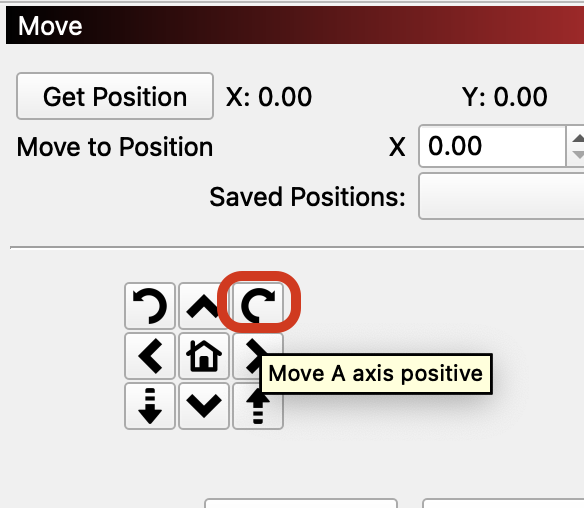
I suppose, you are referring to this button in the Move window. Is that correct?

That sounds wrong.

So, each successive click on the CCW button alternates between $J=G91G21 Z0 A-1 F4000 , and $J=G91G21 Z0 A1 F4000

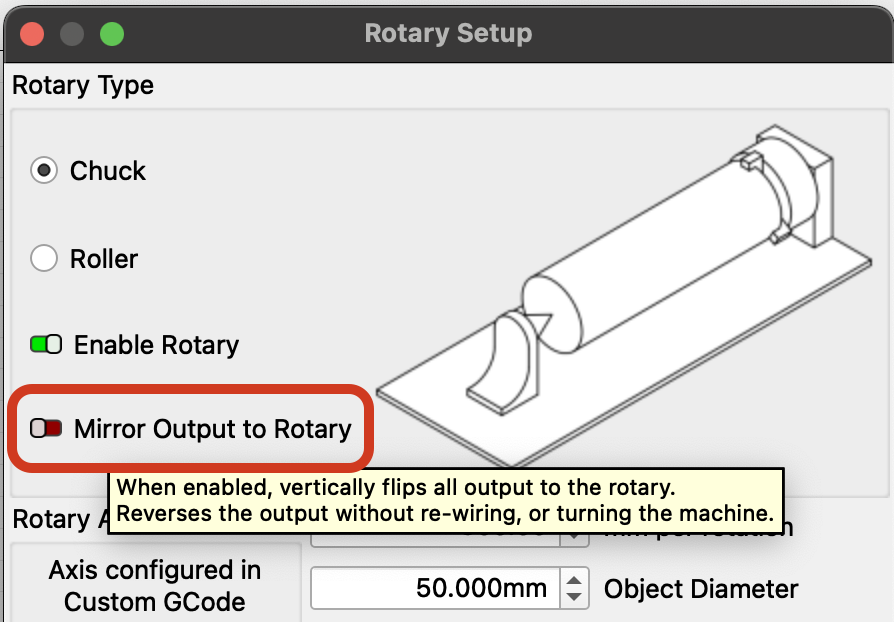
What’s the status of this setting in the Rotary Setup, and does switching this change the behavior?

What happens, if you disable $J Jogging in the Device Settings?

No, the other rotary jog button, to the left of what you have circled. the CCW direction. The button you have circled I’m referring to as CW direction, and it works fine.

agreed, but true.

correct. Exactly as the jog commands are showing. The controller did exactly as it was told, but the LB UI did not. As far as I know, there is no intentional means of programming the device to alternate direction on successive same-button presses.

as to the remaining questions you have, I’ll have to collect that info later today when I get to the shop.
Thanks for looking into this odd behavior.
I’m still LB’s biggest fan :blush:

Sure, CW, and CCW. :slight_smile:

It’s definitely odd, that one works, and the other alternates on successive presses.

If possible.
I’d be curious to know, if the behavior changes, when you toggle the “Mirror Output to Rotary” option.
And if it’s only happening with $J jogging.

But at this point, we have enough to create a bug report. It’ll likely be looked at next week.

:heart:
Thank you for bringing it to our attention!

1 Like

Status of ‘Mirror Output to Rotary’ = OFF
When flipping to ON, the cutting output is mirrored vertically (along the rotary axis as mirroring line) which is normal as I understand it.

other than $J being absent from the jog cmd, same result.
Continuous jogging is disabled for Z and rotary buttons when $J is enabled in settings, although step jogging is performed with $J prefix on the motion command when the ‘Continuous Jog’ switch (at Move window) is OFF.

New discovery though, not only does CCW button alternate step direction jogging, but it also latches the direction change for the CW button. Thus CW button can step jog either direction, the direction being the last direction of CCW. SO, even more wierdness :wink: But, I can live with this. Obviously still a bug based on how buttons are labeled, and perhaps relative to design intent :wink:
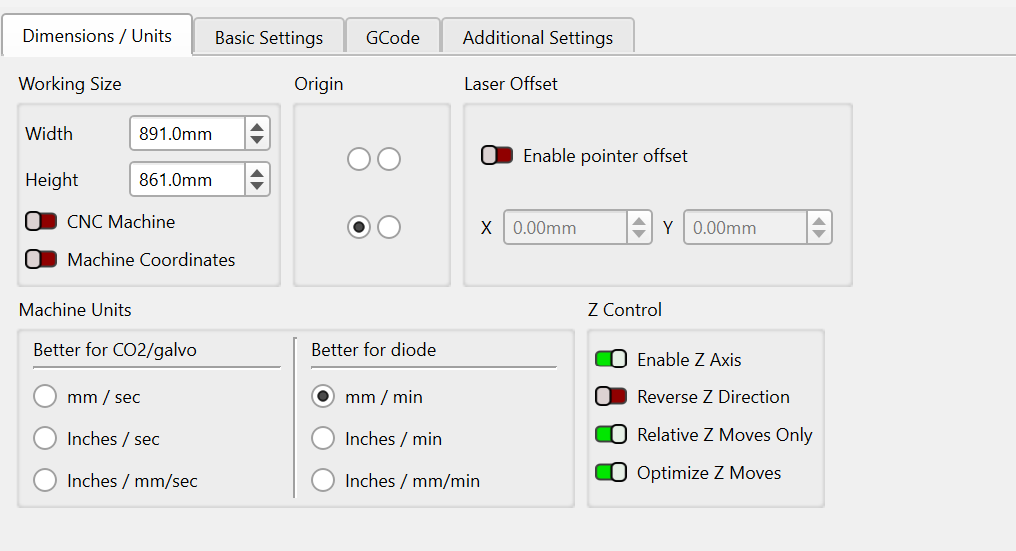
in case you need device settings-

1 Like

Thank you for this detailed write-up!

I’ve added this to the report.

Will update you on the status here.

This topic was automatically closed 30 days after the last reply. New replies are no longer allowed.