Vision Pro 45W laser. LB 2.0.05, WeCreat MakeIt! 3.0.4., Vision Pro firmware version 1.0.7, Comm Port Driver from WCH CH341 (CH340). Comparing laser operation between LB and MakeIt!. #1: Autofocus. No difference, both do the same thing successfully. #2: Material Test. MakeIt! performs the materials test successfully (autofocus performed first), LB goes to center of work area and raises to full height as if it were doing a material test on something 5 inches thick and begins “burning”, EVEN THOUGH an autofocus had successfully been performed immediately prior to attempting the material test. #3: SAFETY FEATURES. MakeIt! software causes laser to cease firing when either the lid is raised OR the “start” button is pushed. LB disables safety features completely. I have seen in this forum that others have had to go backward to LB version 1.7 in order to get functionality. I bought a license for 2.0. Will I be forced to buy a license for 1.7 if I go backward? If I go backward, will I be forced to buy a license to go forward again once these flaws are corrected?
Your license should work for any release. Even if you wish to back up.
I’ve seen a few discussions on the forum. Suggest you start by checking out this thread.
I know some of the things handled by their controller isn’t really standardized grbl.
Good luck.

Thank you for your reply. I haven’t even thought about attempting rotary work yet, since I cannot successfully create a materials test. I am disappointed with how the 45W Vision Pro does not work with LightBurn, and I don’t care to try to place “blame” on either company. I am startled though that the safety features would be disabled. I am hopeful that after the Chinese New Year when things get back to “normal”, WeCreat and LightBurn will be successful in working out a resolution to what should be the most basic of functionalities, and be more proactive with enabling features that LightBurn has that I have yet to look in to due to not being able to get started at all. I have downloaded LB ver. 1.7, but have yet to install it and see how it works.
When a machine doesn’t work with the same gcode as others, it can be a problem. Many of these Chinese companies will not work with Lightburn to help them out.
Most controllers handle the safety interface, so I’d be surprised to find that Lightburn disables the protections, more like the output from your laser isn’t being used or isn’t known.
Maybe Lightburn people can answer your questions. Hang in there.
I agree with @jkwilborn on this one. The safey features are all in the controller and Lightburn would not turn them off or on. You (Lightburn) would have to know (crystal ball?) which (non-standard GRBL) parameters to change.
Feb. 25, 2026. I contacted WeCreat Support. It appears that the Vision Pro (and maybe other WeCreat lasers) will ONLY work with LightBurn ver. 1.7.08. Furthermore, each and every time you do something in LightBurn you must double-click on EACH AND EVERY LAYER and put the Z-offset to 100.00mm. Since there is NO autofocus in LB ver.1.7.08, you must also put in the material thickness. I can see the lack of autofocus being something almost insurmountable with doing anything involving the Pass-Though, Rotary/Cylindrical and Hover. I just may have to use LB as an image program, saving the result as an SVG and importing it into MakeIt!. Also, as far as the safety features being disabled, the tech suggested I send an email to WeCreat support.
Are you willing to try 2.1.00-RC2 With the following device:
WeCreat-Vision_Pro-V1.0.lbzip (6.8 KB)
and check if it works? Installing 2.1.00 keeps 2.0.05
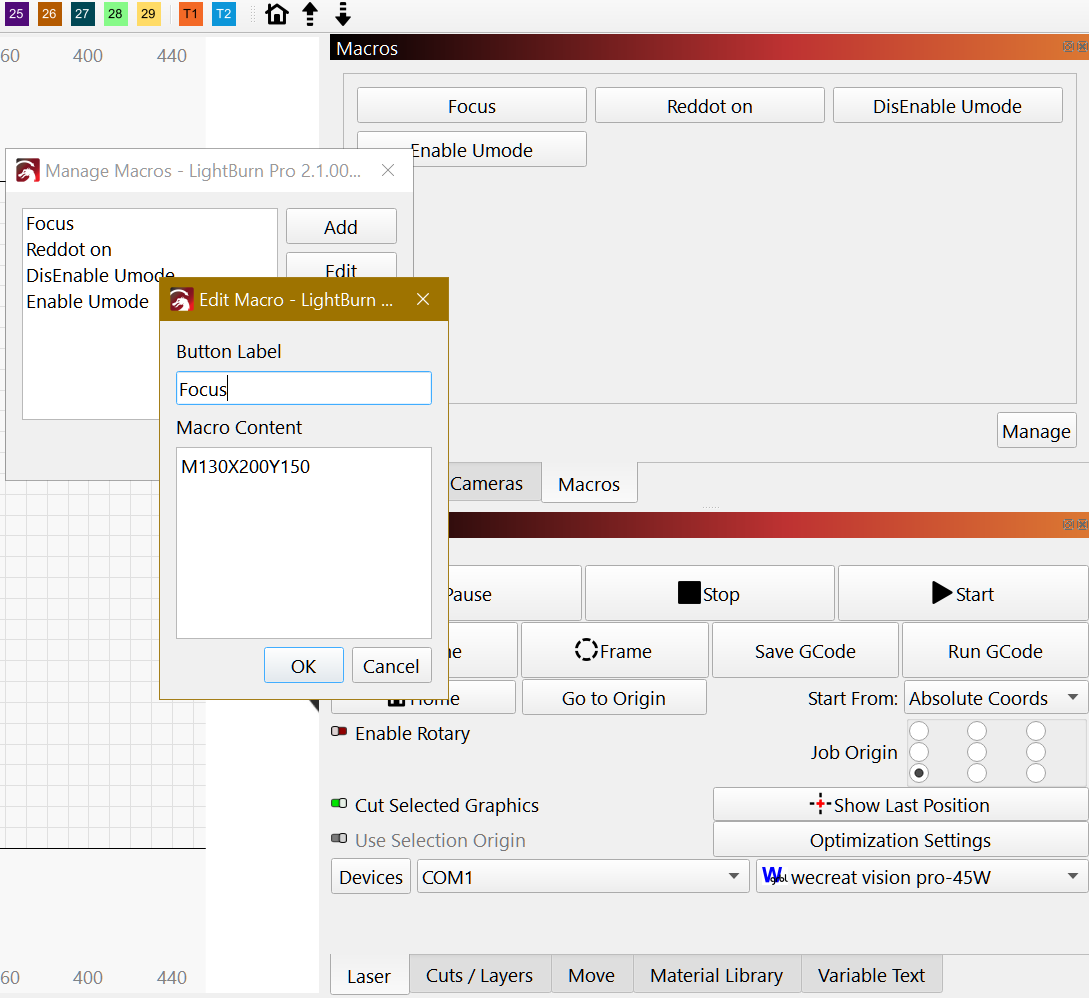
If you go to the Macros Window and click Manage then Focus > Edit you can change the Macro point coordinates.
EDIT: updated device with image from Wecreat.
parsec, why a “zip” file so large (23.4KB) when the WeCreat-Vision_Pro-V1.0lbdev is only 4.32KB? Also, exactly how would I change the Macro point coordinates and to what would I change them? If I were to do this, would it be effective ONLY for the 2.1.00-RC2? I am not knowledgeable (not even “dangerously”) in the field of Macros, how to create or edit, etc. them or use them.
It has a Logo with a W in it but have to edit and change to Wecreat logo.
Lightburn 2.1.00-RC2 has some updates that may work better, and you can have both running side by side.
You can change the values of X and Y to values within the laser’s work area. Ideally were you place your materials to manually focus.
A Macro is simply a series of commands, typically GCode, that is sent to the controller when the macro button is clicked. It is basically a text file, but you do everything in Lightburn. Very simple to do and manage. Fear not!
I have tried researching (Google!) macro codes and almost everything I see does not have a “complete” list. In fact, several of the codes re: WeCreat!'s 45W Vision Pro are not even listed or defined so how am I to proceed? Where do I find a “complete” and pertinent list?
There is no “standard” macro, and thus no list. Each macro is very specific to your machine AND to your particular needs.
Knowing what GCode commands, especially the non-standard ones, can only come from the manufacturer, or someone lucky enough to know them.
For example, a macro to retract my laser module out of the way would be likely different than yours. If you have a specific operation you need to happen with the click of a button, state your need here and somebody can likely help.
Their answer is to use their software.
There are plenty of undocumented gcodes out there. This is exactly why your machine is not as compatible as you wish it was with Lightburn. They don’t tell anyone the codes, that’s more than common, you wonder if it’s written in their law somewhere.
Unless they tell vendors like Lightburn about their selected codes, there will never be fully compatible.
Good luck.
When people use the manufacturer’s software, they often find features that Lightburn cannot duplicate for exactly the reason @jkwilborn mentions here. One manufacturer popular but nameless here does not even execute standard GRBL commands properly. And yet you see claims of generally compatabile with Lightburn.