xTool D1, non-pro, cutting lines works fine, but engravings are always shifted a few mm

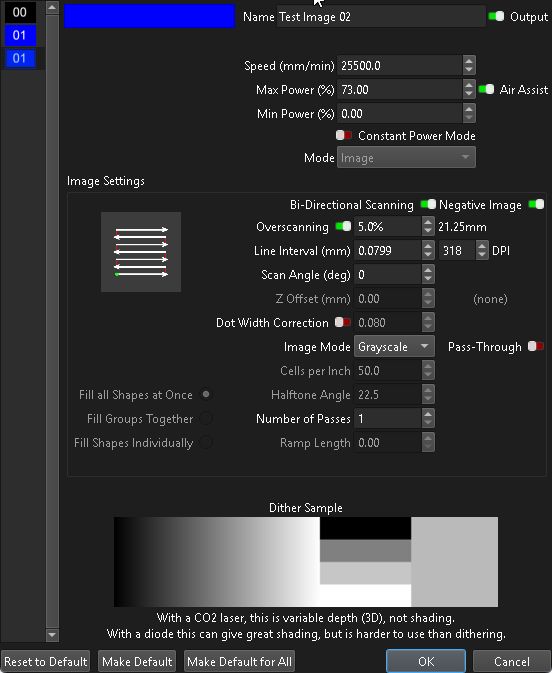
I did another engrave on cardboard and used a different image and settings, and it came out perfect, here were the settings I used.

So then I tried engraving a slate tile with the first settings and I got shuddering on the X-Axis, and the image was all messed up, so yea, it must be my settings.

I ran into another problem, the old version of the Devil1 Lobotomy Kit does not enable the red cross hair, and the controller limits the laser firing for aiming the laser to just a few seconds, yea, I have to walk across the room to move the laser head and by the time I get there the laser shuts off, I have read there are macros you can set up to help with that, and the later versions of the Devil1 Lobotomy Kit enabled the cross hair, and I have the firmware for both, so I may try the new-er firmware, but I wonder if I can, or need to, disable the other two limit switches in Lightburn because I don’t have them, the Devil1 Lobotomy Kit I have only has the two front limit switches, BTW the 3D printed limit switch holder for the X-Axis was so old it just fell apart, I had to use some industrial velcro to told it in place along with a bolt to trigger the switch.

That’s what caused the initial problem and what will cause the next problem.

The home switches set the home position, so any looseness in their mounts directly causes positioning errors.

Velcro is good and I use it a lot, but both home switches must have rigid mounts. grin

2 Likes

The first xTool D1 never had any limit switches from the factory, the limit switches and 3D printed parts came from the Devil1 Lobotomy Kit that was an aftermarket controller upgrade for the xTool D1 sold by a seller on Etsy, the limit switches are now installed, but I don’t use them, I grab the laser head and move it by hand o were I need it to be using the laser to frame what I am trying to cut or engrave.

Also I never touched or moved the laser between engraving and cutting, and the cut and engrave were centered on each other on he screen, a 100mm square engrave inside a 100mm square cut.

That’s the cause of a whole 'nother set of problems, because (in the absense of motor feedback sensors, which I assume the machine does not have) dragging the head by hand means the controller thinks the laser head is at an entirely different place than its actual position.

The typical symptom is having the design look like it’s entirely within the LightBurn workspace, but the controller calmly smashes the head against the end of the axes because it’s lost track of the actual position.

If you have disabled GRBL’s automatic homing, then you must use the manual homing process to ensure the controller knows the laser head position:

Thereafter, if you always move the head using the jog buttons and never yank it around by hand, the machine will never get into trouble after it homes correctly.

1 Like

Yea, I just installed that controller upgrade yesterday, I have been having problems for over a week.

Also has I said, the first xTool D1 was not made with limit switches, and it was normal to move the laser head to your work area.

I tried the firmware and LightBurn config for the newer version of the Devil1 Lobotomy Kit to see if the cross hair would be enabled, but was not, also it tries to home when you first start up, and because I only have two limit switches and not 4 like the newer version, it tries to slam into the frame, so I erased and flashed the old firmware back, and deleted and reinstalled the old LightBurn config, unfortunately it still tries to home to four limit switches and now the X-Axis is somehow reversed, LOL.

If it’s that controller, then it homes to a single switch on each axis.

You must ensure the switches are working and connected properly, then configure the controller to home toward those switches.

Their doc seems comprehensive;

That’s covered in their doc, so reviewing those steps will likely get it running.

1 Like

Yea, I just forgot to load there machine parameters file found over at

On a second note, I found a way to get the cross hair back, but it’s not for people that lack basic electrons skills, took off the laser head and looked it over with a volt meter, it looks like the xTool control board was just sending 3.3v power to a wire running to the laser head for the cross hair, and the Devil1 Lobotomy Kit I have is missing that wire and also missing a ground wire, so I added them, and then I used a cheap LM2596 DC to DC Buck Converter to convert 5v into 3.3v for the cross hair and it works.


1 Like

It’d probably run fine on 5 V, but … yeah, don’t unnecessarily disturb the dragon.

The enclosure looks great! :grin:

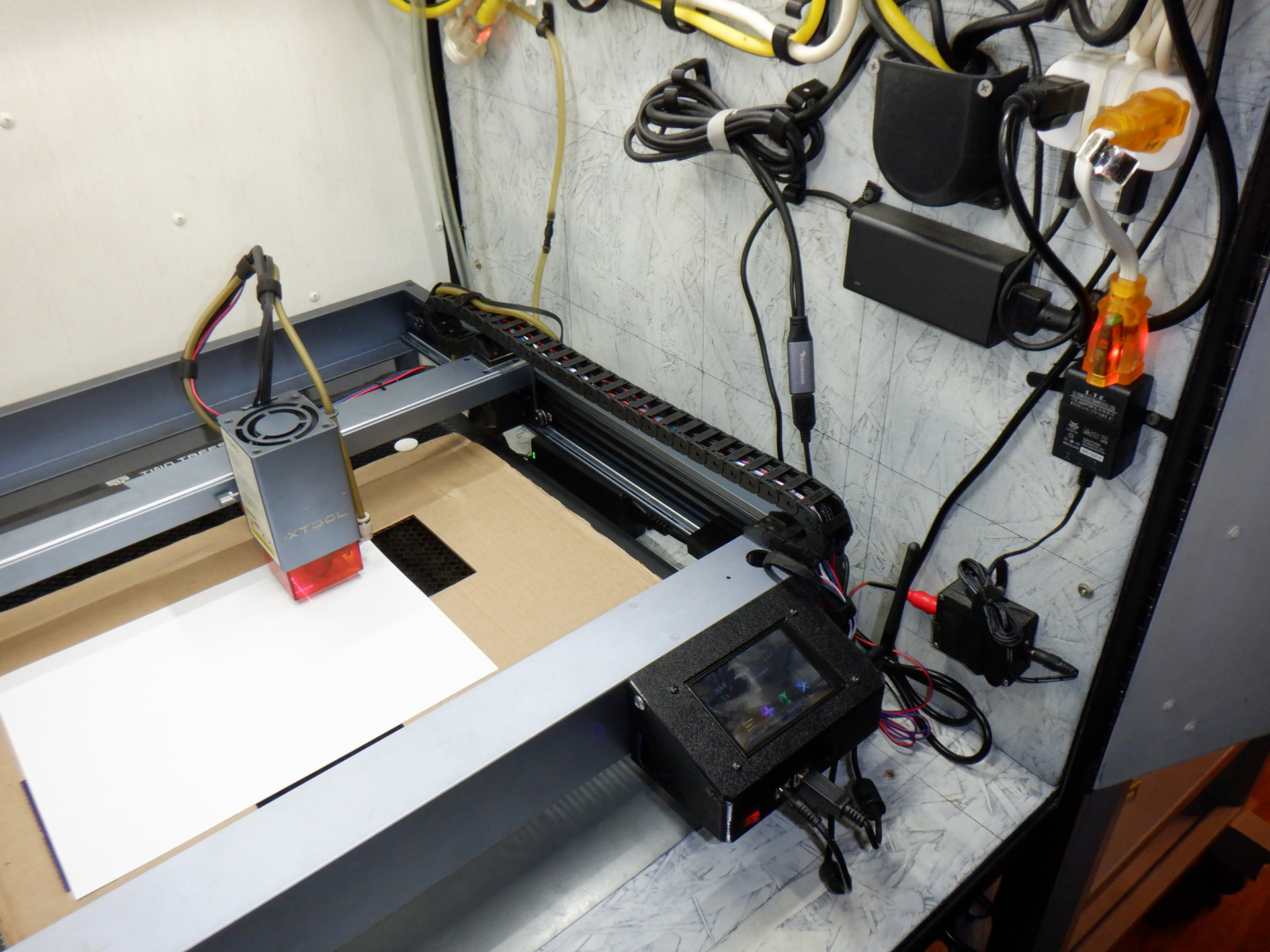
I made the enclosure when I first got the xTool D1, I did not want to mess my eyes up and I wanted to vent the smoke, I had also bought some safety glasses rated for the xTool’s 20W laser, that was one of the reasons I wanted the cross hair, I wanted to aim the laser with it off.

I am still having problems, the shudder is back when engraving, it looks like the laser is slowing down and quickly speeding back up during the engraving making a jerking like movent, and it’s enough to make noise and vibration, all the belts are tight, and nothing is lose, now I wonder about the power supply, I have replaced and fixed everything else.

Perhaps Fast Whitespace Scan is On and, if so, is set absurdly high:

At a more basic level, if the X Max Speed or X Max Acceleration are set beyond what the machine can handle, perhaps because it’s carrying a heavy laser head, it will encounter problems during laser-off moves with G0 commands.

On the gripping hand, XTool’s G-Code interpreter is known to introduce bonus jank, so updating to their newest shiniest version may help:

1 Like

I tried a few things today, but still had the engraving problem, I tried a USB 2.0 port in place of the USB 3.0 port I was using, I have seen that cause problems for other stuff, I may try an older computer with Windows 10 on it just to see if Windows 11 is the problem, I have had Windows cause real serial port and USB serial port problems in the past, and I have a USB 2.0 PCIe card on order for my desktop PC.

I have basically decide to give up on this, I decided to go with a WeCreat Vision 20w, so hopefully it will work better, I am going to keep using the xTool D1, but only for cutting wood, and no engraving, or at least no engraving images and pictures, still however, I wonder what the problem was.

I have a few thoughts about the problem:

(1) I do use a very long USB cable, but its a powered USB 3.0 active extension cable, and I have tried a few other USB cables with no difference, so I don’t think it’s the cable, and I had tried a USB dongle that blocks ground faults with no change.

(2) I replaced all the electrons and wires except the stepper motors, and the power supplies, also I had replaced one of the X-Axis stepper motors with no difference, and I checked the power supplies with a volt meter and the seem just fine, so that is not it.

(3) I checked all the hardware, all the belts are good, I tested them with a 3D printed belt gauge, and all the pulleys are tight, and the frame is square, so that is not the problem.

(4) I had successfully made a bunch of slate coasters before the problem happened, and then suddenly the problem happened with no hardware changes on my end, I fixed a few small issues with the laser, and then made a few more slate coasters, and then the problem happened again, yea pretty strange, makes me wonder if it was a software update, like a Windows update or something.

(5) I have noticed that if I load a Lightburn file that I saved some time ago, and then make a new file just like it, and the settings for engraving are exactly the same, they do sometimes engrave differently, so I wonder if that could be some of my problem, I wonder if I need to make all new files for the new controller that I had installed.

(6) Just bad luck, yea, that seems silly but it does happen, in the past with 3D printers I have had stuff like this happen, and one of three things happens, one is that I never figure it out, two is that the problem just fixes it’s self, or three it’s multiple problems disguised has one problem, and I think this time it’s multiple problems disguised has one problem.
Aye!

Best engineer I ever knew taught me:

  • When you’re trying to fix a problem
  • You find a glitch that can’t possibly be related to the problem
  • Fix it anyway
  • Because you never know enough to rule it out

Of course, after you fix the umpteenth unrelated glitch without fixing the original problem, you realize it’s turning into a slog. :grin:

2 Likes

I gave this laser one last try, I basically ran a bunch of test engravings, one image that was a simple black and white image with very few small details was able to be engraved at 9800 mm/min, however a more detailed image caused the laser to shudder until I dropped the speed down to 4000 mm/min, that being said, this time I used “Jarvis” in place of “Grayscale”.

Before this all started, I was only using “Grayscale” and engraving at 3000 mm/min, so my thinking is that something changed on the computer, it was not the laser, and I am leaning to a driver issue, my thought is that a “Windows Update” changed a driver or a driver setting, and that slowed down the data throughput to the laser, now I have to fix it, because it will likely mess with the new laser in the same way.

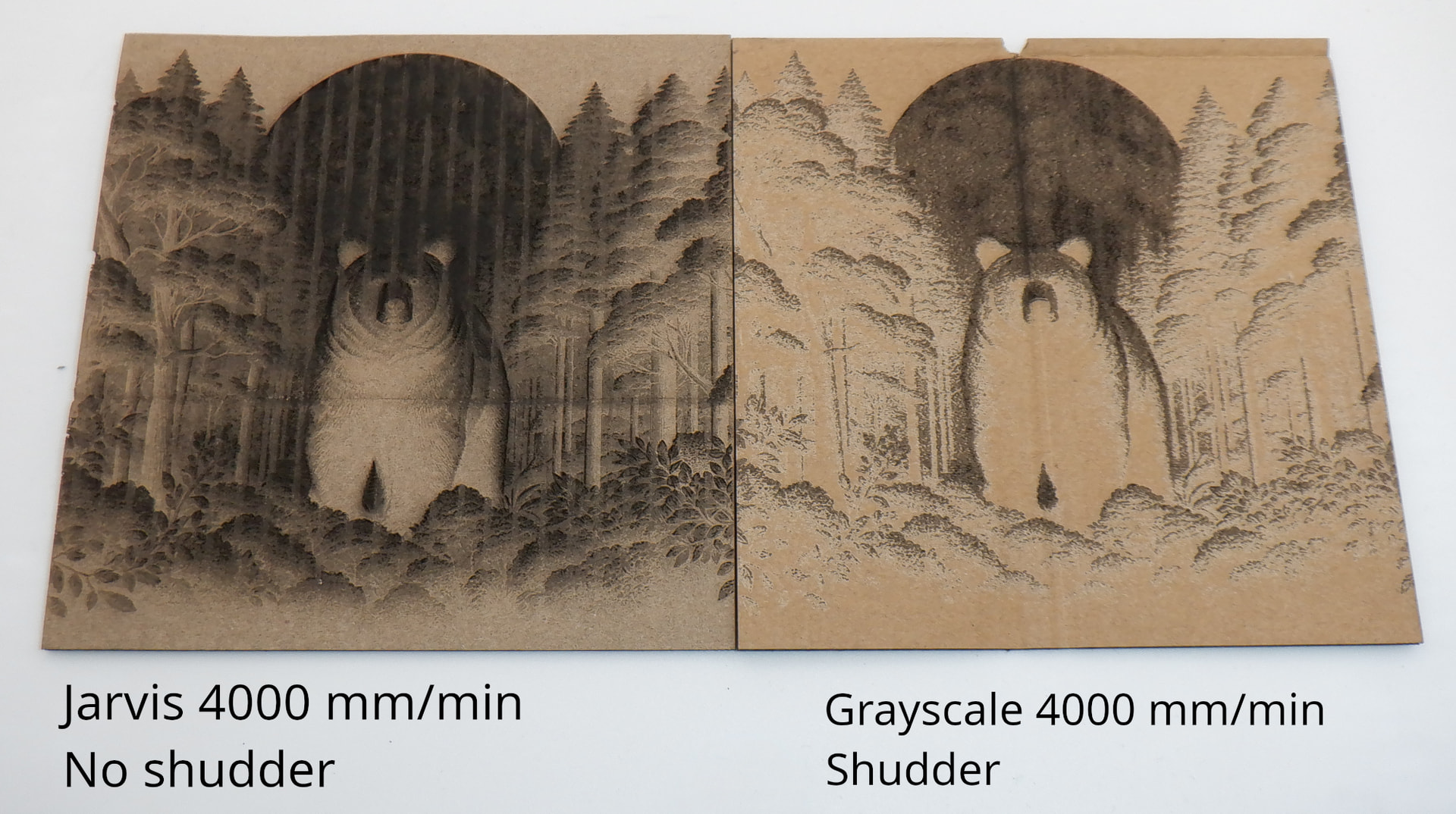
He is an image from one of my tests, both were engraved on cardboard from used shipping boxes, the engrave on both was done at 4000 mm/min, power was at 25%, overscan was at 5%, Line interval was 0.0799 and 318DPI, and both images were processed in the same way inside Lightburn, however the one on the left was using “Jarvis”, and the one on the right was using “Grayscale”, the one using “Grayscale” made the laser shudder, and it seemed like the laser had less power, the test image using “Jarvis” worked just fine and the laser went smooth like butter, yea, something is not right.

BTW today I removed the Windows installed CH340/CH341 USB to serial port driver and installed the driver from over at https://www.wch-ic.com/downloads/CH341SER_ZIP.html, they are the people that made the CH340/CH341 chips, I had hoped this would help, but it did not.

Ah!

A Grayscale image sends a torrent of data compared to dithered images. In round numbers, it’s one byte per pixel, rather than eight pixels per byte.

Running a Grayscale image with a small Line Interval can overrun the maximum speed of the USB connection, causing the controller to stall until the next chunk of data arrives.

If you must use Grayscale, a larger Line Interval will reduce the data and prevent stalling.

1 Like

Yea, I have read that before, and worried about it, however I had engraved a lot of slate coasters before this problem popped up, and some of the images I am using now to test with are the ones I had engraved in the past with no problems, so yea, something is not right, I do agree it’s likely some sort of “data” or “bandwidth” problem.

I lowered the speed to 2500 mm/min and set the Line interval to 0.1050 and 242 DPI, and the engraved image looked the same and the laser still shuttered, I tried going into the Windows Device Manager and then Ports, and the changing the “Bits Per Second” to 115200 for the “USB - Serial CH340” driver, but it made no difference, next I tried 1300 mm/min and the laser finally stopped shuddering.

I was doing some Google searching and someone brought up that there are three configurations that affect the laser, one is the (lbset) machine parameters, another is the (lbdev) device configuration, and the third is the settings stored in the controller, I will try and change the settings stored in the controller tomorrow.

That combination tells you the maximum data rate the controller can handle.

Assuming G-Code Clustering is available for the XTool and is enabled, then the maximum data rate the controller can handle is about:

220 pixel/s = 1300 mm/min × 1 min/60 s × 10 pixel/mm

If clustering isn’t turned on, enabling it will produce a dramatic performance improvement by reducing the amount of data per pixel.

XTool makes that either extremely difficult or impossible, so you’re pretty much stuck with their idea of the correct settings.

Updating to whatever their latest firmware version for your machine may also improve things.

1 Like

I tried logging into the replacement DLC32 controller that the Devil1 Lobotomy Kit gives you, it has a simple web interface, and you can change some settings on the web interface, however it has no settings that I can see that would change any of the USB or COM port settings, so that did not help.

So next I tried using an old laptop that was running Windows 11, I installed LightBurn on it, and copied over all the same files and setting from from the desktop PC I was using LightBurn with, then tried the same 3000 mm/min and “Grayscale” settings from before all this started, and it still shuddered, next I tried connecting the laptop to the laser directly with a different cable, and yep, still shuddered, so it’s not the computer hardware, and not the USB cable.

I got the PCI Express USB 2.0 Card in today and installed it, I then ran a test with my retrofired xTool D1, here is what happened:

The cardboard was done at 3000 mm/min grayscale, just like I had been using before the laser started messing up, and the slate coaster was done at 2500 mm/min grayscale, I slowed it down just a bit, to try and prevent any problems, with both speeds the laser shuddered a bit, but no ware near what I was getting with the USB 3.0 ports, yea, I am starting to think Windows 11 is the problem.

Its hard to tell, but I do think the quality is a bit less than what I had before, but that might be because of all the changes in settings I was trying, not sure.

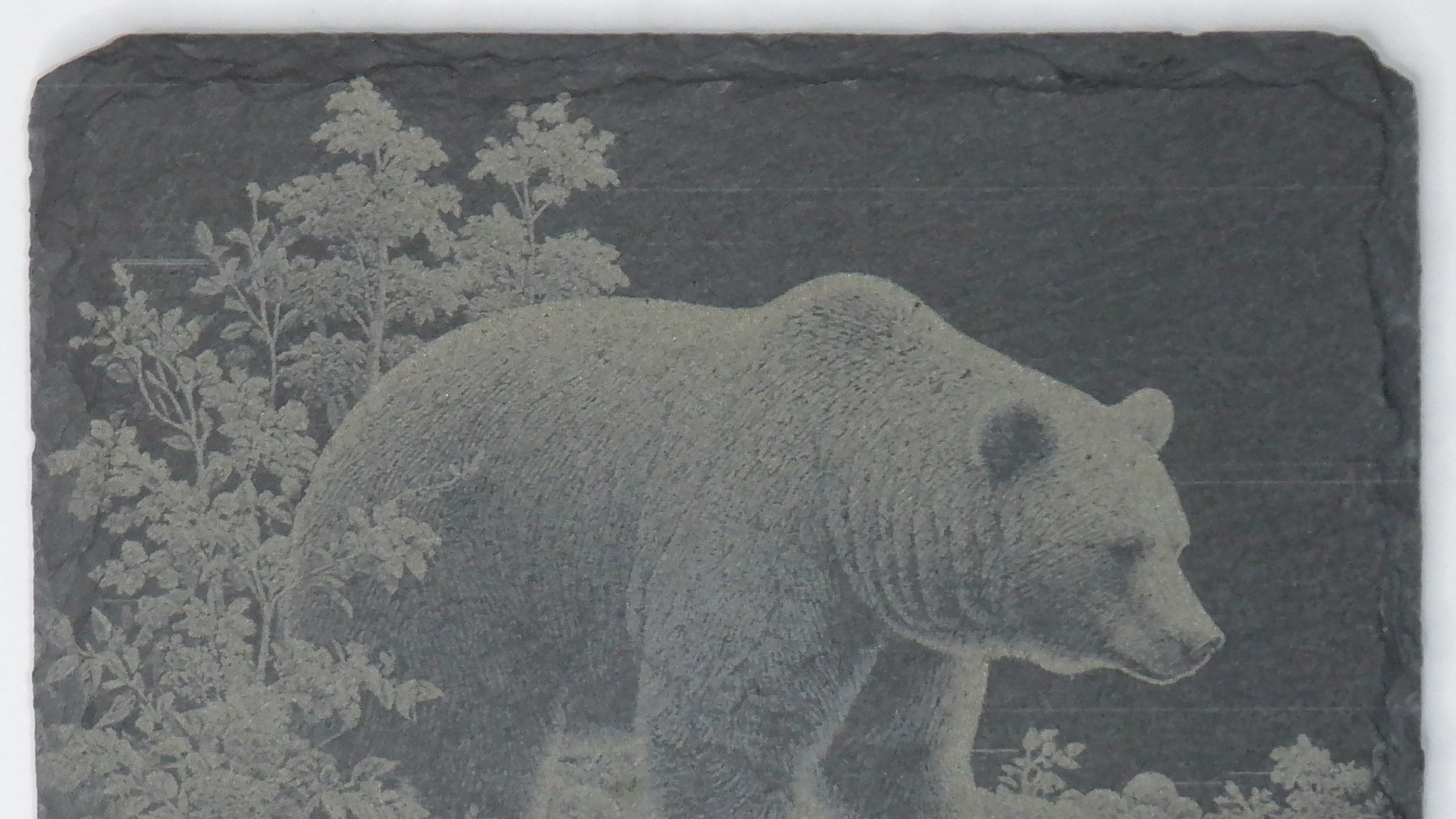
I tried to do a slate coaster set, and on my forth coaster I noticed lines going from left to right that were not part of the image engraved, here iswhat that looked like:


The lines are sometimes faint, but you can see them on the black background of the slate, if it’s not one problem, its another.