The LightBurn API is here
Avid followers of the changelog for LightBurn’s 2.2 release candidate versions might have found out about the API that we’re making available as a Labs feature.
Where is it found?
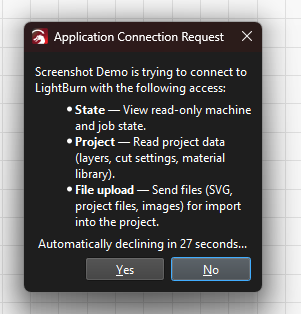
When you get a connection request
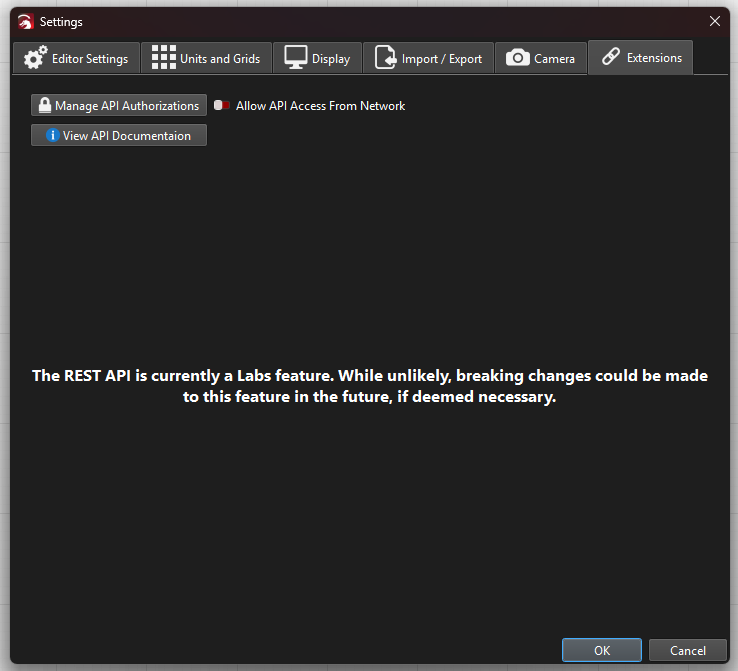
In the preferences…
Or in the device settings

Why a REST API?
Plug-in architectures are fantastic, yet require that third-party code runs inside an application.
If Fusion 360, Inkscape or AutoCAD freezes for a few seconds, there’s no real harm other than user annoyance.
With LightBurn (or MillMage), the consequences can be a lot more severe. We drive machines live. LightBurn streams commands continuously. Interrupting or locking up that communication flow for even a few seconds can become undesirable or quite hazardous. Imagine the machine pausing during your cut with the laser on: extremely high probability of a fire. We don’t want that.
What changes?
LightBurn’s API is listening for incoming commands through the localhost network (unless you expand that manually ‘Allow API Access From Network’ in the Settings->Extensions tab).
Now applications can talk to LightBurn as if they were talking to a web server running on your own computer. Communication is only available to other applications on your computer. API access is user controlled. Access is not allowed from any network, unless the user (You) specifically allow it in the settings.
On the first start of LightBurn 2.2 or later, you might get a Firewall prompt to allow this communication.
What can it do?
The API has been designed to allow other applications to interact with LightBurn while keeping safety with your lasers as our main priority.
This means that you can now directly interact on designs, cut settings, and track usage statistics on your laser (as demonstrated by @misken here).
We have shared two third-party application plugin examples that let you directly send vector drawings from Inkscape to LightBurn, or slicing a 3D model from FreeCAD into LightBurn.
Why did we provide those examples?
To assist with understanding, we provide examples to help you get started. Both FreeCAD and Inkscape are fully open-source and relatively easy to create third party application plugins for. These specific examples demonstrate how to integrate third party application tooling with the REST API we provide.
These examples are offered as technology demonstrations only; they are functional, yet not fully mature projects. We look forward to seeing folks make further enhancements or additional plugins for those programs. We welcome your engagement.
What it won’t let you do
We will repeat this until the heat death of the universe: LightBurn and its supplied API will never, ever facilitate unattended operations.
The status progress tracking is not meant to allow you to run jobs remotely. You cannot start a job, you cannot stop a job, you cannot view the camera through the REST API. And you never will.
Do not ask, it’s a definitively certified no.
Who is this for?
Developers - or folks with enough understanding and AI-coding tokens to take advantage of it.
As time goes on we anticipate to see more and more integrations come into being and available to the community. These integrations will expand the workflow integration capabilities of LightBurn (and MillMage in its next release) that anyone can just work with.
Whether you’re installing a third application plugin into existing apps (like Fusion 360), or building dedicated applications that communicate with LightBurn, the REST API can help simplify your workflow.
To find out more about how it works, read the API-specific documentation here.