Hello, been doing CNC with a 1000 x 1000 X Carve controller on a CNC4newbies setup. Running UGS for that. Adding a Jtech laser and Lightburn software. I finally got everything talking, but when I get the directions on both software programs running, homing goes the wrong way on one. If I switch it on that one, it goes the wrong way in the other software. Is there a way to set this in the software so it doesn’t change the settings on the X controller or do I have to reset them every time? That would be really a pain.
Generally the firmware in your lasers controller handles the homing function. I think Lightburn just sends a $H code for grbl to home. Lightburn doesn’t modify the controllers settings… that would be suicide.
Maybe one of the grbl wizards can help, like @misken, he’s much more up on these.
Hang in there…

1 Like
I use a grbl 4 axis controller on my multipurpose CNC, run UGS v2.1.9 for plasma and routing, LB v1.7.08 for laser process. No issues with homing ($H) direction, which stands to reason since Homing config is stored in the controller, $22 thru $27 values. I’m assuming XCarve is same, check that to be sure. Both UGS and LB issue command $H to home after power up, I don’t use auto home, I manually press the Homing button in the respective UIs.
Are you actually homing $H the machine to homing limit switches after power up or are you attempting motion to a work coordinate system X0Y0 ? G54 WCS is usually the default at power on.
What version of LB are you using ?
please post the listing results from $$ command from UGS.
Jack is correct.
If you manually changed firmware settings, revert them so that they work correctly in UGS.
In LightBurn version 2.0, we changed the way talk to CNC machines like your xCarve, which, unlike a laser, don’t always report 0,0 as the coordinates after homing.
Jon gave a more in-depth explanation here:
This Release Candidate for the upcoming version 2.0.02 addressed an issue that this change has introduced for machines that home in the negative space.
Additional changes in your Device Settings might be needed in your case, and the questions from @bLouChip are relevant!
Please export your Device and send us the .lbzip file.
1 Like
Yup - in addition, one of the poorly communicated changes is how LightBurn 2.0 is now G53 and G54 aware.
In your device settings, under the Working Size, you’ll see 2 toggles:
- CNC Machine which is to be turned on if your machine is in the negative coordinate space (i.e. MPOS 0,0 is back right, but moving left or forward is still a negative X or negative Y move)
- Machine Coordinates which will basically discard any use of the G54 offset and directly work in G53 coordinates.
The lbzip file with your device configuration and the output of $$ in the console in LightBurn will let us replicate the configuration and help you troubleshoot your issue.
Cheers
4 Likes
Lightburn 2.0.02. I have it so both software’s are homing in the right direction now, but in light burn the X in the Y axis are backwards. If I change this in light burn, it changes it in the grbl settings and when I use UGS everything is backwards there.
I have both of those switched to on and have it homing correctly, but in light burn x and y work backwards.
New to Lightburn. Don’t know how to export the device. Sorry, total rookie to this. been using UGS for a long time but haven’t had to deal with any of that.
Please install this version, if you haven’t already:
It will install as a separate “PreRelease” version of LightBurn, which has its own preferences. This means it will not affect your standard installation of LightBurn at all.
The installer should automatically ask if you want to import a copy of your standard release version preferences - you can also use the User Bundles feature to move over your preferences.
Click the ‘Devices’ button in the ‘Laser’ Window, select the device, and click Export:
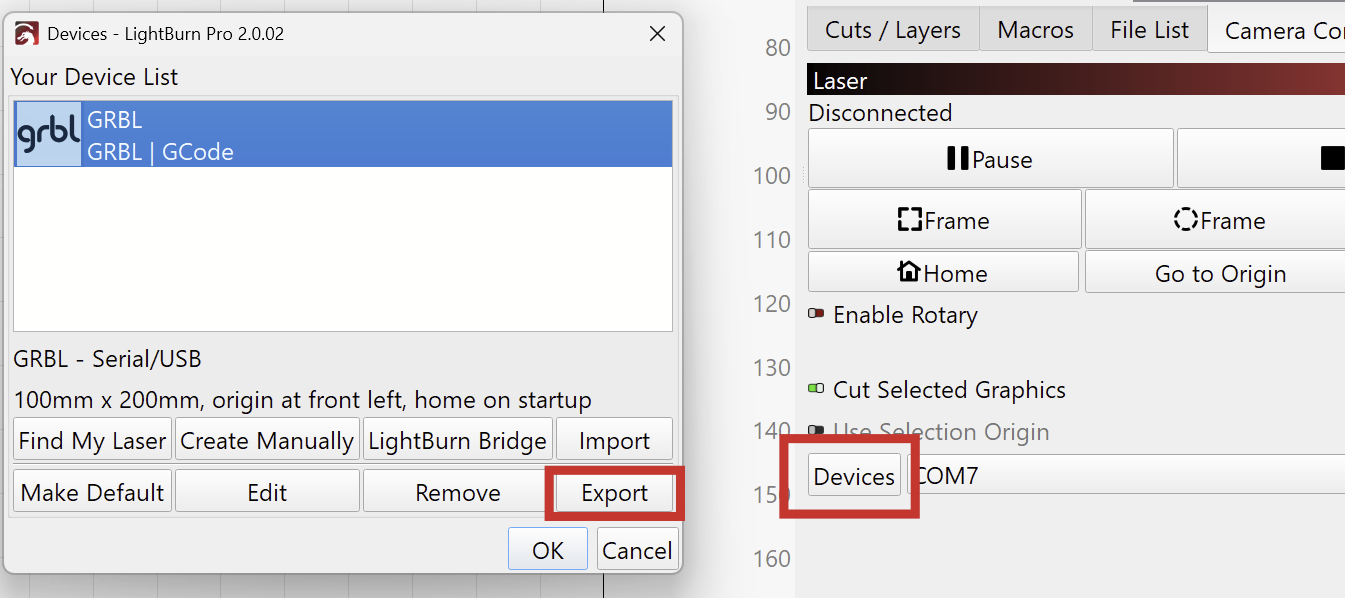
(I’ve now added the link to our docs to my previous post.)
@Aaron.F nope - please use File->Bundles->Export Bundle for that - we would prefer the .lbzip instead of the .lbdev file moving forward.
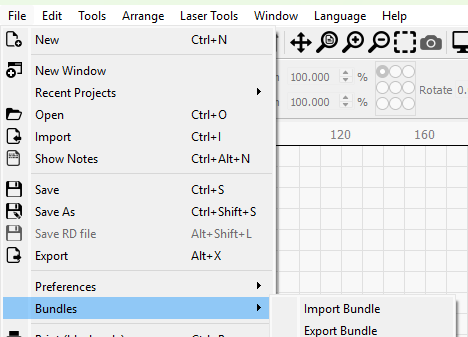
Thanks.
Where / how are you changing this? Screenshots would be fine.
Normally this would be changed in the Device Settings by selecting the proper device origin, not in the Machine Settings which would affect the GRBL configuration.
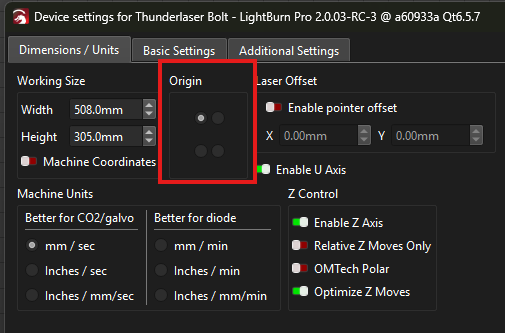
Thanks. I got it working. It’s not cross compatible with UGS so I have to change things from one to the other. Not what I want to do, but I cut some stuff yesterday and it was awesome. Thanks.
I’m curious what makes it incompatible with UGS though, it seems counter-intuitive. Unless you’re using UGS for CNC work?
I use UGS for CNC and light burn for the laser. They operate opposite, one positive coordinates, one negative. You have to reset the brain of the CNC because they run backwards from each other. Haven’t yet found a way to make them work the same but still looking. Someone’s gotta know how. Just didn’t want to have to reset it every time but just working laser for now so it doesn’t matter.
Ok interesting.
Normally you should be able to use origin top right with the CNC machine toggle on and G54 reset for LightBurn as well.
The G54 offset would need to change for every work piece you’re clamping down to cut out with ugs anyways, so if we find the settings so you just need to reset that part to 0,0 I think that’d be the best solution for you.
It can get funky and confusing with the way LB gcode settings work… And it’s not your fault, it’s the way purpose built gcode lasers are all over the place.
Yea, I thought it should be easy to reverse too, but finding its not. I can write a macro to change the settings when I turn it on and when I want to run the CNC without the laser, run them to change it back. When I get them to go the same direction with the direction keys in both programs, Lightburn homes backwards. Someone said set home to right rear and that didn’t do it. Change the home direction, then the other one is wrong.
Odd.
@FLYBOY442 . I have LB v2.0.03 RC3 working fine with UGS v2.1.9 and v2.1.12. See the setup here- V2.0.02-RC1 GRBL continuous jogging has issues - #28 by bLouChip
The notes to add are: I always use LB with the full working area (bed) defined as my G54 work coordinate system, so WCS X0Y0 is max left front corner position, while machine coord X0Y0 is back right corner (defined by grbl after homing). I use a LB macro to define max left front (LF) 000.
Conversely, while using UGS, I routinely define WCS G54 X0Y0 anywhere on the bed, where ever I drop my work piece for routing or plasma process, or I use max LF 000 also when using LB camera while doing 2D CAD for routing or plasma process. This is the net difference and ‘config’ change between LB vs. UGS running the table. But I consider this to be a very loosely coupled ‘config’ change, as it does NOT involve changing any $$ true config settings.
re. UGS versions, I’ve learned not to install the latest UGS until it bakes in public use for awhile, so I suspect this setup will continue to work with UGS well beyond v2.1.12.
I hope this helps you.
1 Like
This topic was automatically closed 30 days after the last reply. New replies are no longer allowed.