Differences between material test and actual result

Many people in this forum (including me) recommend doing a material test. To ensure safe working with a new material (in this case, 2mm thick cardboard), I conducted a material test with the following settings:
Speed ​​from 200 mm/s to 600 mm/s
Power from 50% to 80%

The material test results show that cutting at 80% power should be possible at 378 mm/s.

In fact, even at 315 mm/s, the cardboard wasn’t cut all the way through.

What is the reason for this difference?

Is it possible that the laser doesn’t reach its “full” speed with the 10 x 10 mm rectangles, and is therefore actually slower.
Is this why it cuts in the material test, but not in the actual project with relatively long, straight lines? Could this be the case?

Mike Hembrey suggested this in his post:

But: In the current project, I’m using finger joints with a depth (corresponding to the material thickness) of 2 mm; but even then, the laser doesn’t cut through.

I’m working with Lightburn Core 2.0.04-RC-1, Windows 10,
iKier K1 Pro 24 W, cardboard 2 mm (Graupappe oder Buchbinderpappe in German)

While browsing this forum, I found the following posts related to this issue, but no solution.

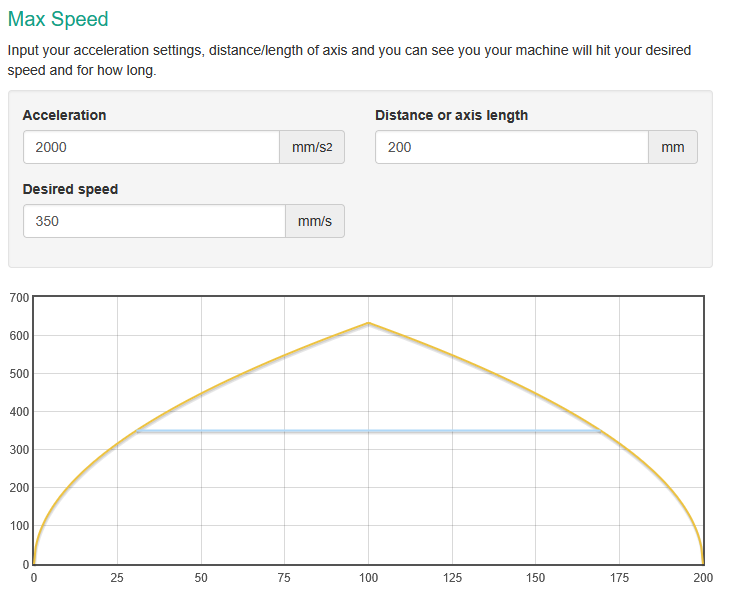
Yes, this will be the case. You are using high speeds. I don’t know the acceleration capabilities of your machine, but in case it’s around 2000mm/s², it would take about 30mm to reach the speed at all. If you have 5mm squares, you will never reach it.

1 Like

Thanks, Melvin, that’s a fact. What I wonder is why it’s like that in the material test and not in the actual project. This also includes sections 2 mm long where the laser can never reach its speed.

049_sandpapierbox.lbrn2 (189,1 KB)

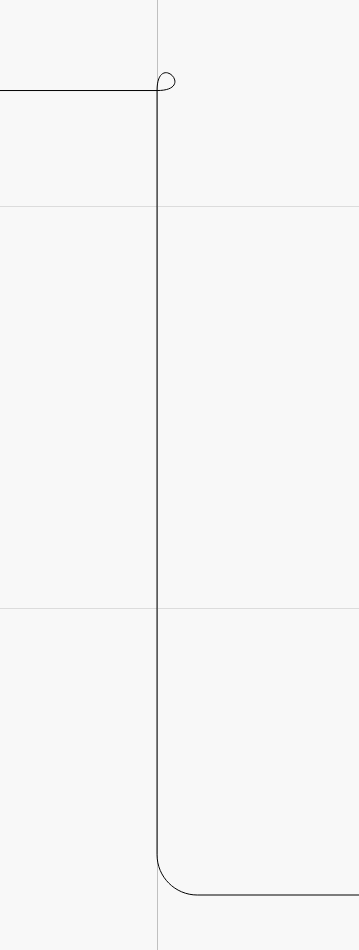
Because those boxes don’t have square corners:

The tabs have rounded outer corners and the little loops mean inner_corners was set to loop.

So, unlike in the test pattern, the controller won’t slow to (almost) a complete stop at the corners. The loops may toast the inner corners a bit, but that’s in the nature of fine tuning.

3 Likes

Thank you very much for the answer. But that just brings me to another question: How can the material test be designed so that it shows realistic results for the future project?

AFAICT, Material Test results can weed out obviously bad settings and give you a general idea of the range appropriate for any particular material, but fine tuning requires running samples of the geometry in a particular job on that particular material.

Larger squares will give a better idea of cut settings for larger shapes, smaller squares will serve for engravings, and none can match the details of whatever you’re doing.

I used the tests to get initial Material Library entries, then tweak those entries during subsequent projects. By now, I can start from a Material Library entry for that material, guesstimate the speed for (say) a different thickness, run a test piece, and come reasonably close. Before doing anything where I care deeply about the results, I run a test piece (or two or three) to tune the results for that particular geometry, resulting in Yet Another Library Entry.

Bonus surprise: “the same material” from a different supplier (or even the same supplier who just got a new TEU container from halfway around the planet) can require different settings than whatever you figured out the last time around. Unless you’re in production with consistent materials, expect the unexpected!

2 Likes

Example: 4" cork coasters. I got one order with 2 different diameters. Later, from the same source, I got some with a diameter different from the first two. When using a fixture, it makes a difference. I had to finally rework the fixture to a smaller diameter, and let the surface height drift. The coasters had curved sides, so this worked.

I never know what the cut-through point is with each batch of 12" square Baltic Birch plywood sheets.

This kind of material variability would put a CNC milling operation out of business.

What would you suggest?


It’s pretty tough to write idiot proof code. Even if you handle all the exception someone can enter, there are still many electro mechanical issues that can arise besides the code generation.

There’s options such as dumping anything that could be incorrect, so the user can go through a list of many possible issues. The software could just make a choice and leave you out of it..

Glowforge uses qr codes so the users can scan it and the machine is setup correctly, one of their selling points. I’m sure this isn’t 100% either.

Unless you have a crystal ball option, there isn’t much it can do for future predictions.

This could also vary by controller type.

I’m sure we’ll all like to hear what you’d suggest to fix some of these issues.

We’ve got some great developers here and I’m sure they would greatly appreciate positive feedback in this area.

:smiley_cat:

1 Like

Let me summarize what I’ve learned so far:

  1. It’s not possible to design a material test in such a way that you can accurately predict which power and speed settings will actually be effective.
  2. It’s always challenging because there are fluctuations in the quality of the material, even if you source the material from the same source.

For my current project, after the material test, I started with

  • 80% power and 378 mm/s and ultimately ended up with
  • 80% power and 180 mm/s.

That’s quite a distance apart. Isn’t it?

Thanks for asking what I would suggest. I’ll put it as a wish: I’d like a material test that’s a bit closer to reality. This wish, like so many others, will probably not come true. :wink:

Last remark: to make it clear: i :heart: lightburn, great software, it is not the job of this software to fulfill the unrealistic wishes of users. :wink:

2 Likes

I can make some ideas on how the material test can be better…

  1. Make circles and squares of course.
  2. Doing some numbers may provide some good quality outside of just squares.
  3. And the same goes with letters on the material test.

But…like me, a user, I can test this myself on various media.

Seth

P.S. So, maybe an option to pick a closer-than-expected route of a laser movement from the start to finish may provide people with more of a realistic approach. For instance, if I needed to test a new laser with new hardware and controller, squares are just two triangles attached to one another. There is no real curve and/or repetition of curves. Anyway, I just thought I should make this addition. For instance, the number two has curves and on most fonts, a square bottom section with right angles.

I made my own one up out of 25mm five pointed stars - purely to show which settings gave a decent line without dots on the end of each point (where the laser slows down and burns more as it changes direction). I also used this as a cut test - with the benefit of a handful of neat cut out five pointed stars I have yet to find a use for!! But seriously, once you have a rough idea of settings, you need to test the design you actually want to engrave on a scrap of the material you are going to use.

2 Likes

Good knowledge. Rough idea on scrap and then the main presentation done lastly.

I used to rush into what I was doing. There are really so many facets of ideas to take in and time allows it. If you have an influx of five pointed stars…

  1. Give them to needy teachers and children.
  2. Let them paint them.
  3. Watch them turn almost joyful!

I used to use 1/4" plywood and then changed it up a bit. I got tired of paint and liked the way HDPE and other plastics would look with different types of screws on numbers.

For instance, 45132 Glennard Blvd. on a mailbox looks nice with contrast of steel bolts and a black setting of a plastic. The steel bolts could be stainless for extra sparkle and oomph.

I turned into that person. Yeppers, just throw some paint on it and be done with it. Then, I started to get customers. “I want this. I want that.” Blah-blah-blah. I got tired of it. Yes, income is nice but can I really succumb to pressures and still feel adequate? NO! I cannot. So, this brought me to overboard reality…

The lady says, "Yes, I accept."
I go about making the numbers for the house.
I make the numbers. Then, I install them on the mailbox.

I get, "Will you please paint it?" I say yes ma'am, "I will paint it."

I paint the numbers. Then, she yells at me, "The screws! I meant
paint the screws!" I painted the screws. Then, she says, "The paint is everywhere."

So, I politely asked her. "How should I have painted it to make it so it is not everywhere?"

Just saying this out loud now, I already installed the numerical values on her box.

"Take it down and paint the screws and put it back up," she says with a nice grin. 

I said, "No." $20.00. She gave me $50.00 for harassment I guess.

Anyway, long story here in a short manner, I got gypped and very angry. It seems rationale is far away in her mind on this context but I took time out to help. At least, this is what I thought I was doing. I was not helping. I was getting explained?

This not that over that not this or whatever. I am a contract worker. If you do not like the job. ESAD or gyp me. I vent frustration to let others understand the bringer of funding is not always a happy sort.

Seth

P.S. If someone can figure out how to make people happy, sign me up. Until then, I am on break.

update

I hope everyone can either learn or gather. Either way, I could just hope this “customer” was nice enough to tell the truth to at least three people. One person at best would gain my attention again to maybe try once more instead of not trying at all. Wording and value come to mind. Now, an eye sore of a job was done, I did it, and I am the person upset. I should have never listened to her and sold her context. Lessons we learn. Sheesh. Profane lessons…blah.

Second Update

I went on a line here and crossed a tangential divide. Sorry. I will refrain from my life skills and get back to business!
This topic was automatically closed 30 days after the last reply. New replies are no longer allowed.