I have searched the forum for this issue and found tons of posts but all the posts I read have expired without showing a resolution. I stopped going through them when someone stated that LightBurn doesn;t support that. It seems to me there are many many people who feel the need to print out onto paper their design accurately sized without any scaling as a means of cheaply checking if their design is what they want before wasting time and money on using their laser. It is critical when combining real world objects and new designs together in a project.
The issue, which I’m sure experts will already know, is that there doesn’t seem to be a way of making LightBurn print out a design to paper or pdf without it applying some sort of scaling. In my case my design is 67x660mm so I have adjusted the canvas size to match (btw. I am using the no machine option). When I print to a windows printer OR PDF the design is shrunk down to fit the paper so it is completely useless. I would like it to print it actual size and spread it over a number of pages so I can jigsaw them together and end up with a real size print out for further analysis.
At the risk of seeming rude, why oh why would LightBurn not be capable of printing accurately to scale without it rescaling the design? This is a no brainer feature request which severely limits the use of LightBurn for all those who need to print technically accurate designs e.g. PCB layouts, construction projects, equipment face plate designs etc. etc.
If I’m wrong and it supports it please explain how to achieve that, if not please state clearly that this is an enhancement request and please process it as such. FYI. Requests for this have been entered in this forum for many years. It’s a basic feature and doesn’t sound too complicated so pretty please…add an option to adjust the scaling that already exists, allow me to enter 0%.
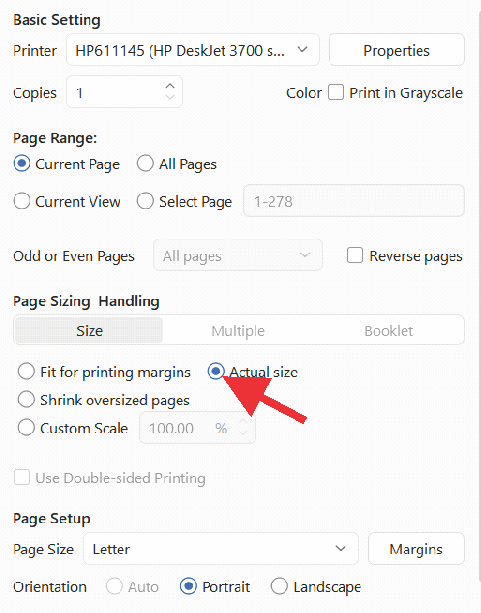
GCode can much more readily produce a preview to scale for testing by directly engraving on paper. I’m interested in knowing why translating a design into a document format and forcing it to print to scale would be preferable. Engraving yellow paper with a blue laser on low power is an irrefutable preview.
I understand what you’re saying about technically accurate designs for PCB layouts. I have used laser-printed transparency sheets and (iron-on) transferred the black print to the bare copper PCB as a resist media with mixed results. Now, I’m testing direct laser engraving on black paint applied to PCBs to skip the printer.
When I was learning AutoCAD in tech college, we had to calibrate a printed page to compensate for the errors the printer introduced into our scaled drawings.
I believe that this is where the issue is. It’s my understanding that LightBurn doesn’t control the printer or PDFs. It all happens at a system dialogue level.
I have posted internally to start a conversation about this.
That’s hopefully not needed anymore. This is why we have printer setups to tell it how to format the output.
There is really a lot of ways this could get corrupted, I mean reformatted. I have to agree with @garyg1 it’s the os that’s likely doing this.
The beauty of Windows, it knows what you want and will fix it for you.. However, to be fair, many machines have a print queue that has the ability a power to reformat the data.
Doesn’t sound too easily implemented … a lot of loose ends, so to speak.
I hope he can posts the links to the feature requests he’s mentioned. I’d like to read them. I didn’t have a lot of interest, maybe I didn’t look well enough. Or I just missed them.

The printer options are determined by the printer manufacturer, not Microsoft. The exception is for some special cases like the Microsoft Print to PDF.
Add scaling so you can tell it no scaling? I know this is not what you meant, but scaling is controlled at the printer, and every manufacturer has their own version.
100% the best option. There is no scaling issue here, WYSIWYG. If the paper pattern does not match the engrave or cut patterns, then you have a mechanical issue.
The Print Queue is just a buffer. Garbage in, garbage out. Anything that happens to the data stream occurs in the print driver before it gets to the buffer.
True, because most printers will not print to the page edges. There is a white border that would have to be accounted for.
What size printer do you have? Your design is 2.6378" x 25.9843". This will fit a “D” size sheet, and when I select D size in advanced settings for Windows Print to PDF, LB does not scale the image.
My design requires a conveyor because it doesn’t fit the laser bed size. Paper is too thin for the conveyor so I would have to mount the paper on a backing board each time. I want to use a normal printer as it should be easier.
Mine is different to that, i will take a screen shot and attach it later today.
Fyi. I just installed inkscape and that did print 1 page without scaling. Admittedly it did not print a second page with the rest of the design. So i copied my design three times and staggered and I actually got a page with all the design on it which i cut up and taped together to make the whole. Far from ideal I know.
But doesn’t that prove its not windows or the printer/printer driver causing the issue?
My printing is using letter size paper. Its a hp 2700 inkjet.
I would be happy to buy a larger printer for this but not until I can see it works on lightburn.
Hi GaryG1,
I am attaching my printer screenshots, I see no reference to scaling. The odd thing is that inkscape does print without scaling as I stated previously albeit cutting the image off due to the paper not being big enough.
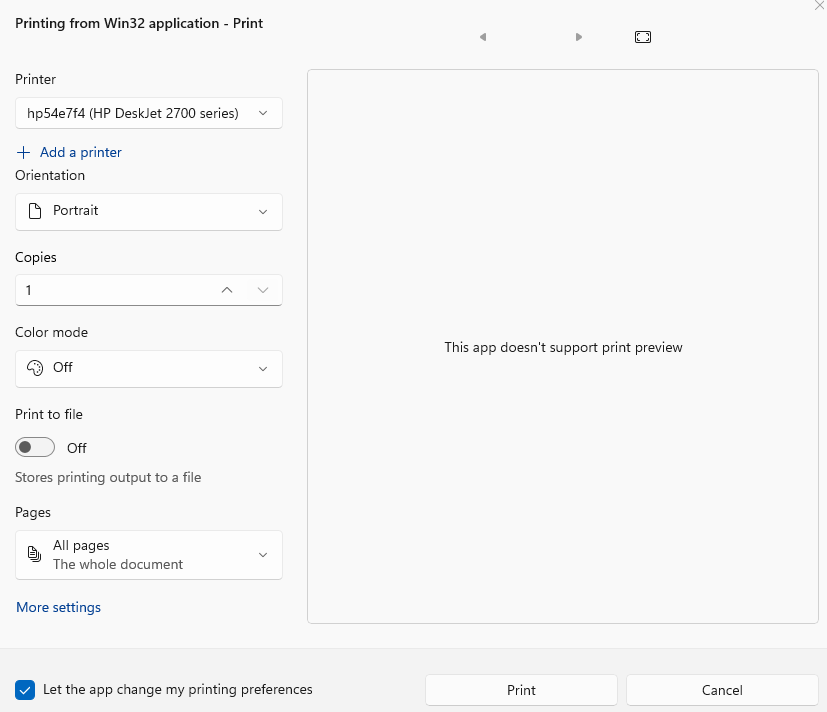
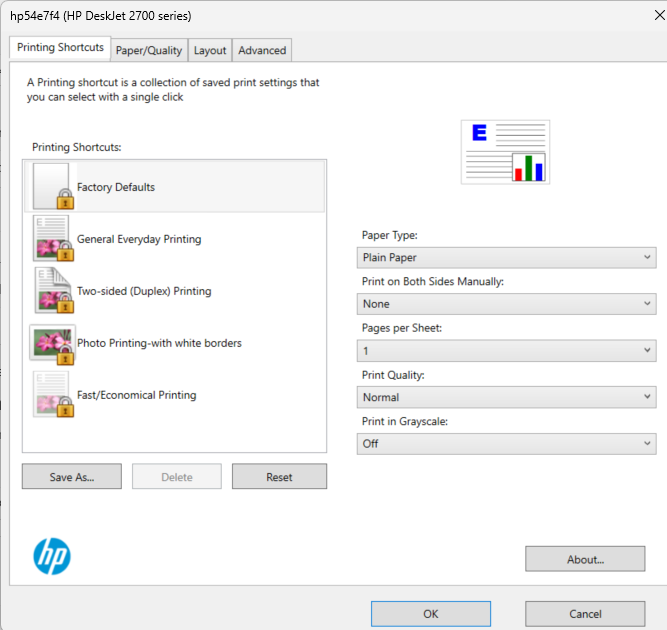
Johnjohn,
I’ve ordered some large yellow cardstock for my laser to try what you suggest, it looks like it would work as a workaround albeit not as fast and efficient or cheap as a standard printer would be.
I don’t have a D size option so I tried A2, then I get different options:
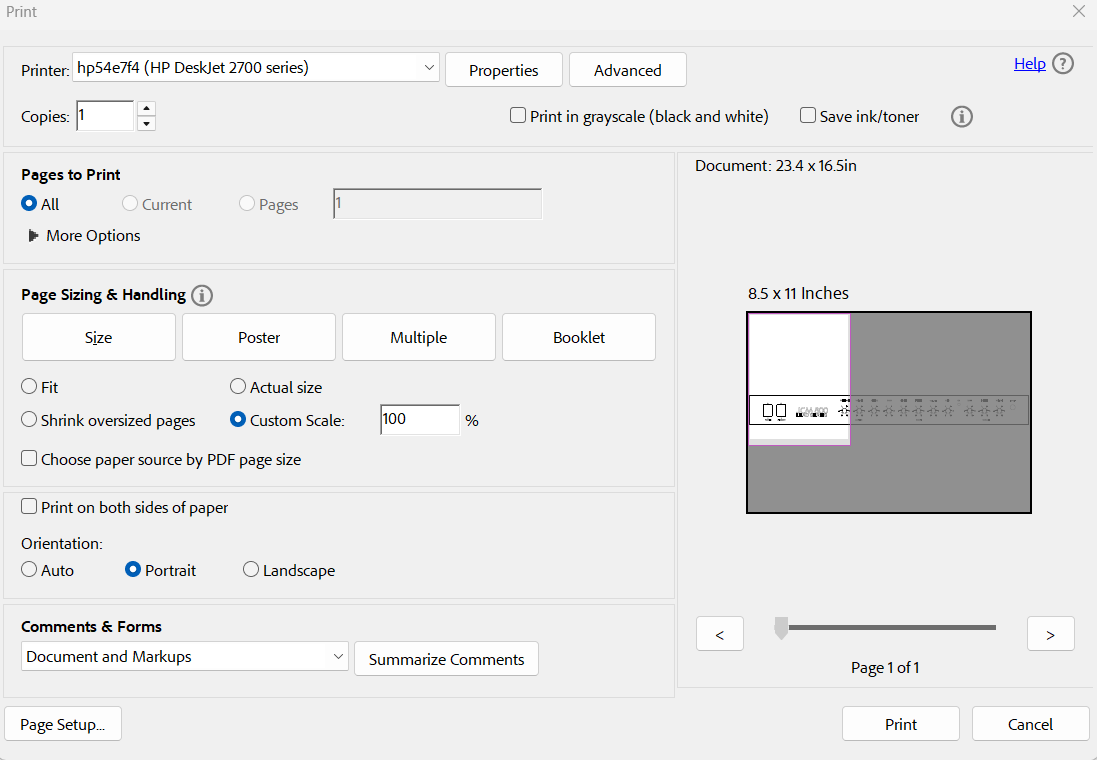
The ‘Poster’ is what I’ve been looking for:
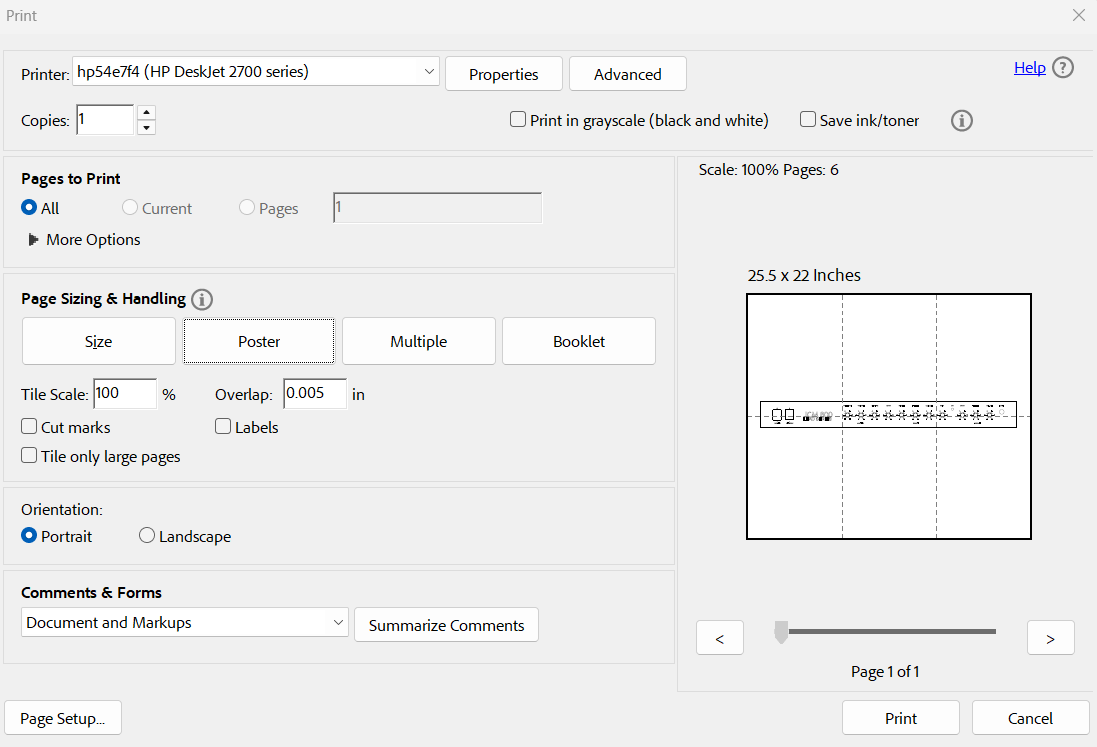
So the PDF is created with the image without scaling over multiple pages. There is a small gap at the edge of pages as another commentator mentioned but I can live with that.
Thanks for the help everyone.
FYI.
By adjusting ‘overlap’ and using ‘cut marks’ feature there is no information lost at the edge of the pages you can trim the pages and join perfectly.
Someone asked for some links to others struggling with printing to paper and scaling issues. Here are a few. My recommendation is to add something to the online documentation advising people about how to print drafts to paper/pdf and avoid scaling. Hope this helps.
There is some guidance here about printing to scale: Print - LightBurn User Guide
Specifically:

Saving the workspace as a .svg or .pdf and printing externally to LightBurn may be the best option here.